
 Need help?
Do you have a question about the Sunbeam GCSBDS-209 and is the answer not in the manual?
The nozzle that dispenses the water spray mist.
The protected opening for filling the water reservoir.
Screen showing the currently selected fabric setting.
Button for an extra steam burst or vertical steaming.
Instructions for operating the iron without steam.
Steps for filling the iron's water tank with tap water.
Instructions for using the steam function during ironing.
Details on unique functionalities like spray mist.
Provides extra steam for stubborn wrinkles.
Enables steaming garments vertically.
Automatic shut-off feature for safety.
Describes the soleplate design for better performance.
Steps for turning off and storing the iron.
Proper methods for storing the iron to prolong its life.
Instructions for cleaning and upkeep.
Recommendations for cleaning the iron's soleplate.
System to eliminate impurities and prolong efficiency.
General advice for effective ironing.
Specific guidance for ironing shirts.
Solutions for common iron problems.
Details on the product's limited warranty.
Warranty coverage for the iron's soleplate.
Exclusions and limitations of the manufacturer's liability.
Instructions for getting warranty service in the U.S. and Canada.
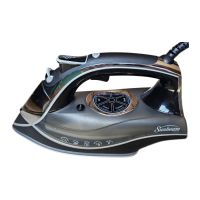
This document outlines the features, usage, and maintenance of the Sunbeam® AeroCeramic Digital Iron, a household appliance designed for pressing and smoothing fabrics. The iron incorporates several technologies to enhance its performance and user experience, including a ceramic soleplate, digital fabric selection, and various steam functions.
The Sunbeam® AeroCeramic Digital Iron serves the primary function of removing wrinkles from clothing and other fabric items through the application of heat and steam. It is equipped with a ceramic soleplate that aims to provide a smooth glide over fabrics, facilitating efficient ironing. The iron's digital interface allows users to select appropriate fabric settings, ensuring optimal temperature for different materials. It also features an Anti-Calcium System, a permanent component within the water reservoir designed to minimize impurities and prolong the iron's efficiency.
The iron offers both dry ironing and steam ironing capabilities. For dry ironing, users simply ensure the Steam Lever is set to the "Dry" position, plug the iron into a 120-Volt AC outlet, and select the desired fabric setting using the Fabric Select Button. A blinking blue light indicates that the iron is heating, turning solid blue once the target temperature is reached.
For steam ironing, the process begins with filling the water reservoir. The manual recommends using tap water and provides clear instructions: turn the Steam Lever to "Dry" and the Fabric Select Button to "Off," unplug the iron, lift the Water Fill Hole Cover, and use a measuring cup to fill the reservoir up to the maximum fill line. After filling, the cover should be closed. Once the reservoir is filled and the iron is plugged in, the Steam Lever can be turned to the desired steam setting. It's important to note that steam settings and the Shot of Steam® feature are recommended only for Wool, Cotton, or Linen fabric settings. The iron will heat up, indicated by a blinking blue light that turns solid blue when ready.
The iron includes several special features to enhance its usability:
SPRAY MIST® Feature: This function delivers a powerful water spray mist to dampen fabrics, aiding in the removal of stubborn wrinkles and setting creases, particularly useful for heavy fabrics. It is activated by firmly pressing the Spray Mist® Trigger. This feature can be used while the Steam Lever is in the "Dry" setting, provided the Fabric Select Button is set to wool, cotton, or linen, and the water reservoir is at least ¼ full.
SHOT OF STEAM® Feature: This provides an extra burst of steam for deep penetration into stubborn wrinkles. It can be used during both dry and steam ironing, as long as the Fabric Select Button is set to wool, cotton, or linen, and the water reservoir is at least ½ full. To use, the iron is placed on the wrinkle, and the Shot of Steam® button is pressed. This feature can be used continuously in approximately 3-second intervals.
VERTICAL SHOT OF STEAM® Feature: This allows the iron to function as a garment steamer, enabling users to steam hanging clothes, curtains, or drapes vertically. To use, the iron must be heated until the "Ready" indicator light is solid blue. The iron is held vertically near the fabric, which should be pulled taut, and the Shot of Steam® button is pressed in 3-second intervals while moving the iron over wrinkles.
3-WAY MOTION SMART® AUTO-OFF Feature: This safety feature automatically turns the iron off if it remains in one position for too long, preventing accidents. If the iron is left horizontally without movement or accidentally tipped over, it stops heating after 30 seconds. If left vertically on its heel rest without movement, it turns off after 15 minutes. When activated, the unit will beep 6 times, and a red light will blink. To reset, the iron needs to be moved back and forth until the "Ready" indicator light turns solid blue.
AeroCeramic Soleplate with Dimpling and Channeling Technology: This design incorporates aerodynamic principles for faster results and improved steam coverage, facilitating easier wrinkle removal. The exclusive dimpling design aims to provide a smoother glide for seamless ironing.
ANTI-DRIP Feature: This system is designed to prevent water from dripping, spitting, or leaking from the soleplate, even at lower temperatures, ensuring a cleaner ironing experience.
Proper maintenance is crucial for prolonging the life and performance of the Sunbeam® AeroCeramic Digital Iron.
Turning Off and Storing: After use, the Steam Lever should be set to "Dry" and the Fabric Select Button to "Off." The iron should be unplugged and allowed to cool completely. The water reservoir must be emptied completely after each use to prevent damage and extend the iron's life. For storage, the power cord should be loosely looped around the heel rest, and the iron should be stored on its heel rest. Tightly wrapping the cord can cause damage.
SELF-CLEAN Feature: This feature should be used once a month to maintain optimal iron performance. The process involves turning off and unplugging the iron, then moving the Steam Lever back and forth to clear debris and minerals from the Steam Valve. The water reservoir is filled with tap water to the MAX line. After plugging in the iron and setting the Fabric Select Button to "Linen," the iron is heated until the indicator light turns solid blue. Then, while holding the iron horizontally over a sink, the Self-Clean Button is pressed and held. Water will drip from the steam vents, and the iron should be rocked side to side and front to back for 30 seconds. The nose of the iron should be dipped slightly below the rear to circulate water. The Self-Clean Button is released after one minute. The fill cap is then opened, and remaining water is emptied. The soleplate should be carefully dried with a towel. Finally, the iron is plugged in, set to "Linen" for 2 minutes to dry out completely, then set to "Off," unplugged, and allowed to cool.
Cleaning Soleplate: The soleplate should be cleaned after every 30 uses, or more frequently if starch is used or build-up occurs. Before cleaning, the iron must be unplugged and cool. It is explicitly warned not to immerse the iron in liquids or use abrasive cleansers or scouring pads, as this will damage the finish.
Anti-Calcium System Maintenance: To prolong the efficiency of the permanent Anti-Calcium System, a monthly maintenance routine or after every 30 uses is recommended. This involves turning off the iron, adding 1 teaspoon of salt to ¼ cup water, and filling the water reservoir with this solution. The solution should remain in the reservoir for 15 minutes, shaken occasionally, and then emptied through the fill hole. This process is repeated once more. Finally, the reservoir is filled with fresh water to rinse and empty.
 General
| Type | Steam Iron |
|---|---|
| Voltage | 120 volts |
| Soleplate Material | Stainless Steel |
| Cord Length | 8 feet |
| Self-Cleaning | Yes |
| Spray Mist | Yes |
| Auto Shut-off | Yes |


 To Next Page