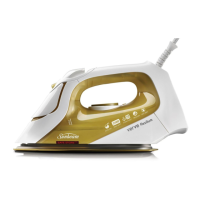
This document is a user guide for Sunbeam Verve Irons, covering models SRC6000, SRC6500, SRS6550, SRA6200, and SRA6800. It provides essential information on the iron's features, safe operation, maintenance, and ironing tips.
The Sunbeam Verve Iron is designed to make ironing efficient and effective, offering a range of features to tackle various fabric types and wrinkle challenges. Its primary function is to remove creases and wrinkles from clothing and other fabrics through a combination of heat, steam, and pressure.
Function Description
The Verve Iron operates by heating a soleplate to a user-selected temperature, which, when applied to fabric, helps to smooth out wrinkles. It incorporates both dry ironing and steam ironing capabilities, providing versatility for different garment care needs.
Usage Features
- Powerful Shot of Steam: This feature allows for an instant burst of steam, ideal for removing stubborn wrinkles. It can be activated by pressing a dedicated button.
- Vertical Shot of Steam: When the iron is held upright, pressing the shot of steam button produces a vertical burst of steam. This is particularly useful for steaming curtains, suits, and delicate fabrics that cannot be ironed flat.
- Fine Spray Mist: A fine mist spray can be dispensed by pressing the spray button, which helps to dampen hard-to-iron fabrics, making them easier to smooth.
- Easy-Fill Water Inlet: The iron features a water tank with a 300ml capacity, allowing for continuous high steam performance without frequent refills. The water inlet is designed for easy filling.
- Drip-Stop Steam System: This intelligent system automatically prevents water from dripping from the soleplate when the iron's temperature falls too low to generate steam, ensuring no water marks on garments, even at lower temperatures.
- Full Length Button Groove: A specially designed groove runs along the soleplate, making it easier to iron around buttons without snagging or creasing.
- Fast Heat Up: The iron is equipped with a 2400-watt heating element, ensuring rapid initial heat-up and quick heat recovery during ironing sessions. This helps maintain the selected temperature and provides superior steam output.
- Safety Auto-Off Feature: For enhanced safety, the iron automatically switches itself off if left unattended. If left in the ironing position (horizontal), it turns off after 30 seconds. If left on its heel rest (vertical), it turns off after 15 minutes. When the auto-off is activated, the thermostat and power lights flash, and a warning beep sounds. Moving the iron will reconnect power, and it will reheat to the selected temperature.
- Power Light: An indicator light illuminates when the iron is connected to the power outlet and powered on.
- Thermostat Light: This light indicates when the iron is heating up and turns off once the selected temperature is reached. It cycles on and off during ironing to show that the iron is maintaining the set temperature.
- Stable Heel Rest: An extra-large heel rest provides stability when the iron is placed in an upright position on the ironing board.
- Cord Wrap: A built-in cord wrap facility allows for neat and tidy storage of the power cord around the heel rest when the iron is not in use.
- Concentric Steam and Temperature Dials: The steam and temperature controls are conveniently positioned together for easy adjustment.
- Variable Steam Dial: This dial allows users to select the desired steam output for different garments. A "DRY" setting is also available for ironing without steam.
- Temperature Dial: This dial enables precise temperature selection for various fabrics. It also indicates the recommended steam level for each temperature setting.
- Soleplate Types:
- CeraFlow™ Soleplate (SRC6000 & SRC6500): This ceramic soleplate is highly scratch-resistant, durable, and designed for speed, agility, and longevity.
- Resilium Anodised Steam Assist Soleplate (SRA6200 & SRA6800): This premium, exclusive soleplate is exceptionally durable, offers super low friction for easier glide, and features 172 steam holes for maximum steam distribution.
- Stainless Steel Soleplate (SRS6550): This sleek and smooth stainless steel soleplate is hard-wearing and an excellent heat conductor, designed to remove tough wrinkles faster.
Pre-Use Preparation:
Before first use, users are instructed to remove all adhesive stickers, plastic covers, or cardboard sleeves from the soleplate and clean any residue with a cloth dampened with methylated spirits. The water tank should be filled and emptied to rinse out any manufacturing particles. It is normal for the iron to emit vapours for up to 10 minutes during its first use due to the initial heating of materials.
Filling the Iron with Water:
To fill the iron, the power must be turned off, and the plug removed from the outlet. The iron can be filled while hot. Users should place the iron on its heel, open the water inlet cover, and slowly pour water until the maximum level is reached, ensuring not to exceed the indicator. The water inlet cover should then be firmly closed. The special soleplate design allows for the use of tap water, but for very hard water areas, distilled or demineralised water is recommended to maintain steam performance. Sunbeam Demineralised Water is suggested for optimal results. Fabric conditioner, starches, or other solutions should not be used as they can damage the steam mechanism.
Operating the Iron:
- Plug the iron into a 230/240 volt power outlet and turn the power on. The power ON light will illuminate.
- Turn the temperature dial to the desired setting. The thermostat light will illuminate while heating and turn off when the selected temperature is reached. When changing from a high to a lower temperature setting, the thermostat light will go out immediately, indicating cooling. For accurate temperature, wait for the thermostat light to come on and go out again before ironing.
Steam Ironing:
For steam ironing, ensure the temperature dial is set within the steam band and the tank is at least 1/4 full. Turn the steam dial to the desired steam setting, corresponding to the selected temperature.
Dry Ironing:
For dry ironing, select "DRY" on the steam dial to cut off steam flow.
Using the Shot of Steam:
This feature can be used during dry or steam ironing when the temperature dial is set within the steam band or above the two-dot setting. Ensure the tank is at least 1/4 full of water. Select the desired temperature and wait for the thermostat light to go out. Press the shot of steam button several times with the iron on the soleplate to prime the pump. If the tank runs dry, re-priming may be necessary after refilling.
Using the Spray Mist:
The spray mist can be used for both dry and steam ironing to pre-dampen hard-to-iron fabrics. Ensure the tank is at least 1/4 full of water. Press the spray button during ironing to release a fine mist.
Ironing Tips & Tricks:
The guide offers various tips for effective ironing, including:
- Ironing Shirts: Start with the collar, then shoulders, cuffs, sleeves, and finally the front and back panels.
- T-shirts: Straighten seams before drying. Turn t-shirts inside out to iron printed graphics and logos. Avoid ironing areas with perspiration marks as heat can permanently fix stains.
- Hung Out to Dry: Remove shirts from the machine immediately after washing, shake them out, and hang them on coat hangers to minimize wrinkles.
- Selecting the Right Temperature: If unsure, test a small area (e.g., a seam or inside hem) starting with a low temperature and gradually increasing it.
- Ironing Silk: Silk is a strong natural fibre. Use a low cotton setting with regular shots of steam and a pressing cloth to avoid shine marks.
- Ironing Seams: Always press seams in the direction they were made to avoid going against the fabric grain.
- Sorting Fabrics: Sort articles by fabric type, starting with lower temperatures and progressing to higher settings to avoid constant temperature adjustments.
- Summer Frocks and Frills: Use steam and vertical shots of steam for delicate summer fabrics like muslin, cotton, and linen, hovering the iron without pressing down.
- Winter Woollies: Steam woollen garments using the vertical shot of steam and brush them to plump up fibres. Use a pressing cloth if ironing flat.
- Table Settings: Iron tablecloths after removing them from the cupboard to avoid unwanted creases. Lay towels across the table and iron the tablecloth over them for best results.
Maintenance Features
- After Each Use: After ironing, turn off the power, remove the plug, and allow the iron to cool completely before winding the cord around the built-in cord wrap.
- Storage: Always store the iron on its heel rest, not with the soleplate facing down or in its carton.
- Cleaning the Exterior: Wipe the exterior with a damp soft cloth and then dry. Harsh abrasives, chemical cleaners, or solvents should not be used as they can damage the surface.
- Cleaning the Steam Holes: To remove any build-up affecting steam performance, use a cotton wool tip moistened in methylated spirits.
- Cleaning the Resilium® Soleplate (SRA6200 & SRA6800): Wipe with a soft damp cloth and dry.
- Cleaning the Stainless Steel Soleplate (SRS6550): Use a stainless steel or metal cleaner, rubbing gently with a damp cloth, and then dry.
- Cleaning the CeraFlow™ Soleplate (SRC6000 & SRC6500): Wipe with a damp soft cloth after each use. If polyester has burnt onto the soleplate, iron a damp cotton cloth while hot.
- Caution for Soleplates: Scouring pads, abrasives, or harsh cleaners should not be used on Resilium®, CeraFlow™, or Stainless steel soleplates, as they will scratch and damage the surface.
The document also includes an ironing chart with recommended temperature settings and ironing advice for various fabric types, including Acrylic, Acetate, Nylon, Polyester, Rayon, Viscose, Silk, Cotton Blends, Wool, Wool Blends, Corduroy, Cotton, Linen, and Denim. This chart guides users on appropriate heat and steam levels, as well as specific techniques like ironing on the reverse side or using an ironing cloth.

 Need help?
 General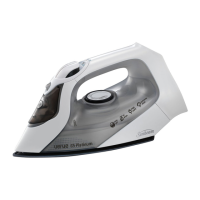



 To Next Page