EasyManua.ls Logo

Sunkwang VK-D300IRD - User Manual

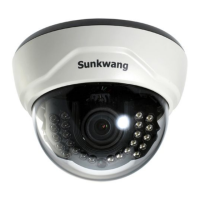
Sunkwang VK-D300IRD
2 pages
Print Icon
To Next Page IconTo Next Page
Loading...
3-AXIS WDR SUPREME
RESOLUTION DAY & NIGHT IR
DOME CAMERA VK-D300IRD
MANUAL
PROTECTION SHEET
LATCH BUTTON
4. Camera angle adjustment :
(1) Pan adjustment
(2) Tilt adjustment
(3) Roll adjustment
: Grasp the disk of camera and then adjust
direction to the right or left(-180 ~ 180 )
: Grasp the LED cover of camera and then
adjust direction to the up or down(6 ~ 90 )
: Grasp the camera holder and then rotate
(-178 ~ 178 )
˚ ˚
˚ ˚
˚ ˚
DIMENSION
ASSEMBLY
<Caution> If you try to adjust the camera out of limited angle, it might cause
troubles and damage to camera.
If the product is to be put out of operation definitively,
take it to a local recycling plant for a disposal which
is not harmful to the environment.
2. Removing the dome
3. Camera installation
:
:
Lift the dome. When you push the latch
button, it is unlocked and you can lift the dome.
(1) Fix the camera set with the supplied screws on ceiling or wall mount.
If you don't use supplied screws, the camera may fall off.
(2) Please refer to '4. Camera angle adjustment' regarding adjust
camera angle.
(3) Lens adjustment(Vari-focal Lens only)
After opening the LED cover,
By turning the "Tele-Wide" knob,
you can access a range of focal
lengths within specified limits.
Since then, by turning the "Near-Far"
knob, you can set the focus toward
the wanted object.
(4) Re-assemble the camera.
<Ceiling mount>
<Wall mount>
SCREW TP1 3.5X20 2EA
ROTATION
U
D
R
L
LED COVER
DISK
CAMERA HOLDER
Ø100
Ø130.8 Ø109
PRECAUTION
FEATURES
HOW TO INSTALL
1. Do not install the camera outdoors.
2. Choose an ideal location for the camera, since a camera unit must
be protected against moisture and vibration.
3. Be careful not to scratch the camera unit, especially lens or dome cover.
4. Use the camera within the temperature(-10℃ ~ +50℃).
5. Handle with care. Dropping it can cause serious damage to the
camera.
6. Avoid any direct sun light toward the lens.
7. Use the AC adaptor 12V DC, 1A regulated.
Dual voltage product can use 24V AC adaptor.(option)
1. This camera is incredibly flexible to install with its 3-axis camera con-
struction, which makes the camera ceiling, wall or slope mountable.
2. 25M range visible in total darkness with 24pcs of IR LEDs.
3. Mechanical filter exchange(True Day & Night), built-in WDR function.
4. Supreme Resolution.(690 TV-Line)
1. Opening the dome : Pushing the latch button.(Remove the pro-
tection sheet after installing.) BASE
CONTROL PCB
DOME COVER
LED COVER
SCREW
COOLING FAN
SCREW
CAMERA MODULE
SCREW
CABLE
DISK
PUSH BUTTON
HARNESS
SCREW
DUAL POWER PCB(option)
Question and Answer IconNeed help?

Do you have a question about the Sunkwang VK-D300IRD and is the answer not in the manual?

Overview

The Sunkwang VK-D300IRD is a 3-Axis WDR Supreme Resolution Day & Night IR Dome Camera, designed for robust surveillance applications. Its versatile construction allows for flexible installation on ceilings, walls, or sloped surfaces.

Function Description:

This camera is equipped with a 1/3" Pixim DPS Sensor (SEAWOLF) and delivers a high resolution of 690 TV-Lines with 758(H) x 540(V) effective pixels, ensuring clear and detailed images. It supports both NTSC and PAL TV systems and utilizes progressive scanning for smooth video output. The camera features a Wide Dynamic Range (WDR) function, which is crucial for environments with challenging lighting conditions, allowing it to capture clear images even when a subject is backlit. The Day & Night function, with a mechanical filter exchange, automatically switches between color and black & white modes, enhancing visibility in varying light levels. For total darkness, it boasts 24 IR LEDs, providing a visible range of up to 25 meters. The camera also includes a Sense-Up function, which can automatically or manually amplify sensitivity in low illumination conditions up to x64.

Important Technical Specifications:

  • Image Sensor: 1/3" Pixim DPS Sensor - SEAWOLF
  • Effective Pixels: 758(H) x 540(V)
  • Resolution: 690 TV-Line
  • TV Type: NTSC / PAL
  • Scanning System: Progressive scan
  • Video Output: 1.0 Vp-p(Sync. Negative) Termination 75Ω ±10%
  • Min. Illumination: 0.1 Lux (Sense up X64), 0 Lux (LEDs ON, Max. 25M)
  • S/N Ratio: More than 50 dB (AGC OFF)
  • SDNR: ON
  • Backlight: WDR / BLC / OFF
  • Day & Night: True D&N (AUTO / COLOR / BW)
  • LED Output: IR LED 24pcs (Level adjustable)
  • Gain Control: AUTO / MANUAL
  • Sense Up: Max. X64 (X2, X4, X8, X16, X32, X64)
  • Power Supply: Regulated 12V DC or 24V AC (dual voltage product)
  • Current Consumption: Max. 500mA (at 12V DC) / 510mA (at 24V AC) with LEDs ON
  • Lens: Vari-focal auto iris lens
  • Operation Temp.: -10°C ~ +50°C
  • Preservation Temp.: -20°C ~ +60°C
  • Dimensions: Ø130.8 x 96(H)mm
  • Weight: Approx. 500g

Usage Features:

The camera's 3-axis construction allows for pan, tilt, and roll adjustments to achieve the desired viewing angle. Pan adjustment ranges from -180° to 180°, tilt from 6° to 90°, and roll from -178° to 178°. Users are cautioned against adjusting beyond these limits to prevent damage. The vari-focal lens allows for adjustment of focal length and focus by turning "Tele-Wide" and "Near-Far" knobs, respectively.

An On-Screen Display (OSD) menu provides comprehensive control over camera settings. This menu is accessed and navigated using a jog lever.

  • Jog Lever: Pushing the lever accesses the menu and confirms selections. Pushing for one second opens or closes the menu and returns to the previous menu from motion detection or privacy mask settings. Up/Down movements navigate the cursor, while Left/Right movements change values.
  • OSD Menu Options:
    • LENS SELECT: For selecting lens type (fixed iris or vari-focal auto iris).
    • PRESETS: Offers preset modes (Custom, Indoor, Window, Outdoor) for quick installation based on common applications.
    • WDR: Adjusts the Wide Dynamic Range function (Low, Normal, Medium, High, Off) to optimize image clarity in high-contrast scenes.
    • EXPOSURE: Includes BLC (Back Light Compensation) and AGC (Automatic Gain Control) settings with selectable levels (Low, Medium, High).
    • SENSE-UP: Configures the Sense-Up function (Auto, Manual, Off) and its amplification level (x2 to x64).
    • WHITE BALANCE: Options include ATW (Auto Tracking White Balance), AWC (Automatic White Balance), and MANUAL adjustments for Red/Blue values and Kelvin temperature.
    • DAY&NIGHT: Sets the camera's mode (Auto, Color, B/W) based on lighting conditions.
    • GAMMA: Adjusts the screen's gamma (default: 45).
    • SHARPNESS: Controls image sharpness (Min to Max).
    • COLOR GAIN: Adjusts color gain (-8 to 8).
    • IMAGE ADJUST: Offers image inversion options (Off, Horiz, Vert, Both) and digital zoom (Off, On, Pan, Tilt).
    • MOTION: Configures motion detection with up to 4 adjustable areas, allowing users to set position and size, and change mask color.
    • PRIVACY: Allows masking of up to 12 privacy zones, with adjustable position, size, and mask color.
    • RS-485 SETUP: For setting camera ID (1-255), displaying the ID on screen, and changing its position.
    • SYNC: Configures synchronization (Internal or External) and V-PHASE control.

Maintenance Features:

The camera is designed for easy installation and adjustment. When opening the dome, users must push the latch button and remove the protection sheet. For lens adjustment, the LED cover needs to be opened. The manual emphasizes careful handling to avoid scratching the camera unit, lens, or dome cover. It also specifies operating within a temperature range of -10°C to +50°C. For disposal, the product should be taken to a local recycling plant to ensure environmentally friendly disposal.

Sunkwang VK-D300IRD Specifications

General IconGeneral
BrandSunkwang
ModelVK-D300IRD
CategorySecurity Camera
LanguageEnglish