high
comp
high
low
comp
comp
eq bal
comp
gain trim
master
volume
power
tuner
only
high
mid
notch
input
level
comp
250 500
1k 2k 4k
8k
16k
eq
trim
graphic
line out
post
pre
comp
on
off
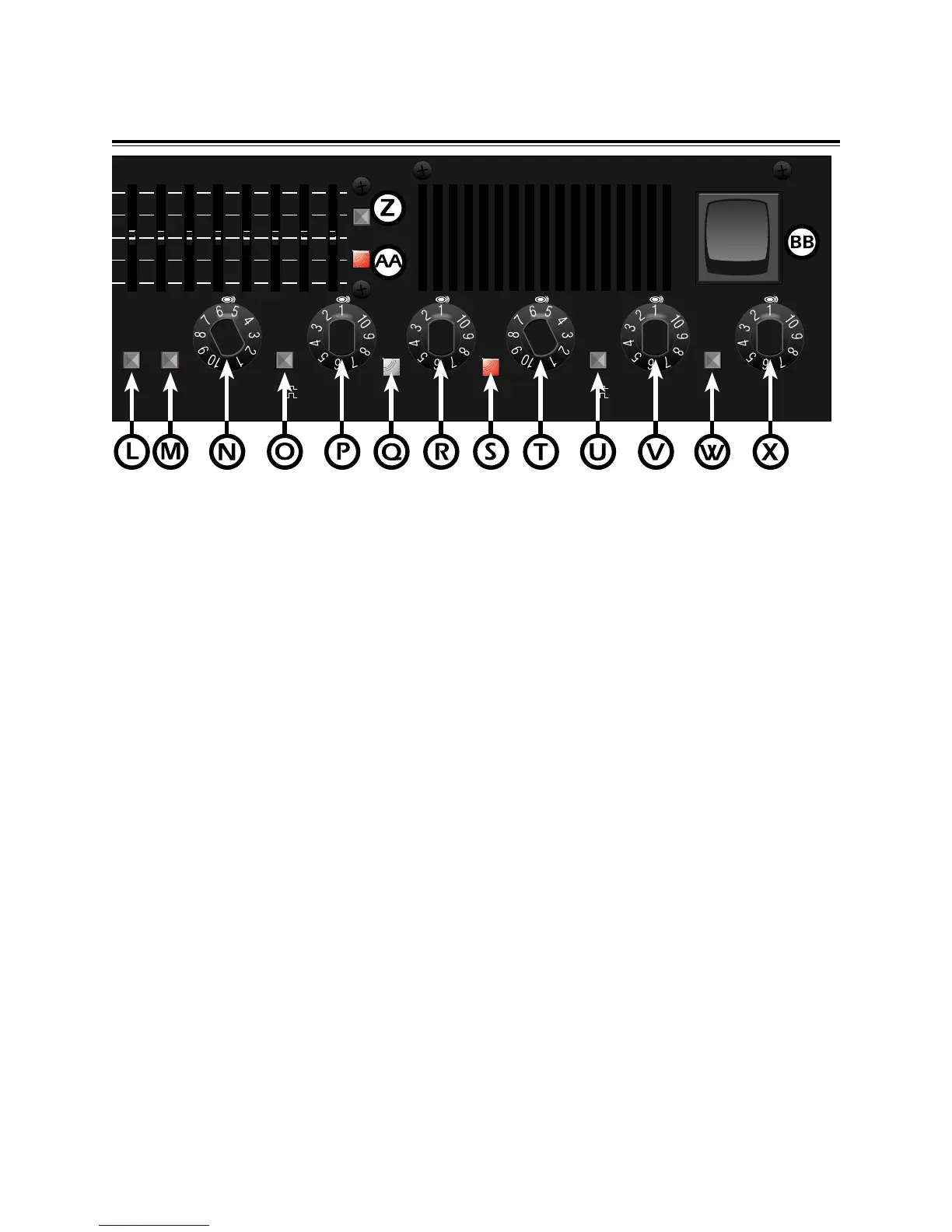
P. LOW COMP - This knob adjusts the compression
ratio at 420 Hz and below. Rotating the knob
clockwise increases the compression rate at 420Hz
and below.
Q. INPUT LEVEL LED - This LED illuminates GREEN
once the threshold of the compressor has been
reached. When a RED light is displayed, this
indicates clipping and your 1200s is being
overdriven. When the compression circuitry is not
engaged, the LED will still indicate signal level.
R. HIGH COMP - This knob adjusts the compression
ratio at 420 Hz and above. Rotating the knob
clockwise increases the compression rate at 420Hz
and above.
S. COMP LED - This LED illuminates when the
compression circuitry is active.
T. COMP EQ BAL - This detented knob mixes the
low and high compressor outputs. When the knob is
at “1”, only the low compressor is in the output mix.
When the knob is at “10”, the high compressor is in
the output mix. By rotating the knob, an optimum mix
of both compressors can be obtained.
U. COMP - This push button switch is used to
activate the on-board compressors. When this push
button is in, compressors are active. Using the
footswitch overrides the front panel comp select
switch.
V. COMP GAIN TRIM - This knob adds gain to make up
for any level lost once the compression circuitry has
been engaged. Rotating the knob clockwise
increases the amount of gain.
W. TUNER ONLY - This push button mutes all
outputs and sends your bass guitar's signal to your
tuning device (not included).
X. MASTER VOLUME - This knob adjusts the
overall volume level of the 1200s. Rotating the knob
clockwise increases volume with “1” producing no
volume and “10” producing maximum volume.
Y. GRAPHIC EQ - This 10 band graphic equalizer
consists of active band pass / band reject filters
spaced at octave intervals. Moving the sliders up or
down boosts or cuts the gain at the indicated
frequency. The EQ Trim slider provides a gain or
decrease of the bass’ signal through the graphic EQ.
When the slider is at it’s centered notched position,
the input signal is neither boosted nor cut.
Z. GRAPHIC ON/OFF - This button activates the
Graphic EQ. When the button is in, the Graphic EQ
is active. Using the footswitch overrides the front
panel graphic select switch.
AA. GRAPHIC EQ LED - This LED illuminates when
when the Graphic EQ is active.
BB. POWER - Turns the AC power ON and OFF.
When the rocker switch is is down, the amplifier is
OFF and completely shut down.
7


 To Next Page
 Loading...