10
sleep period (Options: O, 10, 20, 30, 40, 50, 60, 70, 80 and 90 minutes).
•Theradiowillautomaticallyswitchowhenthesleepperiodisover.
•PresstheSLEEPbuttontochecktheremainingtimebeforetheradioswitches
o.
•PressthePOWERbuttontocancelthisfunction.
Display information
•Instandbymode,presstheY-M-Dbuttonrepeatedlytochangeshowingthe
year, date, time and day of the week (d1 = Monday, d2 = Tuesday, d3 =
Wednesday, d4 = Thursday, d5 = Friday, d6 = Saturday and d7 = Sunday).
•Inradiomode,presstheBACKWARDorFORWARDbuttononcetobriey
change the display from the clock time to the current radio frequency.
Display brightness
•Instandbymode,presstheDIMMERbuttontochangethebrightnesslevelof
the display (low level, high level or o).
Projector
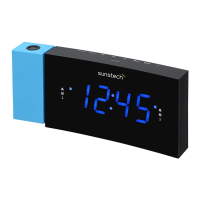
•PressthePROJECTORbuttontoprojectthecurrentclocktimeonawall.
•Rotatetheprojector(upto180°)toadjusttheprojectionangle.
•Pressthe180°FLIPbuttontoiptheprojectedimage.
Charging external device
Connect an external device (e.g. smartphone, mp3 player) via a USB cable (not
provided) to the USB jack on the back of the radio for charging. The radio cannot
access the contents in the connected external device.
Specications
Tuner Range: FM: 87.50 – 108.00 MHz
Number of preset radio stations: 10
AC power adaptor: Input: AC 100-240 V, 50/60Hz
Output: DC 5 V 1.5A
Made in China
Care and maintenance
•Cleantheradiowithasoftdampclothandletallpartsdrycompletelyafter
cleaning.
•Donotuseanyaggressivecleaners,brusheswithnylonbristles,sharpor
metallic cleaning utensils, knives, hard scrapers and the like. They could
damage the surfaces of the radio.
•Donotimmersetheradioinwateranddonotletwatergettingintothe
housing of the radio.
Storage
•Unplugthepoweradapterandcleantheradiobeforestorage.
•Alwaysstoretheradioinadryandcleanplace.


 To Next Page