1
Product
Product
Product
ProductOverview
Overview
Overview
Overview
WiththelatestBluetoothV4.0technology,HPB210givesyoutheconvenient
wirelesswaytoenjoythecystalclearstereosoundqualitymusictransmittedfrom
theBluetoothA2DP
*1
devicesuchasmobilephone,mp3player,PCorPDAinthe
availablerange.
Moreover,youcanuseHPB210toremotecontrolthemusicplayingfunctionsof
yourBluetoothdevicethatsupportsBluetoothAVRCP
*2
.
Switchingbetweenmusicandphonecalls,HPB210alsoallowsyouanswerormake
callswiththeBluetooth-enabledmobilephone
*3
whileyouarelisteningtomusic.
Afteryouendedthecall,themusicwillfollowtobestreamedinfewseconds
*4
.
Besidesthewirelessstereoandmobilehands-freeapplications,youcanapplythe
HPB210totheBluetooth-enabledPC
*5
.
Notes:
*1Theplaybackoritsplug-inBluetoothadapter/transmitterneedstosupportBluetoothA2DP(Advanced
AudioDistributionProfile).
*2Theplaybackoritsplug-inBluetoothadapter/transmitterneedstosupportBluetoothAVRCP(AudioVideo
RemoteControlProfile).
*3ThemobilephoneneedstosupportBluetoothHSP(HeadsetProfile)orHFP(Hands-freeProfile)andsupport
BluetoothA2DP(AdvancedAudioDistributionProfile).
*4Somemobilephonesdonotreleasetheconnectionswitchfunctiontotheheadset,whichwillcausethe
headsettofailtoswitchtheBluetoothconnectionbetweenmusicandcall.
*5Thecomputeroritsplug-inBluetoothadapterneedstosupportBluetoothHSP(HeadsetProfile).
MadeinChina
Getting
Getting
Getting
Gettingto
to
to
toknow
know
know
knowyour
your
your
yourBluetooth
Bluetooth
Bluetooth
BluetoothStereo
Stereo
Stereo
StereoHeadset
Headset
Headset
Headset
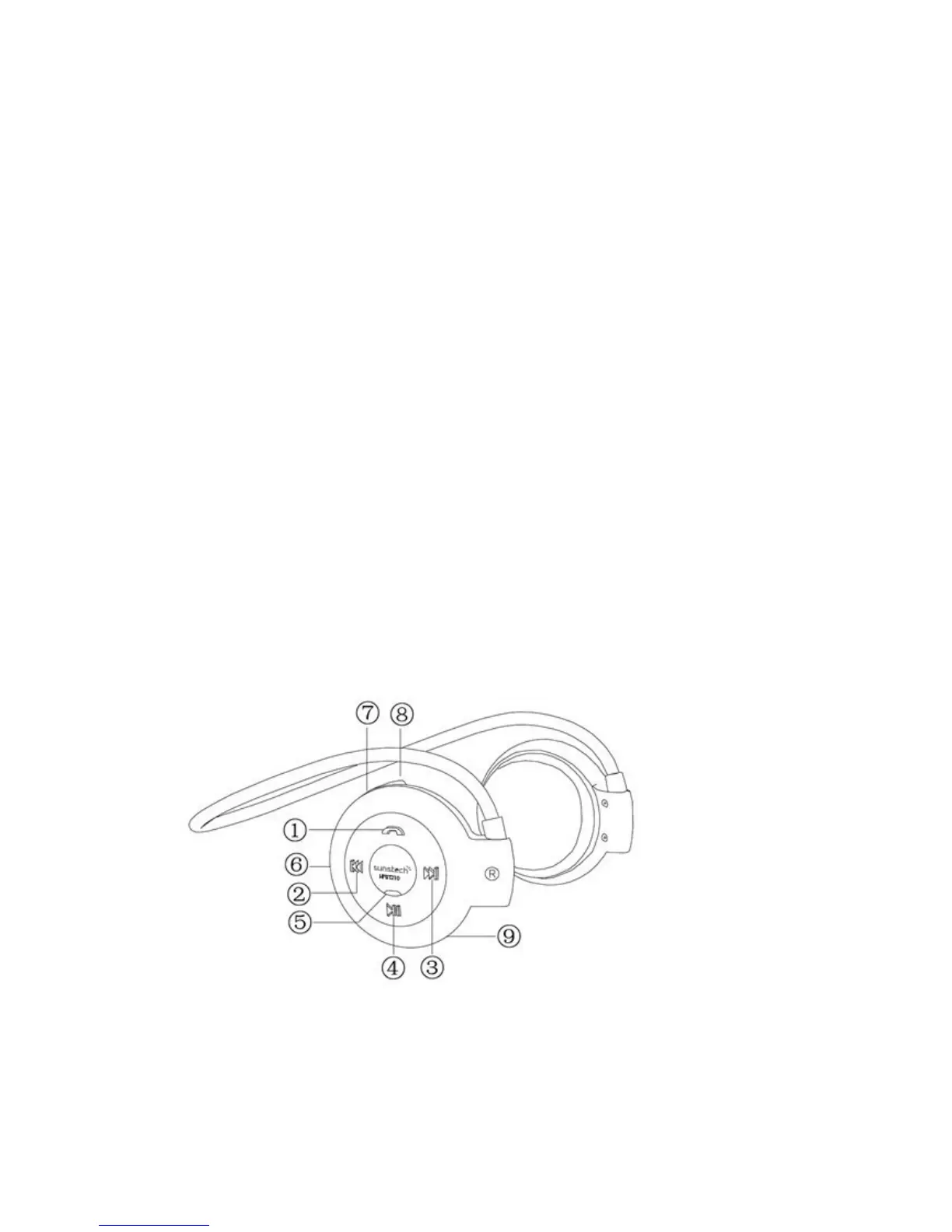
1.MFBbutton(Multi-FunctionalButton):
PowerOn/ff,answer/endcall,pairtheheadset,voicedialing,Re-dialcall,
rejectscall
2.Backwardbutton
3.Forwardbutton
4.Play/Pause


 To Next Page
 Loading...