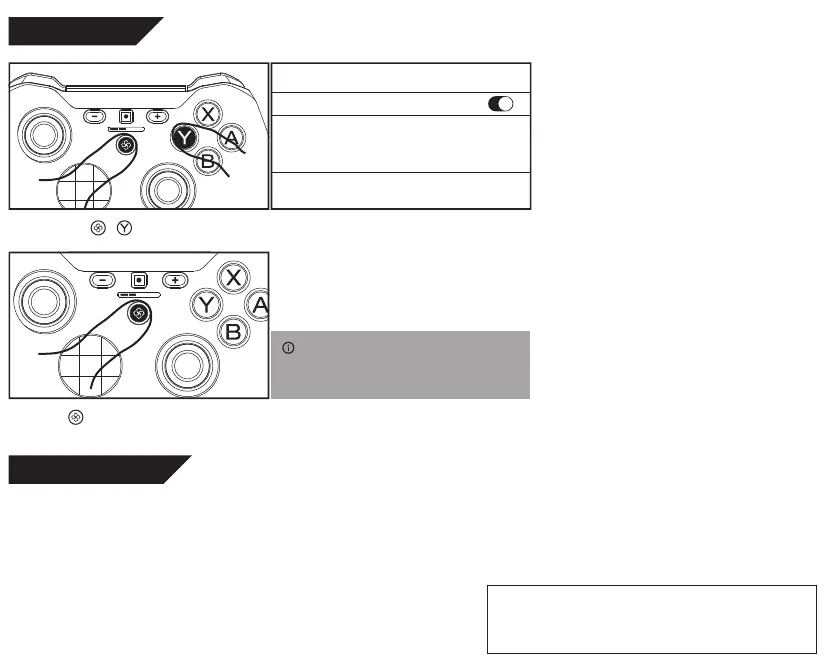
Connect to iOS
Connect to Fire TV
Just press to link to with the device ever paired
(ensure Bluetooth is on).
Press and hold + until lights run. Turn on Bluetooth, connect the device “Xbox Wireless
Controller”.
< Settings
Bluetooth
Xbox Wireless Controller
OTHER DEVICES
Bluetooth
Amazon Fire OS devices support NIntendo Switch Pro controller, Xbox 360 Controller, Xbox One Controller and Android Gamepad,
so all the previously introduced 4 pairing methods may be applicable.
Ver. 1.04
Contents in this documents may change without notice.
The names of actual companies and products mentioned herein maybe the
trademarks of their respective owners.
© 2020 Sunwaytek Limited. All rights reserved.
INFO:
This pairing mode will pair the controller as Xbox One
Controller. Same applies to other Apple devices like iPad,
Mac and Apple TV, and Google Stadia.


 To Previous Page