EasyManua.ls Logo

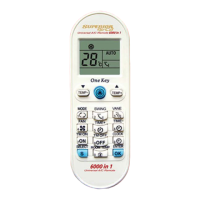
Superior Airco 6000 - User Manual

Superior Airco 6000
5 pages
Print Icon
To Next Page IconTo Next Page
Loading...
Question and Answer IconNeed help?

Do you have a question about the Superior Airco 6000 and is the answer not in the manual?

Summary

Superior Airco 6000 IN 1 English Instructions

Code Setup by Brand

Instructions for setting the remote control code by selecting the correct brand code from the table.

Automatic Code Search

Procedure for automatically searching for the correct code if the brand is not listed in the table.

One-Key Function Usage

Guidance on using the 'One-Key' button to set temperature based on summer or winter mode.

Clock Setting Procedure

Steps to set the current time on the remote control using the CLOCK and TIME buttons.

Timer On and Off Settings

Instructions for programming the timer to turn the air conditioner on or off at specific times.

Room Temperature Display

How to view the current room temperature displayed on the remote control for 5 seconds.

Important Notes and Precautions

Essential advice regarding battery handling, remote placement, and timer functionality.

Technical Features and Specifications

Details on the remote's maximum reach, battery type, dimensions, and weight.

Product Guarantee Information

Information regarding the 2-year warranty against manufacturing defects and repair procedures.

Summary

Superior Airco 6000 IN 1 English Instructions

Code Setup by Brand

Instructions for setting the remote control code by selecting the correct brand code from the table.

Automatic Code Search

Procedure for automatically searching for the correct code if the brand is not listed in the table.

One-Key Function Usage

Guidance on using the 'One-Key' button to set temperature based on summer or winter mode.

Clock Setting Procedure

Steps to set the current time on the remote control using the CLOCK and TIME buttons.

Timer On and Off Settings

Instructions for programming the timer to turn the air conditioner on or off at specific times.

Room Temperature Display

How to view the current room temperature displayed on the remote control for 5 seconds.

Important Notes and Precautions

Essential advice regarding battery handling, remote placement, and timer functionality.

Technical Features and Specifications

Details on the remote's maximum reach, battery type, dimensions, and weight.

Product Guarantee Information

Information regarding the 2-year warranty against manufacturing defects and repair procedures.

Superior Airco 6000 Specifications

General IconGeneral
BrandSuperior
ModelAirco 6000
CategoryUniversal Remote
LanguageEnglish

Related product manuals