PRE-DN BUTTON
-In the radio mode,
press PRE-DN button to choose the back channel.
-In the mp3 mode,
press PRE-DN button to enter the back folder.
-In the radio mode,
press PRE-UP button to choose the next channel.
-In the mp3 mode,
6.PRE-UP BUTTON
8.REPEAT/MO/ST BUTTON
- Repeat a track CD/MP3/USB program.
- Repeat mode : normal->repeat 1->repeat all->
repeat album ->normal.
- Press MO/ST button once , to mono state.
- Press MO/ST button twice , to stereo state,
stereo is displayed(In FM mode)..
1
2
3
4
5
6
7
8
9
10
11
12
13
14
15
16
17
18
19
20
21
22
23
30
FIG
EN-2
EN-3
24
24
25
26
27
28
29
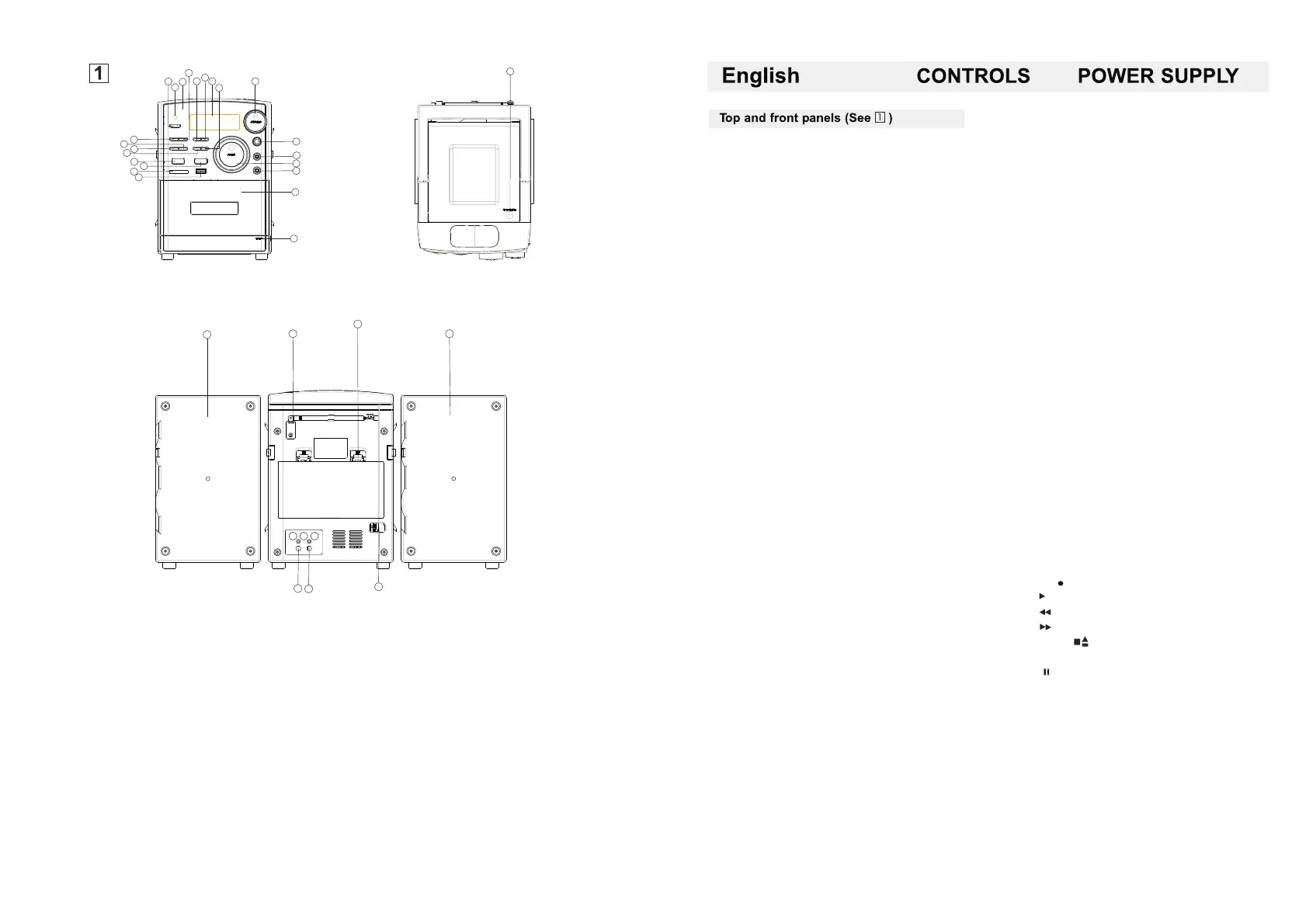
1.
2.
3.
4.STOP/USB/SD BUTTON
5.PRE-DN
6. PRE-UP
7.LCD DISPLAY
8.REPEAT /MO/STBUTTON
9.VOLUME
10.PLAY/PAUSE BUTTON
11.MUTE BUTTON
12.EQ BUTTON
13.TIME/PROGRAM BUTTON
14.FUNCTION BUTTON
15.RANDOM/BAND BUTTON
16.SD/MMC CARD JACK
POWER BUTTON
REMOTE SENSOR
STANDBY INDICATOR
17.
18.
19.AUX JACK
20.TUNING CONTROL
21. STEREO HEADPHONE JACK
22.CASSETTE COMPARTMENT
23.CASSETTE RECORDERS KEYS
24.LEFT&RIGHT SPEAKER BOXES
25.FM ANTENNA
26.BATTERY DOOR
27.SPEAKER WIRE CONNECTOR(R)
28.SPEAKER WIRE CONNECTOR(L)
29.AC MAINS
30.CD DOOR
USB JACK
BASS BUTTON
1.POWER BUTTON
-Press POWER button on
2.REMOTE SENSOR
3.STANDBY INDICATOR
4.STOP/USB/SD BUTTON
- stop CD/MP3/USB/IPOD/SD/MMC playback;
erase a CD program.
Press and hold more than 1.5 sec
change USB1.1/MMC(SD)media(only USB)
5.
7.LCD DISPLAY
- show the AM/FM dial frequency
- show the number of tracks
9.VOLUME
- adjust volume level.
10.PLAY/PAUSE BUTTON
- start or pause MP3/CD/USB/IPOD/SD/MMC play
11.MUTE BUTTON
-Press the mute button allows CD / MP3 / USB
/ MMC / SD / TAPE / IPOD (AUX) / the RADIO
to enter the mute state.
12.EQ BUTTON
-Press the button to change EQ CD/MP3 / USB/
SD/MMC/IPOD/RADIO's music style.
-When playing the music, push down this button
is in the popular-jazz-OFF-classica-rock.
13.TIME/PROGRAM BUTTON
-In standby mode, to setup the time of the unit.
-program and review programmed track numbers.
-In the working status, push down this button
can on CD/MP3 / USB/SD/MMC for programming.
Rotate the volume button to hold the CD/MP3 /
USB/SD/TAPE/IPOD (AUX) / RAID the volume.
14.FUNCTION SELECT
- select source of sound CD/USB/TAPE
IPOD(AUX)/RADIO
15.RANDOM/BAND BUTTON
-
16.SD/MMC CARD JACK
- To listen to your SD/MMC card
with Mp3 music files.
17.USB JACK
-To listen to your USB flash memory
stick with Mp3 music files.
18.BASS BUTTON
-
19.AUX JACK
-Push FUNC button , select MP3/AUX station.
Play Mp3、DISCMAN、 WALKMAN AUX
insert when no disc.
In a CD/MP3 / USB/MMC/SD mode,
press this button can be played at random.
-The radio in the mode, press this button
to select the FM STEREO, FM, AM.
Press the BASS button can make the CD/MP3/USB/
MMC/SD/TAPE/IPOD (AUX) / RADIO into the BASS state.
NOTE:Please take out the CD disc.
20.TUNING CONTROL
-Rotate the TUNING control to find the desired stations.
21.STEREO HEADPHONE JACK
- 3.5 mm stereo headphone jack.
22.CASSETTE COMPARTMENT.
23.CASSETTE RECORDERS KEYS
RECORD ( ) - start recording
PLAY ( ) - start playback
F.REW ( )-rewind the tape toward the beginning.
F.FWD ( )-advance the tape toward the end.
STOP/EJECT ( ) - stop the tape
- open the cassette compartment
PAUSE ( ) - interrupt recording or playback.
24.LEFT&RIGHT SPEAKER BOXES
25.FM ANTENNA
- to improve FM reception
26.BATTERY DOOR
-to open battery compartment
27.SPEAKER WIRE CONNECTOR(R)
28.SPEAKER WIRE CONNECTOR(L)
29.AC MAINS
- inlet for power cord.
30.CD DOOR OPEN BUTTON
- press here to open/close the CD door.


 To Next Page
 Loading...