START COOKING
IMPORTANT: Maximum food capacity for air fryer basket is 11 quarts of food per basket.
Cook using the full basket:
1. Plug the air fryer cord into an electrical outlet. The ON/OFF control will light up in white.
2. Place food on the crisper baking tray in the air fry basket without the separator.
a. WARNING: Do NOT Overfill. To ensure proper cooking and air circulation, NEVER fill any
Air Fryer Basket more than 2/3 full.
b. NOTE: When air frying fresh vegetables, it is not recommended to add more than 2 to 3
cups of food to the Air Fryer Basket.
3. Insert the basket into the air fryer and lock into place.
4. Press the ON/OFF control. The control panel will illuminate.
5. Press Switch.
a. NOTE: The L, R, Sync, and Dual Cook buttons will turn off. Sync buttons will turn off.
6. Press the desired cooking function. The default cooking time and temperature with flash.
7. If necessary, adjust the cooking time and temperature using the + or – buttons.
a. NOTE: In the Dehydrate Setting, time is adjustable in 1 hour increments.
8. Press the start/pause button to initiate the cooking process.
a. NOTE: To pause the cooking process, press the start/pause button. To resume the
cooking process, press the start/pause button.
b. NOTE: Two-thirds through the cooking process, the air fryer will beep and the display will
show SHK, reminding you it’s time to shake or flip your food for even cooking.
9. When the remaining time reaches 00:00, the display will show a countdown of 20 seconds,
the air fryer will beep 5 times and turn off.
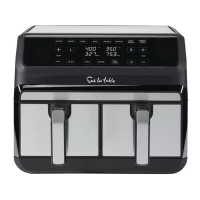
Cook using both baskets:
1. Plug the air fryer cord into an electrical outlet. The ON/OFF control will light up in white.
2. Place food on the crisper baking tray in the air fry basket with the separator.
a. WARNING: Do NOT Overfill. To ensure proper cooking and air circulation, NEVER fill any
Air Fryer Basket more than 2/3 full.
b. NOTE: When air frying fresh vegetables, it is not recommended to add more than 2 to 3
cups of food to the Air Fryer Basket.
3. Insert the basket into the air fryer and lock into place.
4. Press the ON/OFF control. The control panel will illuminate.
5. Press the L button to set up the cooking process for the food on the left basket.
6. Press the desired cooking function. The default cooking time and temperature with flash.
7. If necessary, adjust the cooking time and temperature using the + or – buttons.
8. Press the R button to set up the cooking process for the food on the right basket.
9. Press the desired cooking function. The default cooking time and temperature with flash.
10. If necessary, adjust the cooking time and temperature using the + or – buttons.
a. NOTE: Press the Sync button to synchronize the cooking time in each basket so both
dishes finish cooking at the same time.
11. Press the start/pause button to initiate the cooking process.
a. NOTE: To pause the cooking process, press the start/pause button. To resume the
cooking process, press the start pause button.
b. NOTE: Two-thirds through the cooking process, the air fryer will beep, and the display will
show SHK, reminding you it’s time to shake or flip your food for even cooking.
12. When the remaining Time reaches 00:00, the display will show a countdown of 20 seconds,
the air fryer will beep 5 times and turn off.
Cook using only one basket:
1. Plug the air fryer cord into an electrical outlet. The ON/OFF control will light up in white.
2. Place food on the crisper baking tray in the air fry basket with the separator.
a. WARNING: Do NOT Overfill. To ensure proper cooking and air circulation, NEVER fill any Air
Fryer Basket more than 2/3 full.
b. NOTE: When air frying fresh vegetables, it is not recommended to add more than 2 to 3
cups of food to the Air Fryer Basket.
3. Insert the basket into the air fryer and lock into place.
4. Press the ON/OFF control. The control panel will illuminate.
5. Press the L or R button to set up the cooking process for the food in the desired basket.
6. Press the desired cooking function. The default cooking time and temperature with flash.
7. If necessary, adjust the cooking time and temperature using the + or – buttons.
8. Press the start/pause button to initiate the cooking process.
a. NOTE: To pause the cooking process, press the start/pause button. To resume the cooking
process, press the start pause button.
b. NOTE: Two-thirds through the cooking process, the air fryer will beep, and the display will
show SHK, reminding you it’s time to shake or flip your food for even cooking.
9. When the remaining Time reaches 00:00, the display will show a countdown of 20 seconds,
the air fryer will beep 5 times and turn off.
2120



 To Next Page
 Loading...