Have Questions?
We have answers! Reach out to our US-based support team:
Call: 1-888-365-6283
Email:
support@surecall.com
Visit: www.surecall.com
Fusion2Go XR Fleet | SC-Fusion2GoXR-Fleet
BEFORE YOU BEGIN
© 2024 SureCall, Inc. All rights reserved
Identify a location on the vehicle’s roof that (1) has at least a 12-inch
radius clear of obstructions and other radiating elements, such as a
radio antenna and (2) at least 6 inches away from any windows.
Using a drill with a 3/8-inch hole saw bit, drill hole in the center of
the desired location. Remove the metal collar from the connector
and insert the NMO mounting cable through the hole (see above
illustration).
Position threads of the cable mount to extend through the center of
drilled hole and above vehicle surface.
Screw the collar to the base mount, ensuring the mount is centered
and tighten with a wrench. Next, thoroughly clean the mounting area
before screwing the antenna onto the NMO mount. Ensure full contact
of the antenna to the vehicle surface.
Note: The outside antenna must not be collocated or operating with
any other antenna or booster.
Once the antenna installation is complete, route the NMO Antenna
cable from the point of entry to the desired location of the booster. To
hide the cable, route behind the headliner cover, interior trim and floor
of the vehicle.
Please note: This product is designed for professional installation as
the antenna is mounted through a hole drilled into the vehicle’s sheet
metal.
A “soft installation” should first be performed by assembling the
NMO antenna and routing the cable through an open window. After
completing the remaining installation steps and successful operation is
verified, proceed with final installation.
➌➌
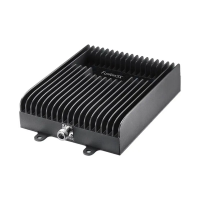
Booster
➍➍
Inside
Patch
Antenna
➎➎
12V
Hardwire
Power Supply
➊➊
Outside
Antenna
➋➋
NMO
Mounting
Cable
1. INSTALL OUTSIDE ANTENNA
➊➊
➋➋
➌➌
➍➍
➎➎
NMO Antenna
Collar
NMO Mount
Cable
➊➊
➋➋
Fusion2Go® XR Fleet
Quick Installation Guide
Quickly optimize your antenna separation with the ‘SureCall’ mobile
app that is available in the Google Play or Apple’s App Store
Industry-Best Three-Year Warranty
Thank you for your SureCall purchase. Please take the time to register
your new product at www.surecall.com/activate
SureCall warranties its products for three years from the date of
purchase against defects in workmanship and/or materials.
Products returned by customers must be in their original, un-modified
condition, shipped at the customer’s expense in the original or
protective packaging with proof-of-purchase documentation enclosed
and a Return Merchandise Authorization (RMA) number printed clearly
on the outside of the shipping container. RMA numbers are obtained by
contacting Customer Support.
This warranty does not apply to any product determined by SureCall
to have been subjected to misuse, abuse, neglect, or mishandling that
alters or damages the product’s physical or electronic properties.
For complete warranty text, including limitations and liability, see the
Fusion2Go XR Fleet full user manual, available online.
NMO Antenna
NMO Mount
NMO Cable
to booster


 To Next Page
 Need help?
 General