Supplied loading values:
• 100 ohms
• 200 ohms
• 1k ohms
• 10k ohms
• 47k ohms
Supplied gain values:
• 40 dB
• 45 dB
• 50 dB
• 55 dB
• 60 dB
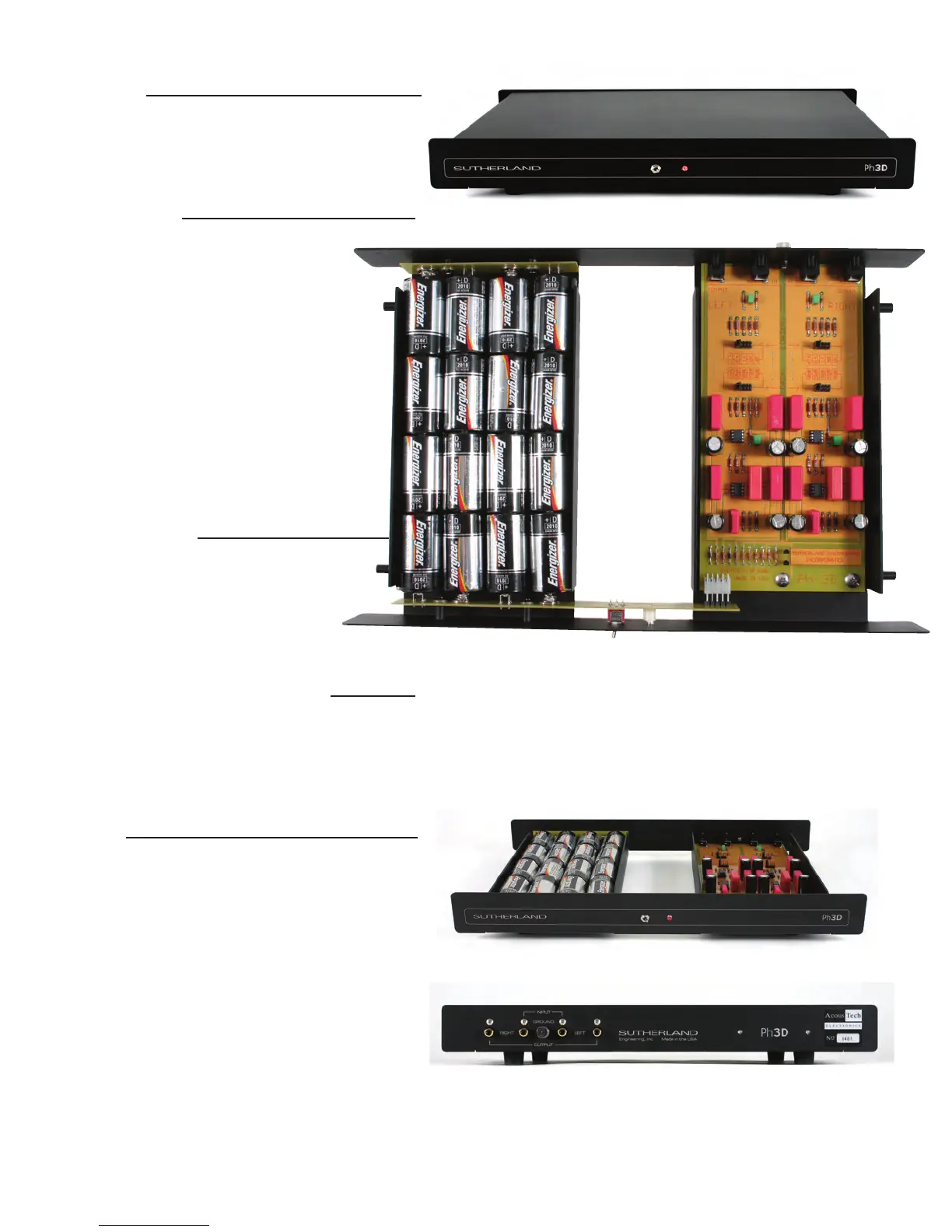
The r
ear panel includes inputs, outputs and a gr
ound lug.
INDICATORS
The red front panel LED indicates power on. As the
battery voltage decreases with usage, it will get dim-
m
er. When the voltage gets low enough that per form-
a
nce is compromised, the LED will go out abruptly.
CONFIGURATION
Conventional designs use inexpensive, low-quality
computer rocker switches. Their design is
inadequate for configuring the low-level signal
from a phono cartridge. To offer the user a wide
range of configurations while maintaining signal
integrity, the Ph3D uses gold-plated header pins
and gold-plated shunts. They offer high-pres-
sure and large surface area contacts.
Each channel has two configuration headers:
One to select cartridge loading and another to
select gain. When changing configuration, be
sure to set each channel to the same value.
Options are printed directly on the circuit board
next to the configuration headers.
GAIN ADJUSTMENT
There are five available gain settings. Gain is
set using the supplied, gold-plated shunts.
There is a gain setting header block for
each channel. Position the shunt to the
desired gain value. Be sure to set the gain
of each channel to the same value.
CARTRIDGE LOADING ADJUSTMENT
There are five available loading settings. Loading is set
using the supplied, gold-plated shunts. There is a load
setting header block for each channel. Position the
shunt to the desired loading value. Be sure to set the
loading of each channel to the same value.
BATTERIES
Your Ph3D is powered by 16 D-cell alkaline batteries. They
have a nominal useful life in this application of about
1,200 hours. The front panel red LED functions as both a
Power-ON indicator and a battery condition indicator. As
the batteries discharge, their voltage will decrease. When
the voltage has decreased to a level that will impair the
performance of the Ph3D, the LED will not illuminate, and
it is time to replace the batteries.
It is r
ecommended that the batteries be r
eplaced when
either the LED does not illuminate or once a year, whichev-
er occurs first. Replace all batteries at the same time with
all batteries of the same type.
The negative battery is placed facing the springs. If batter-
ies are installed incorrectly, protection circuitry will prevent
any damage to your Ph3D's circuitr y.
T
he red front panel LED indicates power on.
Y
our Ph3D is power
ed by 16 D-cell alkaline batteries.


 To Next Page
 Loading...