Sutron Corporation 8310 & 7310 Users Manual 8800-1125Rev. 2.7 (BETA) 4/16/2014 pg. 153
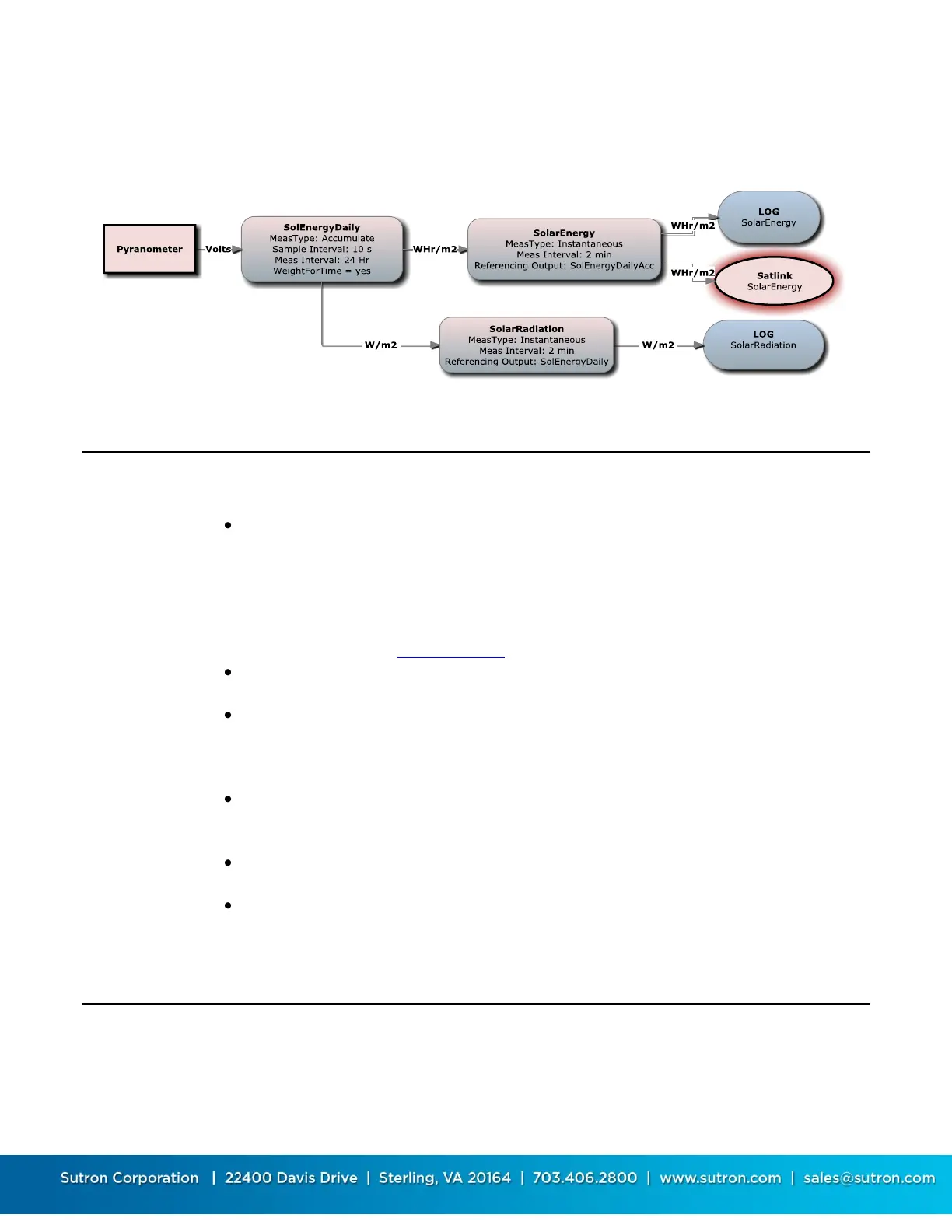
in this case. Remember that an Accumulation also outputs sample data (values prior to
accumulation calculation, W/m
2
in this case), which are output every 10 seconds. Logging all the
10 second samples may be more data than you want, so the instantaneous measurement
SolarRadiation logs a single radiation sample from SolEnergyDaily every 2 minutes.
Telephone with Speech/Modem
Sutron’s voice modem works both as a data modem and as a voice modem. It is commonly
connected to COM3. Set the device type to VOICE.
As you setup each measurement output, make sure you set SSP
Settings/SSPEnabled=YES and AlarmsEnabled=YES. This makes the output available for
voice and data communications. In addition, if you are going to use voice
communications, configure the prefix and suffix phrases with the appropriate phrase.
When the 8310 speaks information about an output it first says the prefix (such as
temperature), then the value (twenty five point 7), then the suffix (such as degrees).
Refer to the table of Speech Phrases in Appendix C.
If you intend to use “alarms” configure the alarms for the output in the SSP Settings
menu.
Configure the other settings for the VOICE device. The most common setting for Answer
Mode is “Voice and Data”. In this mode, the 8310 will answer "Please press pound" and
pause for a few seconds. If "#" is not pressed, the 8310 will turn on its modem signal
and try to establish a data link. The other Answer Modes are available if you need them.
With The Answer Mode in one of the voice modes, you will want to create a DialIn
message. A common dialin message causes the 8310 to speak the ID, speak live
(current) data and then give you a menu.
If you want to dialout on alarms, set Enabled=YES and specify the phone numbers as
needed.
Pick a password for the station to protect your unit from unauthorized users. You can
probably use the same password for all your sites.
LOS Radio
The system is ready to operate with LOS Radios with some simple changes to the configuration.
Set one of the communication ports to type=RADIO. With this type, the system will function
properly with a radio that requires the radio to be keyed prior to transmission. Radios that do


 To Next Page
 Loading...
