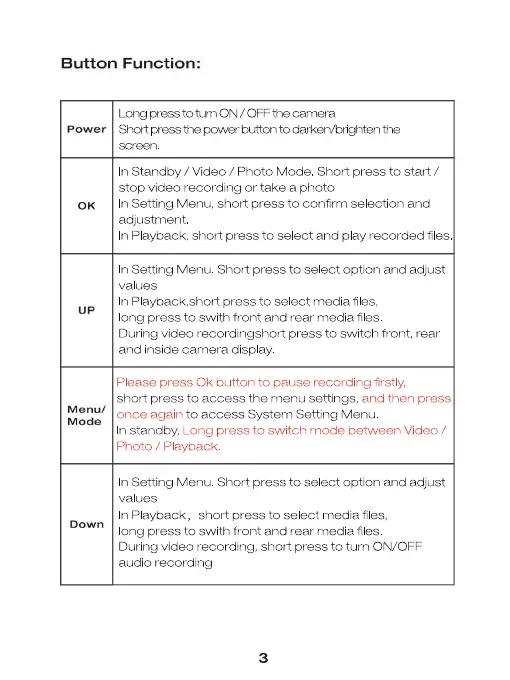
Button Function:
power
0K
Menu/
Mode
Down
Lcng prees to tum ON / CFF the camera
Shat press the pu,ver button to darken,'brigtlten the
n Standby / Video / Photo Mode Short press to start /
stop video recording or take a photo
n Setting Menu, short press to confirm se ection and
adjustment
n Playback, short press to select and play recorded files
n Setting Menu Short press to se ect option and adjust
n Playback,short press to select media fi es,
ong press to swith front and rear media files
During video recordingshort press to switch front, rear
and inside camera display
Please press 0k button to pause recording firstly,
short press to access the menu settings, and then press
once again to access System Setting N,lenu
n standby, Long press to switch mode between Video /
Photo / Playback
n Setting Menu Short press to se ect option and adjust
values
n Playback, short press to select media files,
ong press to swith front and rear media files
During video recording, short press to turn ON/OFF
audio recording
3


 To Next Page
 Loading...