ENG
3
E-701BT, E-702BT
User Manual
SAFETY PRECAUTIONS
Don’t use the stereo headphones while driving.
Don’t use the stereo headphones at high volume for a long time (more than 15 minutes), as this
may cause hearing impairment.
SPECIAL FEATURES
Bluetooth wireless signal transmission.
Touch control of incoming calls and track switching.
Two additional sets of interchangeable ear pads.
Battery operation time up to 3 hours.
Operating time using a charging case up
to 8–9 hours.
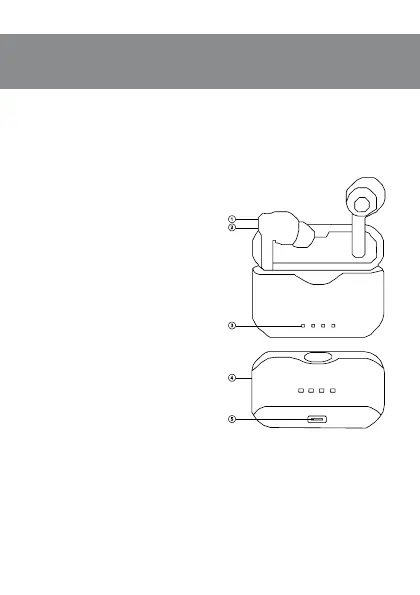
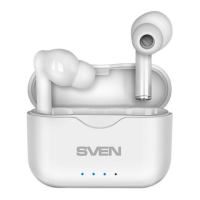
DESCRIPTION
a Multifunction sensor button.
b Headphones LED indicator.
c Charging сase LED indicator.
d Charging case.
e TYPE-C jack for battery charging.
CONNECTION
First connection
Remove both headphones from the charg-
ing case, then put them back to the case toac-
tivate the headphones.
If there is a protective lm on the contacts,
you must remove it before using the head-
phones.
The battery in the headphones and case
is used as an integral part of the device. Be-
fore using for the rst time, make sure that
theheadphones are fully charged. Ifthehead-
phones are discharged, they need to be fully
charged (see headphone charging section).
Headset to a device interfacing
It is necessary rst to interconnect the
device with a signal source (see the connec-
tion diagram in Fig. 2) to transfer signals via
Bluetooth. To pair the headphones with the
device, put them to the charging case, then
get them out. Both earphones are automat-
ically switched on and connected to each
other. Atthe same time on right earphone LED indicator b will alternate blue and red glow.
It is necessary to select Bluetooth device search mode on a signal source (telephone, notebook,
smartphone, etc.). “SVEN E-701BT” or “SVEN E-702BT” massage will be displayed onthescreen,
which is tobe connected to*.
If connection successful, there will be a short beep signal in the headphones; the search mode
indication on the headphones is over. If no devices connected, headphones will turned o au-
tomatically in 2 minutes.
Fig. 1.


 To Next Page