Player mode
Attention! The file system of a micro SD carrier is FAT32. Maximum volume is 32
GB. It is not recommended to use the micro SD Ultra Speed.
• The system will enter the Player mode automatically when a carrier USB-flash or
micro SD is connected to corresponding ports. Use button b to switch between Play
/ Pause modes. You can control tracks by using buttons
c (previous track) and d
(next track).
The use in the wired mode (AUX)
•
To connect the speakers to an additional signal source use a AUX connector and
3.5 mm mini-jack signal cable (not included).
• To turn on the speakers into the AUX mode – press the button a several times until
the speaker switches to the AUX mode.
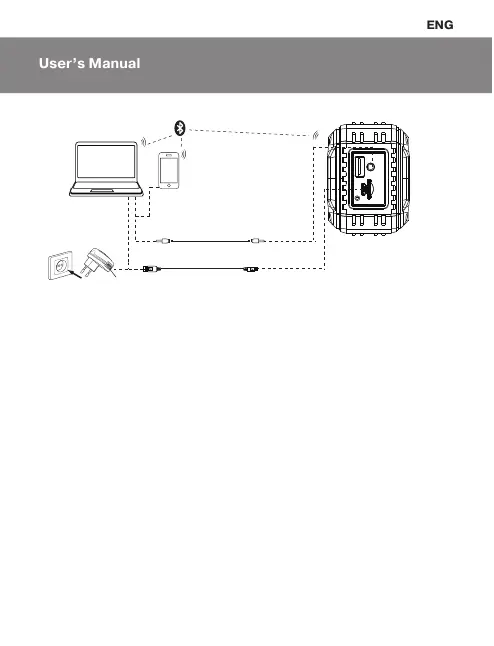
Fig. 2. Connection diagram
USB jack
Socket
Mobile
device
PC
USB to microUSB Power cable
Mini-jack to mini-jack signal cable
17
PS-220


 To Next Page