TEXT
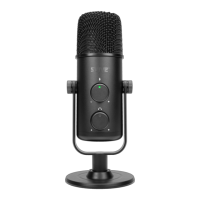
3. Headphone volume
Turn the knob clockwise to increase the volume,
and counter clockwise to reduce it.
4. Dual mode switch for Omni-directional and Cardioid
Slide the switch to change mode.
5. Headphone Jack
Universal 3.5mm TRS jack for voice monitoring and
audio output.
6. USB Type-C
High-speed audio data transmission.
7. Multipurpose stand
Easy adjustment of microphone position.
Compatible with boom arm stand.
8. Stand base
Heavy and shock absorbing for good stability.
SETUP WITH ANDROID DEVICES
Svive Hydra Essential Microphone suppos Android
5.1 and later versions; your mobile needs to suppo
the USB OTG function.
Connect the microphone to your device by using a
cable compatible with your device. The microphone
will draw power from your device and sta up within
a few seconds. The LED will turn green and the
microphone is ready to use with apps that suppo
external microphone for recording.


 To Next Page