Need help?
Do you have a question about the Svive TRITON TKL and is the answer not in the manual?
Utilize Fn key combinations for media control and application access.
Restore keyboard to default settings or disable Windows key.
Swap functionality between CTRL/CAPS and ALT/WIN keys.
Cycle through various lighting modes and adjust colors.
Adjust backlight intensity and animation speed.
Automate complex command sequences for gaming advantage.
Guide to recording, saving, and enabling/disabling key macros.
Switch different backlight colors using dedicated software.
Download software for custom backlights, key settings, and game modes.
Access technical support and contact details.
 General
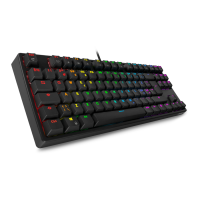
| Backlighting | RGB |
|---|---|
| Key Rollover | N-Key Rollover |
| Connectivity | Wired |
| Dimensions | 360 x 135 x 35 mm |
| Keycaps | ABS |
| Interface | USB |
| Anti-ghosting | Yes |
| Cable Length | 1.8 m |
| Type | Gaming Keyboard |
| Keyboard Layout | TKL (Tenkeyless) |

 To Next Page