08
ENGLISH
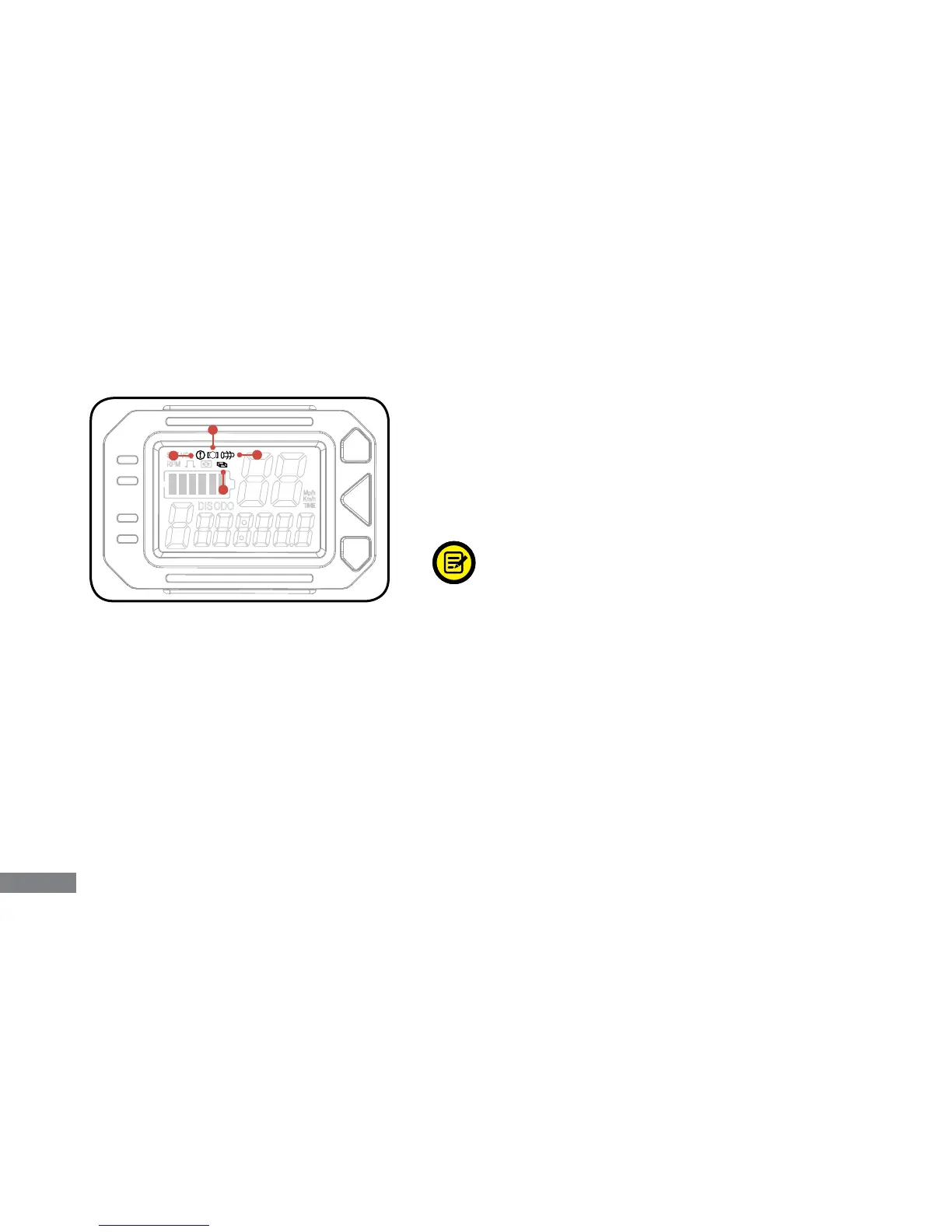
1. Motor Failure: The icon indicates motor activity and will appear if an element of the motor fails to function
properly. If the issue is resolved and/or there are no issues with any element of the motor, the icon will not
appear.
2. Handle Failure: The icon indicates handling activity and will appear if an element of the steering fails to
function properly. If the issue is resolved and/or there are no issues with any element of the scooter’s handling,
the icon will not appear.
3. Control Failure: This icon indicates a serious internal issue with the Swagger’s components. If this icon
appears, immediately stop using the Swagger and contact customer service.
4. Brake Failure: This icon indicates abnormal brake activity and will appear if an element of the brakes fails
to function properly. If the issue is resolved and/or there are no issues with any element of the brakes, the icon
will not appear.
Fault Indicators:
There are four icons which will appear under abnormal
circumstances and/or if the internal system or parts inside the
Swagger encounter some type of issue. Read the information
below to understand what each icon relates to.
In the event that any of these icons appears, attempt to turn the
Swagger off and back on again.
If turning the Swagger off and back on
again doesn’t resolve the issue, please
contact customer service.



 To Next Page