06
SWAGTRON
®
SWAGGER COLLAPSIBLE ELECTRIC SCOOTER USER’S MANUAL
Step 1. Remove the cap and screws at the top of the Swagger’s handlebar stem.
Step 2. Center the handle bar connector into the handle bar stem.
Step 3. Position the cap back to the connector bar, then insert and tighten the screws using the
appropriate Allen key.
Note: When place correctly, the display will sit partially over the middle connector bar.
Step 4. Screw each handle into each side of the middle connector bar.
Do not perform assembly when the power is on or the battery is charging. Be extra
caution during assembly, otherwise the carbon fiber stem of the Swagger may be
scratched.
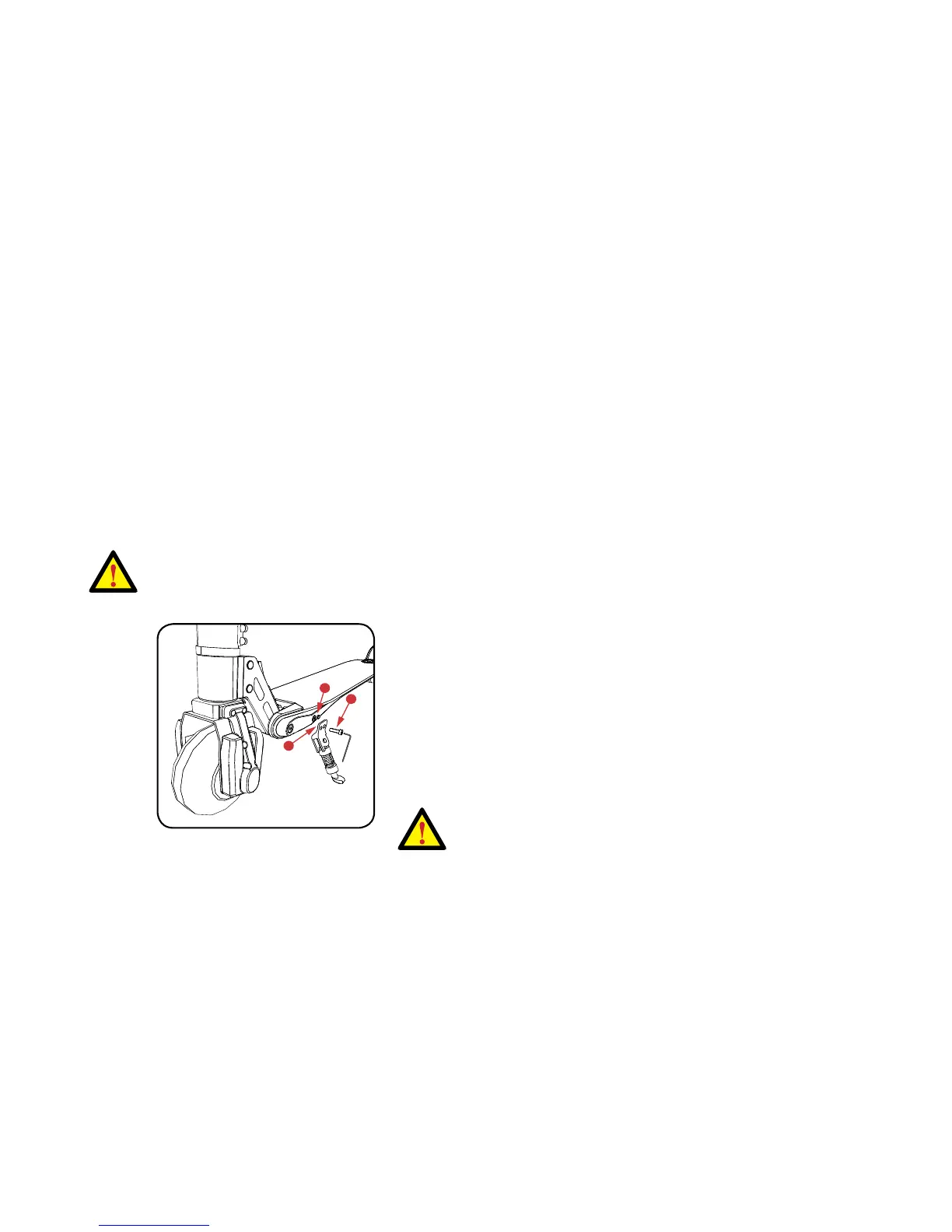
To install the kickstand, see the image below and follow the steps.
Step 1. Locate the part of the Swagger where the kickstand will
be attached.
Step 2. Using the bottom row, press the kickstand onto the peg.
Step 3. Using the appropriate screw and its corresponding Allen
key, secure the kickstand.
Do not perform additional assembly unless
instructed to do so by a customer
service representative.












 To Next Page