Basic operation
Preparation
• Put the TV on a stable surface.
• Do not fix the TV with others fixations than those provided or suggested by the manufacturer.
• If you have a wall mount, check that it is steady.
• Do not place any material on the TV.
• Do not block or cover the ventilation openings on the TV.
• The TV must be plugged with a tension source of 110-240 volts and 50-60 Hz.
• Power cord and cables must be properly routed and protected to prevent from stepping on
them.
• Keep the power cord away from any heat source. Possible fire hazard.
Heating sources and humidity
• Keep the TV dry and away from humidity.
• Keep the TV away from heat sources.
Cleaning and maintenance
• Unplug the TV before cleaning it. Do not use solvents or liquids to clean the TV.
• Only clean the TV with a soft and dry cloth.
• In case of troubleshooting, do not use spare parts other than those suggested by the
manufacturer. Using inadequate spare parts can lead to electric shocks, short-circuits fire or
others incidents. Please contact a technical authorized by SWEDX brand.
Departure in holidays
• Unplug the LCD-TV during lightning storms or when unused for long periods of time.
• Use AC 100-240V 50-60 Hz power outlet for the TV power supply.
• lf the screen of TV is not on, please press the power button on the remote control or on the
TV.
• lf you want to shut off the TV temporary, please press the power button on the remote control
or on the TV.
• lf you want to shut off the TV completely, please switch off the power switch ON/OFF.
• In TV/AV state, the TV will enter idle state if there is no signal input within 3 minutes.
• ln PC state, the TV will enter idle state if there is no signal input within 2 minutes.
• The setting and tuning of picture and sound will be saved when the TV is shut off, which will
be working in the pre-shut off state when the TV is turn on again.
• lf PC signal source is used, please first set the resolution of the PC display card as the
following modes: (1920x1080 60 Hz for Full HD models and 1366x768 for HD models).
• lf there is progressive output of the signal used by the user, signal source with
output is recommended.
progressive
WARNING:
TO REDUCE THE RISK OF FIRE OR ELECTRIC SHOCK, DO NOT EXPOSE THIS APPARATUS
TO RAIN OR MOISTURE.
WARNING
RISK OF ELECTRIC SHOCK
DO NOT OPEN
CAUTION:
TO REDUCE THE RISK OF ELECTRIC SHOCK, DO NOT
REMOVE COVER(OR BACK). REFER SERVICING TO
QUALIFIED SERVICE PERSONNEL
Design and specifications are subject to change without notice.
5
Contents
Included items in XP-series:
2 x AAA Battery
Remote Control
Notice AC Cable
POWER SOURC
E
MUTE
SLEEP STILL
INFO.
DUAL I-II
ARC
PSM SSM
PI
P
P.IN
PUT
P.POSI
TI
ON
P.SIZ
E
3
2
1
65
4
987
PRE/CH
P
C
HD
M
I
S
.
S
E
L
E
C
T
T
V
MENU EXIT
PR+
VOL+
PR-
VOL-
ENTER
Scart
C
om
ponent
TTX ON
MIX
SIZ
E
HOLD
CANCEL INDEX T
IME
R
EVEAL
RED GREEN YELLOW BLUE
PIP PR+
PIP PR-
PG UP
PG DOWN
FAV
GUIDE
T
V
/
R
ADIO
D
TV SETUP
0-/--
LCD
Notice! / InformationNotice! / Information
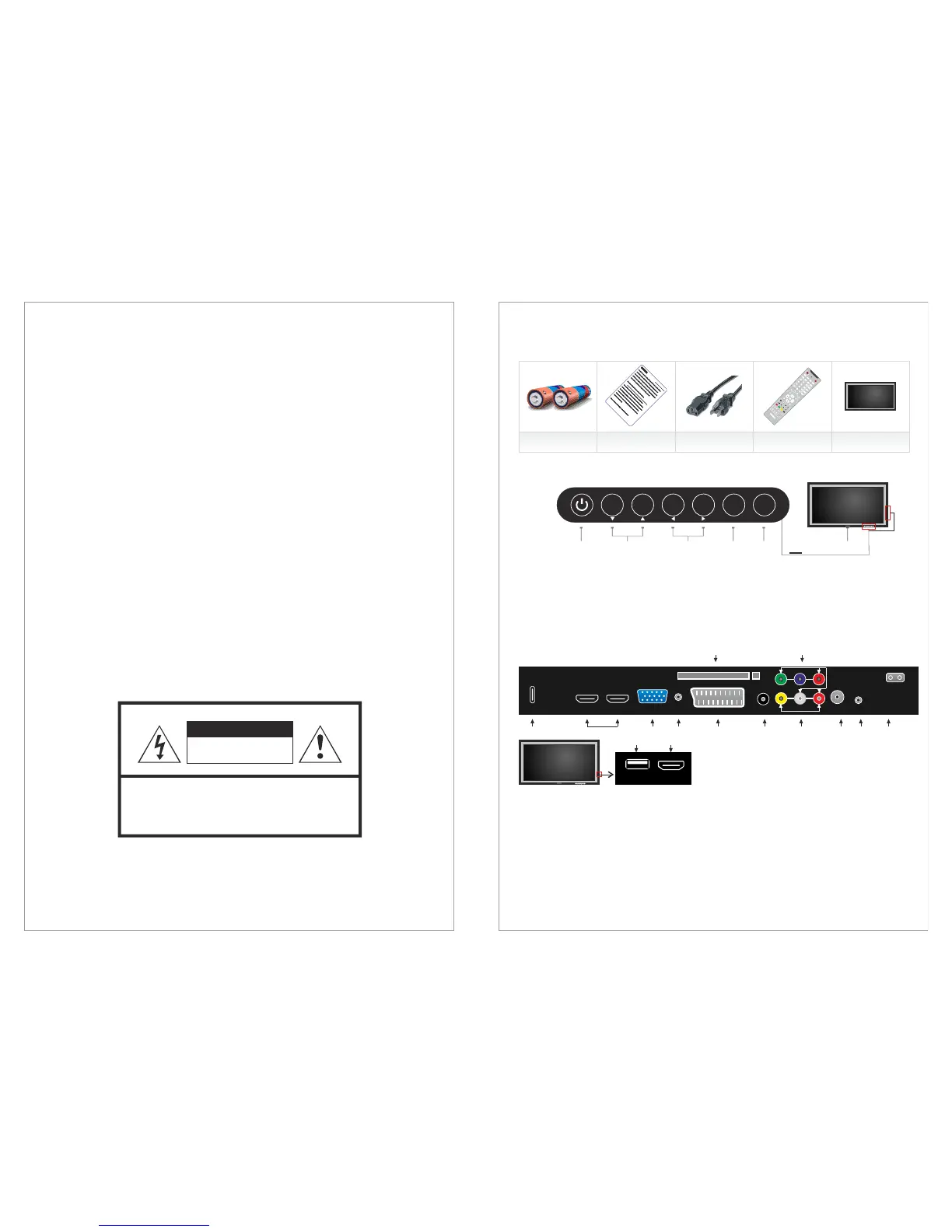
1. USB2 USB Media Player
2. HDMI 1 HDMI1, inputs
3. USB1 /FW USB Media Player / Firmware update
4. HDMI 2-3 HDMI2 and HDMI3 inputs
5.
6. VGA Audio
Scart Scart
Composite video (AV)
Component Component
VGA PC (VGA) input
Audio-input of PC/VGA
input
8. D.Audio Digital Audio output (Coaxial)
input
input (YPBPR)
11. ATV/DTV Aerial input for analog channels and DVB-T Digital channels
12. Sp. Out Speakers output
13. Power Power Input 110-240 V @ 50-60Hz
14. CI Module CI Module Inputs
7.
9. AV
10.
1. ON/OFF: Power switch ON/OFF
2. CH+/-: Zap the channels / Navigate the OSD menu
3. Vol+/-: Decrease and increase the audio volume / Navigate the OSD menu / Adjust
values in the OSD
4. Select/Menu: Activate the OSD menu / Select in the OSD menu or Sources
Activate the input source menu / Exit the OSD menu
6. LED: Power indicator
7. IR: Remote control Infra Red receiver
Connections on the rear of the LCD-TV
5. Source/Exit:
ON/OFF SELECT EXIT
MENU
SOURCE
VOL+VOL-CH+CH-
23
4
5
1
6,7
Control buttons:
The control buttons’s outlook on your SWEDX LCD-TV is the following:
ON/OFF SELECT EXIT
MENU
SOURCE
VOL+VOL-CH+CH-
6
4
57
9
11 133
12
68
1014
12
HDMI 2 HDMI 3
VGA
D. Audio
VGA
Audio-in
FW/USB
Input
AV
Component
Sp. Out
Scart 1
DVB
ATV
Power Input
AC - 100-240 V
@ 50/60 Hz
ON/OFF SELECT EXIT
MENU
SOURCE
VOL+VOL-CH+CH-
USB 2
HDMI1
CI Module / PCMCIA
Design and specifications are subject to change without notice.


 To Next Page
 Loading...