Design and specifications are subject to change without notice.
USB Media Player
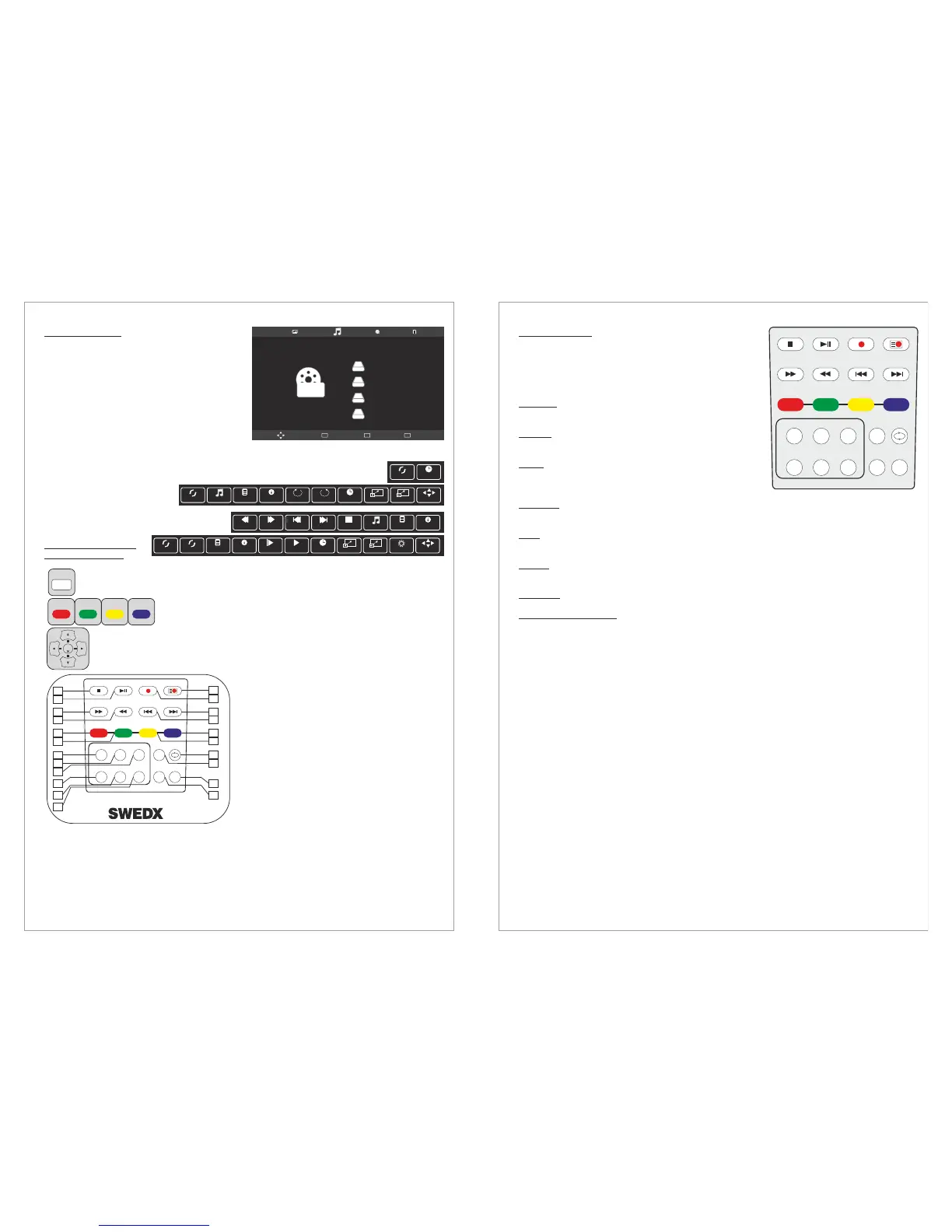
Remote Control Keys
used in USB Mode
This product is equipped with high end USB
Media Player. It is capable of playing music,
movies (up to 1080p and with subtitle support),
and display photos or text documents.
To Enter USB mode
In USB mode you can choose between:
Enables you to display several formats
of photos and images
Enables you to play several formats of music and audio files
Enables you to play
several formats of movies and
video files
Enables you to display
TXT files
The INFO button will display available controllers where it is possible to i.e. rotate an
image. The controllers may vary depending on the USB mode.
Red, Green, Yellow, Blue have diffrent functions acoording to diffrent
menu postions.
Navigation Key to navigate in the diffrent postion of the menu and press enter for
activating the function.
16.Stop
17. Play, Pause
18. Fast forward
19. Fast Backward
43. Record list
44. Record
45. Next
46. Previous
49. Repeat
The AUDIO button will alter audio track (if several audio tracks are available in the played file).
The SUB-T button will alter the subtitles or turn it off (if several subtitles languages are available in
the played file).
Press Source
Choose USB
Press Enter
Photos:
Music:
Movie:
Text:
BLUEYELLOWGREENRED
13
Disk C:
Move Menu
MENU
Play
OK
Exit
EXIT
MOVIE
INFO.
Repeat A.. Goto TL.
Music info menu
Repeat A.. Music Playlist Info. Rotate Rotate Goto TL.
A
Move view
Zoom in Zoom out
Picture info menu
Slow Fo..
Prev Page
Prev. Next Stop Playlist
Music
Info.
Prev Page
Text info menu
Repeat A.. Set A Playlist Info. Slow Fo.. Step Fo.. Goto TL.
AB
Move view
Zoom in Zoom out
Aspect Re..
Video info menu
ENTER
TTX ON MIX SIZE HOLD
CANCEL INDEX TIME REVEAL
RED GREEN YELLOW BLUE
S.SELECTPIP
POSITIONSIZE
AUDIO
SUB-T
TV/RD
FAV
LIST
EPG
16
18
19
17
43
45
46
44
20
21
47
48
22
23
24
25
26
27
49
50
51
52
17
Design and specifications are subject to change without notice.
Text-TV / Teletext
Most television stations provide written information services
via Teletext. The index page of the teletext service gives you
information on how to use the service. In addition, you can
select various options to suit your requirements by using the
remote control buttons.
Press TTX ON to enter Text-TV
Press TTX ON to exit Text-TV
Used to display the index (contents) page at any time
while you are viewing teletext.
Press to display the double-size letters in the upper
half of the screen. For lower half of the screen, press it again.
To display. normal screen, press it once again.
Used to display the hidden text (answers to quiz games, for
example). To display normal screen, press it again.
Press to activate teletext mode after selecting the channel providing the teletext service. Press
it twice to overlap the teletext with the current broadcasting screen.
Used to hold the display on a given page if the selected page is linked with several
secondary pages which follow on automatically. To resume, press it again.
Used to display the broadcast when searching for a page.
If the FASTTEXT system is used by a broadcasting company, the different
topics covered on a teletext page are color coded and can be selected by pressing the colored
buttons. Press one of them corresponding to the required. The page is displayed with other colored
information that can be selected in the same way. To display the previous or next page, press the
corresponding colored button.
TTX ON:
INDEX:
SIZE:
REVEAL:
MIX:
HOLD:
CANCEL:
Red/Green/Yellow/Blue:
18
TTX ON MIX SIZE HOLD
CANCEL INDEX TIME REVEAL
RED GREEN YELLOW BLUE
S.SELECTPIP
POSITIONSIZE
AUDIO
SUB-T
TV/RD
FAV
LIST
EPG


 To Next Page
 Loading...