Need help?
Do you have a question about the Swema SwemaMan 60 and is the answer not in the manual?
How to power on the device and interpret the initial display showing firmware version and battery voltage.
Visual alerts for low battery voltage and the consequences for instrument operation and startup capability.
Details the mathematical formula and parameters used to calculate air velocity from pressure measurements.
Steps to connect the SwemaMan 60 to a computer for data transfer using terminal software and a PC cable.
Instructions for altering decimal format, auto-shutoff time, display time constant, and valve settings through PC connection.
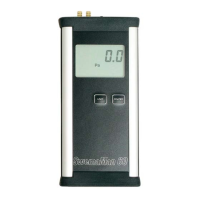
The SwemaMan 60 is a versatile instrument designed for measuring differential pressure and air velocity, primarily when connected to a pitot static tube. This device is capable of displaying differential pressure in Pascals (Pa) and air velocity in either meters per second (m/s) or feet per minute (fpm), offering flexibility for various measurement needs.
The SwemaMan 60 is designed for ease of use, starting with its power source. It operates on two AA-batteries, which can be either regular or rechargeable, providing convenient power options. For extended use, a 220V adapter (part no. 763.050) can be utilized, though it's important to note that this adapter does not charge the batteries.
To begin using the instrument, simply press the ON/OFF button. Upon startup, the display will briefly show the battery voltage and the firmware version number. After approximately one second, the device transitions into its measuring mode, ready for operation.
A crucial aspect of accurate measurement is calibration. The SwemaMan 60 allows for easy zero calibration. A short press of the UNIT button sets the instrument to zero. For precise zeroing, it is essential to ensure that there is zero differential pressure connected to the device and that the instrument remains stationary during this process.
The device offers flexibility in displaying units. To switch between Pa, m/s, or fpm, press and hold the UNIT button for at least three seconds. The selected unit will be saved and used the next time the instrument is powered on, streamlining repeated measurements. If the differential pressure falls outside the instrument's measuring range (higher than 5050 Pa or lower than -303 Pa), the display will blink, indicating an out-of-range condition. To measure air velocity, a pitot static tube must be connected to the instrument.
The SwemaMan 60 also provides a clear indication of battery status. If the battery voltage drops below 1.8 V, a low battery symbol will appear on the display, alerting the user to replace or recharge the batteries. Should the voltage fall below 1.6 V, the instrument will be unable to power on.
For advanced users, the SwemaMan 60 supports data transfer to a personal computer. This is achieved by connecting the instrument to a computer using a "PC-cable to SwemaMan" (Part no: 763040). This cable features an RS232 connection, which should be connected to a free COM-port on the computer. If the computer lacks a COM-port, a USB-adapter (Part no: 583225) can be used. Data transfer is facilitated through terminal software such as "Hyperterminal" or "Teraterm," which can be downloaded from www.swema.com.
Once connected to a PC, various settings of the SwemaMan 60 can be altered. To access the settings menu, press "%M ENTER ENTER" on the computer keyboard. Within this menu, several parameters can be adjusted:
To exit the settings menu, press "% ENTER."
When connected to a PC, pressing ENTER on the computer keyboard will generate a calibration protocol. This protocol displays calibration values, with those between -300 and 500 Pa having one decimal but printed without a decimal comma. The surrounding temperature during calibration is also shown with two decimals, but without a comma. Pressing the Space key will print the measurement data on the screen, using the same unit as displayed on the instrument. The instrument shows one value at a time: Pa (with 1 decimal), m/s (with 1 decimal), or fpm (without decimals).
The air velocity calculation is based on the formula: v = √(2 * ΔP / ρ), where ΔP represents dynamic pressure (stagnation pressure minus static pressure in Pa), and ρ is the density of air. The density of air is calculated using the formula: ρ = 1.293 * (B - 273) / (1013 - (273 + t)), where B is the barometric pressure (with a calculated value of 1013 hPa) and t is the air temperature (with a calculated value of 20°C). For measurements at different temperatures and barometric pressures, a correction table located on the backside of the instrument should be consulted.
To ensure stated accuracy, users should correct measured values using the correction provided on the calibration protocol. A recommended calibration interval for the SwemaMan 60 is one year, ensuring the instrument maintains its precision over time.
 General
| Type | Micromanometer |
|---|---|
| Accuracy | ±0.2% of reading ± 0.1 Pa |
| Resolution | 0.1 Pa |
| Operating temperature | -10 to 50 °C |
| Storage temperature | -20 to 60 °C |
| Weight | Approx. 500 g |
| Output | USB |
| Power Supply | Rechargeable NiMH battery |

 To Next Page