included in the delivery). Insert the memory card
into the slot until it stops as illustrated.
6 Insert the battery. The golden contacts on the
battery must face towards the bottom right. Press
lightly on the top end of the battery until it snaps into
place.
7 Replace the battery cover on the back of the phone
and shift it upwards until it clicks into place.
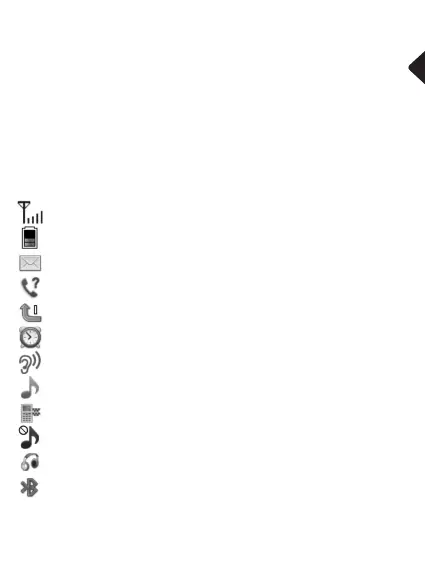
Display status symbols
Signal strength of the phone’s connection
Battery capacity
New SMS
New call
Call forwarding active
Alarm is activated
Boost is activated
Profile “Outdoor“ or “General“ is activated
Profile “Meeting“ is activated
Profile “Silent“ is activated
A headset is connected
Bluetooth is activated
33


 To Next Page
 Loading...