
 Need help?
Do you have a question about the Sylvania SDVD5088 and is the answer not in the manual?
Warning about not opening the unit and referring servicing to qualified personnel.
Lists important information for safe and enjoyable use of the product.
Instructions for proper installation and placement of the appliance.
Warnings regarding ventilation, outdoor antenna grounding, and power lines.
Warnings about damaged supply cords and product usage limitations.
Information regarding the unit's classification as a Class 1 Laser Product.
Lists the types of discs the player supports.
Specifies the TV aspect ratio and screen format selection.
Lists the available video output ports on the player.
Lists the available audio output formats.
Highlights specific features related to DVD playback.
Lists additional operational features of the player.
Details the available video output ports for connection.
Instructions on how to set up the TV system output (PAL/NTSC).
Notes on the default NTSC setting and potential issues.
Step-by-step guide for inserting batteries into the remote.
Guidance on proper battery disposal.
Explains what a DVD (Digital Versatile Disc) is and its capabilities.
Provides technical details about DVD and CD disc specifications.
Explains DVD Region Code System and player compatibility.
Instructions on how to handle and clean discs to prevent damage.
Identifies components on the front and back panels of the player.
Labels the buttons and indicators on the front of the player.
Labels the various input/output jacks on the rear of the player.
Describes the functionality of the remote control and its buttons.
Additional notes on remote control operation and signal reception.
Lists accessories and initial setup steps before connecting.
Lists essential accessories included with the player.
Instructions for installing batteries in the remote control.
General guidance on connecting the unit to other components.
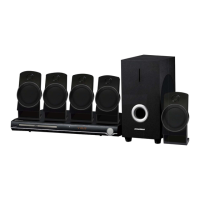
Details the steps for connecting a 5.1 channel surround sound system.
Explains the audio setup for bass management in the remote control.
Notes on using 2.1CH mode and potential issues with subwoofer connection.
Diagrams showing the 5.1CH audio input and speaker connections.
Safety notes regarding subwoofer placement and magnetic field effects.
Initial step to unpack the player and its accessories.
Emphasizes reading the manual before installation and use.
Instructions for loading batteries into the remote.
Ensures system connections are secured properly.
Instructions for connecting the player to the AC power outlet.
Guide on how to insert and play a disc.
Describes the automatic playback process after disc insertion.
How to navigate and select options from a DVD menu.
Notes on MP3 disc loading time and region code restrictions.
Explains the function and activation of the automatic screen saver.
Instructions on how to turn the player on and off.
How to open and close the disc tray using the remote.
Details on using the Play, Pause, and Stop buttons.
Instructions for skipping chapters forward and backward.
How to search forward and backward through the disc content.
Instructions for playing the disc in slow motion forward.
How to navigate and select items within menus.
How to return to the DVD disc menu or title screen.
How to clear input numbers or selections.
How to select different viewing angles for DVDs.
How to select different subtitle languages for DVDs.
Information on the number of subtitle selections available.
How to select different audio languages for DVDs.
How to switch video modes (Composite, S-Video, etc.).
How to search for specific titles, chapters, or times on a disc.
Notes on the search function's compatibility and limitations.
How to set repeat modes for DVD, CD, and MP3 discs.
How to set a specific section of the disc for repeated playback.
Notes on A-B repeat functionality and disc compatibility.
How to enlarge the picture during DVD playback.
How to mute or unmute the audio output.
How to use PBC Play for VCD2.0 discs.
How to select audio channels (left, right, stereo) for VCD/CD.
How to switch Left/Right output mode for VCD/CD.
How to set up a playback sequence for DVD, CD, and MP3 discs.
Notes on disc compatibility for programming and single track discs.
How to return to menus or cancel PBC mode.
How to play the disc randomly.
How the On Screen Display indicator works and what it shows.
How to cycle through various information displays for DVD mode.
How information is displayed for MP3 playback.
Details on displaying MP3 file information like artist and song name.
How to adjust video settings like aspect ratio and TV system.
How to set language for OSD, subtitles, and audio.
How aspect ratio affects movie display on the TV screen.
Setting for wide screen TVs to display original aspect ratio.
How to set the TV system to broadcast (PAL/NTSC).
How to set the player's rating level and parental control.
How to set the digital audio output format.
Explanation of various miscellaneous settings available.
Checks for power issues if the player does not turn on.
Troubleshooting steps for discs not playing correctly.
Steps to resolve issues with no picture displayed.
How to fix picture noise or distortion problems.
How to adjust screen format for full screen display.
Procedure to reset the player in case of malfunction.
Troubleshooting steps for audio output problems.
Reasons why SKIP or SEARCH functions may not work.
Further checks for audio issues, including mute and language settings.
Troubleshooting for issues with surround sound output.
How to handle MP3 discs with mixed file types.
Steps to troubleshoot if the remote control is not working.
Lists the types of optical discs supported by the player.
Specifies the video compression format used.
Lists the audio compression formats supported.
Details the color system and audio output configurations.
Provides the frequency response for CD and DVD formats.
Signal-to-noise ratio specification.
Total Harmonic Distortion specification.
Lists all available output connectors on the player.
Specifies the power input requirements for the player.
Provides the physical dimensions of the player.
 General
| Brand | Sylvania |
|---|---|
| Model | SDVD5088 |
| Category | Home Theater System |
| Language | English |

 To Next Page