10
551E
552E
/
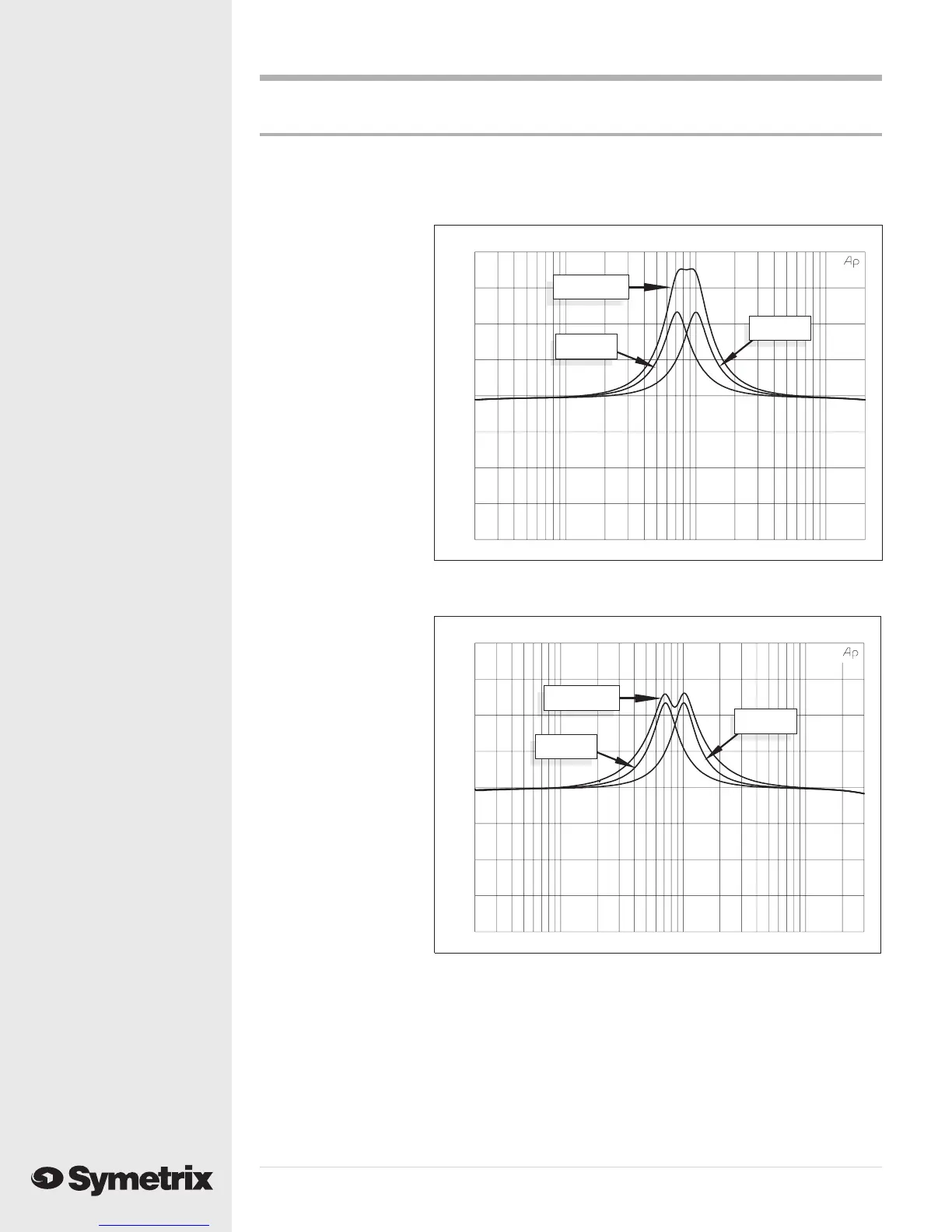
Diagram 9 - Overlapping EQ curves on adjacent bands.
AUDIO PRECISION 551E
vs
23 MAY 96 16:51:46
-20.00
-15.00
-10.00
-5.000
0.0
5.0000
10.000
15.000
20.000
AMPL(dBu)
20
100
1k
10k 20k
FREQ(Hz)
Band 1
Band 2
Band 1+2
Although each EQ band can cover the entire audio spectrum, the 551E/552E will give you the best
(read: most accurate) results if you use adjacent bands for overlapping cuts and boosts. See
Diagram 9.
Although the five EQ
bands have identical
ranges and functions,
they are not identical in
one respect - the way in
which they combine.
We have implemented a
series/parallel configu-
ration to ensure the
most accurate band
interaction while
maintaining the best
noise and distortion
performance.
To maximize the
performance of this type
of layout, make sure
you use adjacent EQ
bands (i.e. Bands 1 and
2, 2 and 3, 3 and 4, etc.)
when you are applying
overlapping boosts or
cuts. Diagram 9 shows
how adjacent, overlap-
ping bands produce a
curve that is the result of
correctly adding the
curves of the individual
bands. Nonadjacent
bands (1 and 3 for
instance) produce a
combined curve that is
not correctly summed,
even though it might be
useful in some applica-
tions. See Diagram 10.
Overlapping Bands
AUDIO PRECISION 551E
vs
28 MAY 96 12:42:32
-20.00
-15.00
-10.00
-5.000
0.0
5.0000
10.000
15.000
20.000
AMPL(dBu)
20
100
1k
10k 30k
FREQ(Hz)
Band 1
Band 3
Band 1+3
Diagram 10 - Overlapping EQ curves on nonadjacent bands.


 To Next Page