8
Quick Start Guide
6408 216th Street SW | Mountlake Terrace, WA 98043 USA
T +1.425.778.7728 F +1.425.778.7727 | www.SymetrixAudio.com
Brain Anatomy
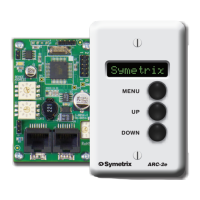
The Modular ARCs, true to their modular construction, utilize
an “expansion” board (which provides the user interface)
and a “brain” board (which provides the system, logic and
expansion connections, device addressing, processing,
etc.). Each Modular ARC must have one brain board to
which up to six extra expansion boards attach. Each brain
board has at least one expansion board attached by default
(anARC-K1alreadyhasoneEXK).Thebrain
board possesses the host processor, system connection
and power jacks, configuration jumpers and device
address rotary switches. To quickly identify a brain board,
look for the RJ-45 jacks. The anatomy of a brain board is
outlined below:
J12: RS-485 and Power
When powering a Modular ARC from the
includedPS-6powersupply,RS-485data
and Power both connect here. Connect
the PS-6 positive lead to “V+” and the
negativeleadto“GND”.TheRS-485
shield or ground also connects to “GND”
andtheRS-485conductorpairconnects
thebusinaparallelfashionto“A”andB”.
WARNING! Do not use at the same time
as J9.
J11: RS-485 Termination
Place a jumper here to terminate the
RS-485busatthisdevice.Refertothe
RS-485Terminationsectionformore
information.
J9: RJ-45 “ARC” ports
TheARCportsdistributeRS-485data,
power and an ARC Audio line to one
or more ARC devices over standard
CAT5 cable. These ports may be used
to chain multiple ARCs or to home
run back to any Symetrix rack mount
device with an ARC port.
S1: Device Address “Ones”
Rotary switch which sets the device
address “ones” (1-9).
S2: Device Address “Tens”
Rotary switch which sets the device
address “tens” (10, 20, 30, 40, etc.).
J7: Baud Rate Select
Jumpered=115k,Open=38.4k.See
theRS-485BaudRatesectionformore
information.
J6: Hardware Lockout
Open=Unlocked,Jumpered=Locked.
SeetheHardwareLockoutsectionfor
more information.
J5: Logic Input
LogicinputaddressablefromSymNet
Designer’sRS-232/485Controller
Number system. Pin 1 is the active
input, Pin 2 is ground.
J8: Open Collector Output
Logicoutputaddressablefrom
SymNetDesigner’sRS-232/485
Controller Number system. Pin 1 is
the active output, Pin 2 is ground.
J13: ARC-Audio
The CAT5 cable connection provides
a balanced analog audio line
between the system and a remote
source or destination. Connects to
theMICorXLRintheARC-MICor
ARC-XLR,respectively.Canalsobe
wired to an installer-supplied audio
source/destination.
J2: Modular ARC Expansion Bus
Modular ARC expansion devices
daisy-chain from this connection.
BrainAnatomy


 To Next Page
 Loading...