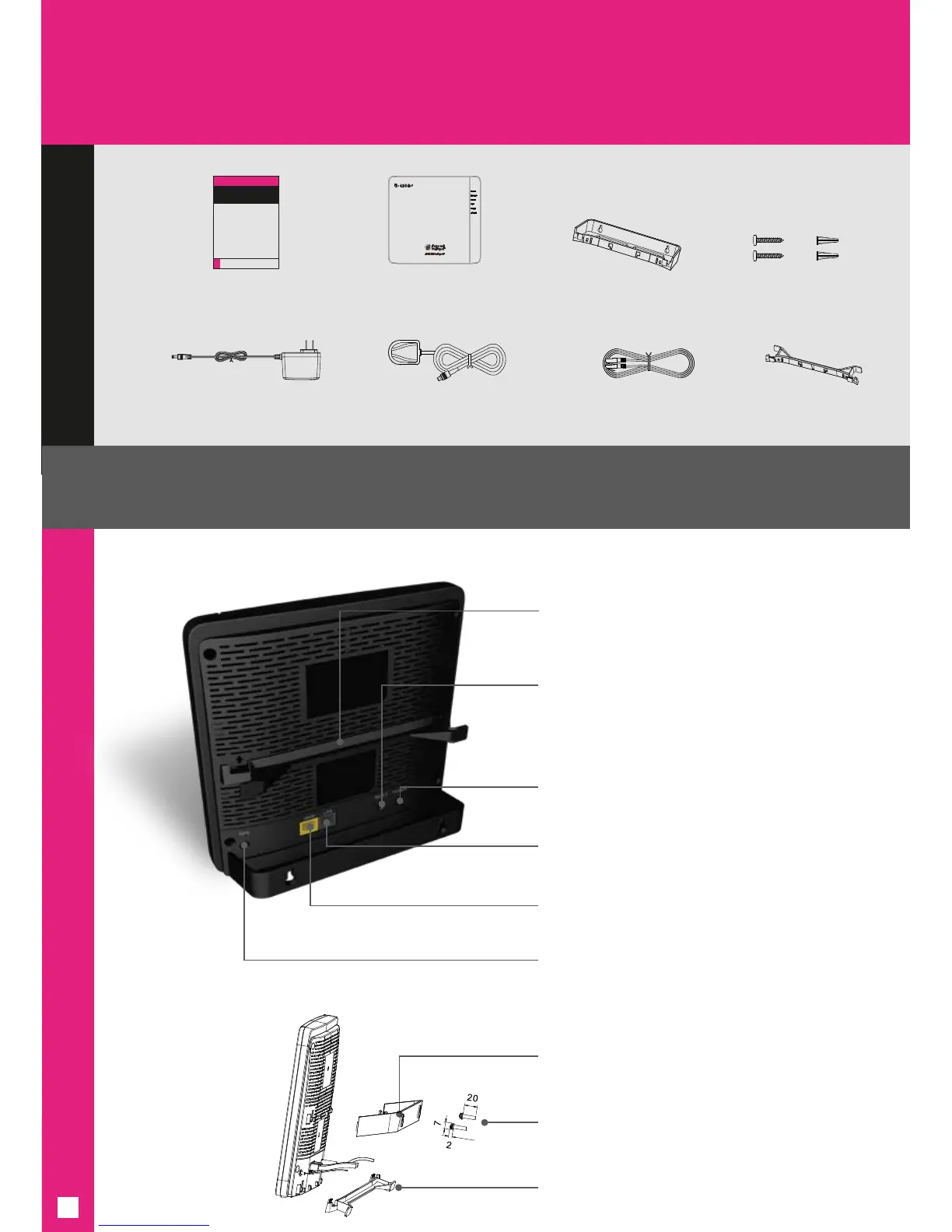
Reset
1. Press and hold for 5 seconds for reboot
2. Press and hold for 30 seconds for factory
setting reset and software update
Yellow WAN Port
(Connect to Wi-Fi router or Wi-Fi cable modem router)
Grey LAN Port
(Connect to other devices if needed)
Power
(Power on when AC Adaptor is plugged in)
Round GPS Port
(Connect to GPS Antenna & Cable)
Stand/Wall Mount
Wall Mounting Kit
CellSpot Device in Stand
GPS Cable Bracket
(Wrap GPS antenna cable here after installation
is complete. Leave GPS cable plugged in)
GPS Cable Bracket
What’s Inside
Getting to know your 4G LTE CellSpot
®
Quick Start Guide
(This document)
Stand/Wall Mount
Ethernet Cable GPS Cable Bracket
4G LTE CellSpot Device
AC Power Adaptor
GPS Antenna & Cable (15 ft)
Wall Mounting Kit
(2 Cheese Screws and
2 Wall Anchors)
CellSpot Device
with Wall Mount
2


 To Next Page