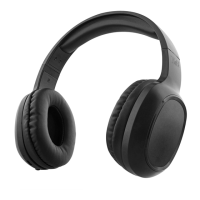
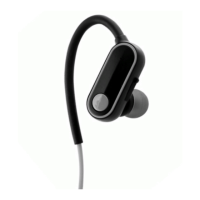
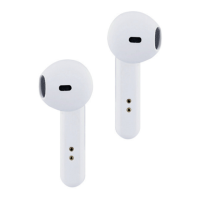
The TWS BUDDY Bluetooth earbuds are designed for wireless audio enjoyment, offering a blend of convenience, portability, and essential features for everyday use. These earbuds come with a charging case that doubles as a portable power source, ensuring they are ready for use whenever you need them.
Function Description
The TWS BUDDY earbuds are primarily designed for wireless audio playback and hands-free calling. They utilize Bluetooth technology to connect to your smartphone, tablet, or other Bluetooth-enabled devices. The "TWS" in their name stands for "True Wireless Stereo," indicating that the left and right earbuds operate independently, without any physical connection between them, providing a truly wire-free listening experience.
The earbuds feature a multi-function button on each earbud, allowing users to control various functions such as power on/off, play/pause music, skip tracks, answer/end calls, and reject incoming calls. The charging case not only protects the earbuds but also recharges them multiple times, extending their usage time significantly.
Important Technical Specifications
- Impedance: 16 Ohms
- Sensitivity: 92 dB
- Range: 10 m (Bluetooth range)
- Frequencies: 20-20000 Hz (Standard human hearing range, indicating full-spectrum audio reproduction)
- Battery: Lithium 60 mAh (per earbud)
- Autonomy: 5 h (Playback time on a single charge)
- Magnet Size: 10 mm (Likely referring to the driver size, influencing sound quality)
- Max. input power: 100 mW
These specifications indicate that the earbuds are designed to deliver clear audio within a typical Bluetooth range, with a decent battery life for extended listening sessions. The 10mm magnet size suggests a capability for good bass response and overall sound quality for their compact size.
Usage Features
Charging the Earbuds:
The earbuds come with a built-in rechargeable battery. Before first use, it's recommended to fully charge the earbuds. A full charge of the battery takes around 1 hour for each earbud. When the battery is fully charged, the LED light will turn blue. To charge, simply place the earbuds in their charging case. The case itself is charged via a supplied USB cable, connecting it to a computer or a USB wall adapter. When the battery is low, the LED will flash red and emit three tones. When fully charged, the LED will turn blue.
Syncing the Earbuds for the First Time:
To ensure both earbuds are turned on, press the multi-function button on both earbuds for 1 second. Then, press and hold the multi-function buttons for 8 seconds on both earbuds simultaneously. Wait for 3 seconds until both earbuds flash blue. This indicates that your earbuds are now synced together.
Pairing the Earbuds:
After syncing, follow these steps to pair your earbuds to your smart phone or tablet:
- Ensure the earbuds are turned off. If they are not, please turn off the earbuds first before pairing.
- On the earbud you wish to use, press and hold the multi-function button for 8 seconds until the red and blue LED flash alternate. This indicates your earbud is now in pairing mode.
- Ensure Bluetooth is enabled on your phone or music device. Refer to the manufacturer's instructions for how to enable Bluetooth on your device.
- Place the earbuds and the Bluetooth device to which you would like to pair it within the operating distance (recommended keeping the two devices no further than 2 feet apart).
- Once you have activated Bluetooth on your device, select the earbuds "TNB BUDDY" from the list of available Bluetooth devices.
- If required, enter the PIN code "0000" and confirm the entry.
- Please note, pairing mode on the earbuds will last for two minutes. If no devices are paired after two minutes, the earbuds will automatically return to standby mode.
- If pairing is unsuccessful, turn off the earbuds first and repair following the aforementioned steps. Once you have paired the earbuds with a device, the earbuds will remember this device and will pair automatically when the device's Bluetooth is activated and in range.
- You do not need to re-pair any previously connected devices. Your earbuds can pair up to two multi-point devices. You can reconnect a previously paired device without going through the pairing or PIN process on up to two devices.
- Once your earbud is successfully paired with your smart phone or tablet, turn on your second earbud, press and hold the multi-function button on your second earbud for 3 seconds. The LED on the second earbud will flash blue once to indicate it is synced to your first earbud.
During use, the battery life of your earbuds is visible on your iPhone or iPad screen.
Turning Headset On/Off:
- Power On: Using either earbud, press and hold the multi-function button for 3 seconds. You will hear a "Beep" sound. On the second earbud, press and hold the multi-function button for 3 seconds, you will hear a "Beep." The LED on the second earbud will flash red once and flash blue periodically, this indicates it has paired with the first earbud.
- Power Off: On either earbud, press and hold the multi-function button for 3 seconds until the LED stops flashing. You will hear a "Beep" sound and both earbuds will turn off. In order to save power, the earbuds will automatically turn off if not paired with a device after 5 minutes.
Using Earbuds Separately:
The earbuds can be used independently on separate devices. If you want to use them separately, select the earbud you want to use, press and hold the multi-function button for 3 seconds. This will power the earbud on and into its own pairing mode.
- Power Off: On the earbud you are using, press and hold the multi-function button for 3 seconds until the LED stop flashing. You will hear a "Beep" and the earbud will power off. In order to save power, the earbud will automatically turn off if not paired with a device after 5 minutes.
- Play/Pause: Press the Multi-function button once.
- Next Track: Press the Multi-function button twice.
Answering a Call:
Press the multi-function button once to answer an incoming call.
Reject an Incoming Call:
Press the multi-function button twice quickly to reject the incoming call.
Ending a Call:
Press the multi-function button once to end a call.
Maintenance Features
The TWS BUDDY earbuds are designed to be water resistant, but it's important to note that this does not mean they are waterproof.
- Caution: These earbuds are not water resistant. To prevent any damage or malfunction, do not expose the earphones to moisture, perspiration, leaks or splashes, and do not immerse the earphones under water. This implies that while they might withstand light exposure, direct contact with water should be avoided.
- Cleaning: While not explicitly detailed, general maintenance for earbuds includes wiping them down with a dry, soft cloth to remove earwax or debris, and ensuring the charging contacts remain clean for efficient charging.
- Storage: When not in use, storing the earbuds in their charging case protects them from physical damage and keeps them charged for the next use.
Overall, the TWS BUDDY Bluetooth earbuds offer a straightforward and user-friendly experience for wireless audio and communication, making them a practical choice for daily listening.

 Need help?

 To Next Page
 General