Need help?
Do you have a question about the Tactacam Reveal X Gen 2.0 and is the answer not in the manual?
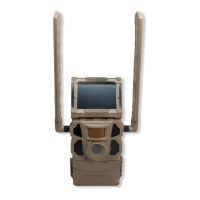
Securely attach the antenna to the camera's side bolt without overtightening for optimal signal reception.
Open the camera door, eject the tray, insert 12 AA or lithium-ion batteries, and slide the tray back into the camera.
Insert a full-sized 32GB Class 10 U3 high-performance SD card into the designated SD card slot.
Download the Tactacam REVEAL APP from your app store and follow the on-screen prompts to create an account.
In the app, tap the '+' icon, select 'Add a New Camera', and choose your specific camera model for activation.
Use the app prompts to confirm that the batteries, SD card, and antenna are correctly installed and functioning.
Scan the interior QR code when prompted to activate the cellular network connection and name your camera.
Turn on your activated camera by sliding the power button to the ON position.
 General
| Cellular Connectivity | 4G LTE |
|---|---|
| Power Source | 12 AA batteries |
| Weatherproof | Yes |
| Flash Range | 80 feet |
| Memory Card Slot | Yes |
| SD Card | Up to 32GB |
| Video Resolution | 720p |
| Flash Type | Infrared |
| Cellular Network | Verizon or AT&T (depending on model) |
| Operating Temperature | 140°F |
| Dimensions | 3 inches |
| Trigger Speed | 0.4 seconds |

 To Next Page