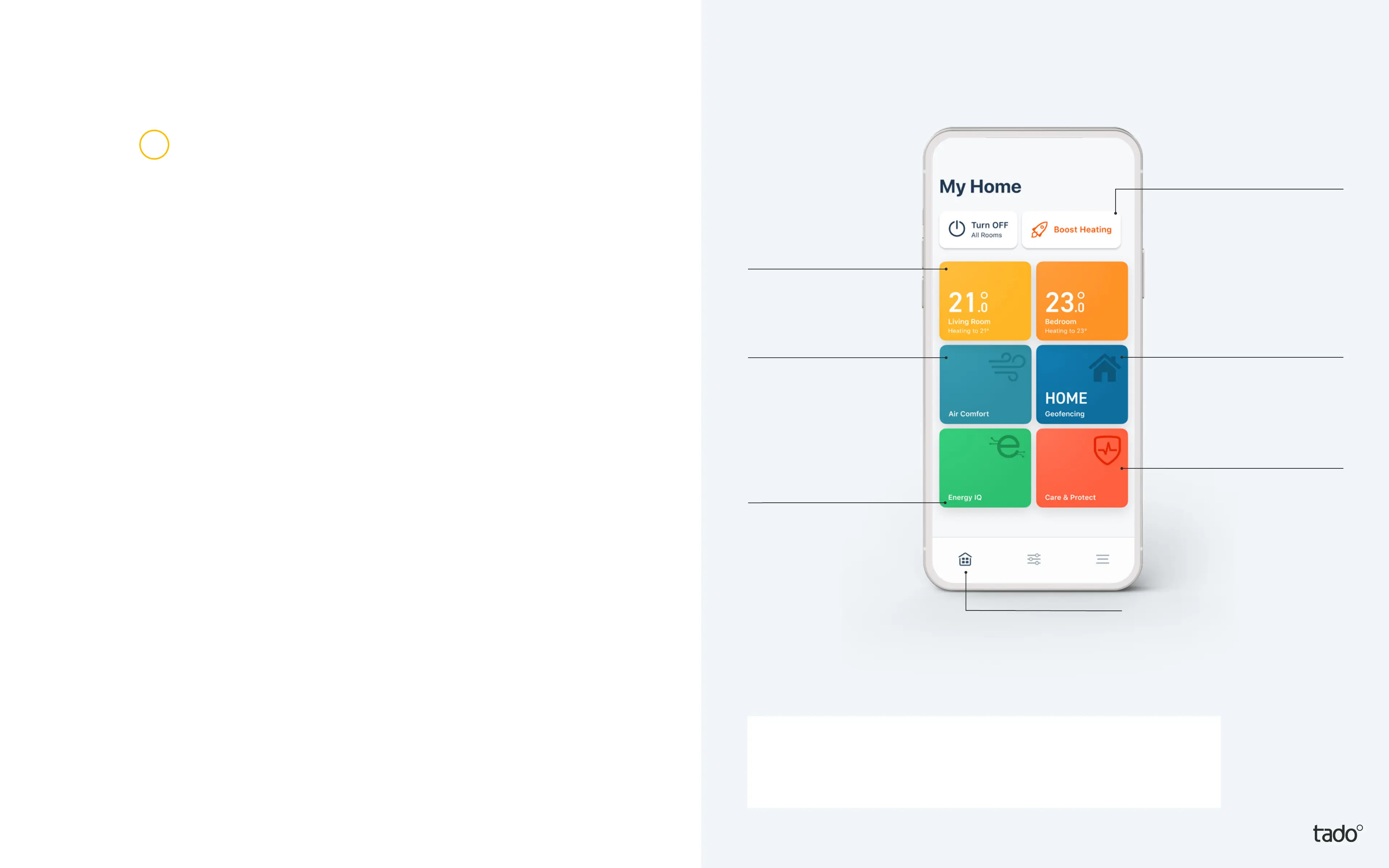
Your tado°
home screen
The most important tado° features
can be controlled from your home
screen. Here you can also see the
current temperature of your rooms
or zones as well as the geofencing
mode.
Zone/Room
Control your heating
system per room.*
Air Comfort
Highlights the air
quality in each
room with a Smart
Thermostat or Smart
Radiator Thermostat.
Care & Protect
Monitors your heating
system and noties
you if unusual heating
behaviour is detected.
Quick Action
Quick Actions allow
you to make changes
that affect specic
rooms or all of your
rooms at once, from
your Home screen.
Geofencing
Quickly check whether
your tado° system is in
Home or Away Mode.
Settings & More
Access skills, settings,
support and more.
Energy Savings
Report
See how much
energy you are
saving thanks
to tado° Skills.
2
* If the home is only set up with a single Smart Thermostat
then the zone widget will control the heating in the entire home.
(!) Some features are only available with Auto-Assist.


 To Next Page