
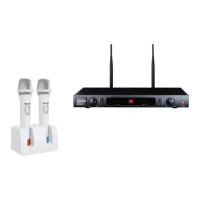
What to do if the buttons on my Takstar Microphone system don't respond?
- LlesliemillerJul 28, 2025
If the buttons on your Takstar Microphone system are not responding and the LCD shows “LOC”, long press the “SET” button to unlock it.

What to do if the buttons on my Takstar Microphone system don't respond?
If the buttons on your Takstar Microphone system are not responding and the LCD shows “LOC”, long press the “SET” button to unlock it.
Why is there no RF signal on my Takstar UHF Microphone system receiver?
If your Takstar Microphone system has no RF signal on the receiver, it may be because the frequency of the transmitter and receiver is not the same, or they are out of the operating range.
Why is there audio signal distortion in my Takstar UHF Microphone system?
Audio signal distortion in your Takstar Microphone system can occur if the transmitter’s modulation frequency deviation is too high, or the output level of the receiver is too high.
Why is the background noise of my Takstar UHF Microphone system too loud?
If your Takstar Microphone system has a loud background noise, it could be due to the receiver's output level being too low or interference signals nearby.
Why is the operating distance of my Takstar UHF too short?
If your Takstar Microphone system has a short operating distance and an unstable signal, check if the receiver antenna is wrongly placed or if there is strong electromagnetic interference nearby.
| Brand | Takstar |
|---|---|
| Model | UHF |
| Category | Microphone system |
| Language | English |
Instructions for safe use of the power adaptor, handling, and battery precautions.
Technical specifications for the overall system including frequency range and dynamic range.
Technical specifications for the receiver unit, including frequency and sensitivity.
Technical specifications for the transmitter unit, including output power and battery.
Description of the receiver's front panel controls and display elements.
Explanation of the digital tube display for channel and status indication.
Instructions for understanding LED indicators on the receiver panel.
Guidance on setting up and adjusting the handheld microphone for optimal performance.
Procedure for adjusting the channel on the LED panel.
Procedure for synchronizing the transmitter and receiver using infrared.
Technical specifications for the system's frequency range, channels, and audio response.
Technical specifications for the receiver, including interface and sensitivity.
Technical specifications for the transmitter, including power supply and operating time.
Loading...