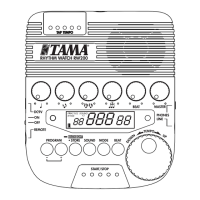
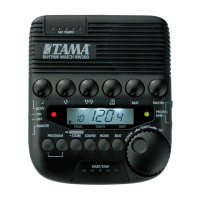
OWNER’S MANUAL
取扱説明書
MODE D’EMPLOI
BEDIENUNGSANLEITUNG
MAMUALE DI ISTRUZIONI
MANUAL DEL USUARIO
用户手册
安全上のご注意
表示について
警告
注意
絵表示の例
ー 以下の指示を必ず守って下さい。ー
警告
注意
PRODUCT SPECIFICATIONS
Power supply
2 x AAA battery
Tempo range
= 30 ~ 250/minute
Tempo precision
±0.2%
Beats
0, 1, 2, 3, 4, 5, 6, 7, 8, 9
Displays
LCD (TEMPO, RHYTHM, SOUND, BEAT)
Tempo LED x 2
Speaker
× 1
Controls
, , , , ,
TEMPO dial, RHYTHM, SOUND, BEAT, TAP
tempo, START/STOP
Size (W × H × D)
61 x 21 x 118 mm (2.4” x 1” x 4.7”)
Weight
90g (3.2oz) including battery
Accessories
Instruction manual, 2 x AAA battery
* Specications and external appearance are subject to change without
notice due to improvements.
* Les spécications ainsi que la comception de l’appareil peuvent être
modiées pour amélioration sans avis préalable.
* Die Technischen Daten und das Design können sich aufgrund des tech-
nischen Forischritts jederzeit ohne Ankündigung ändern.
* Le speciche tecniche e l’aspetto esteriore sono soggetti a variazioni
senza alcun preavviso.
* Las especicaciones y la apariencia externa de este aparato podrán ser
modicadas sin previo aviso, con objeto de mejorar el producto.
*因产品改进,规格或外观可能有所变更,敬请留意。
Thank you for purchasing the Rhythm
Watch Mini RW30. Please read this man-
ual carefully before using your product,
in order to take full advantage of its many
features and functions, and be sure to store
the manual in a safe place for future refer-
ence.
FEATURES
The Rhythm Watch Mini RW30 is a
simplied version of TAMA’s best selling
metronome, Rhythm Watch, but designed
to be smaller, lighter, and more portable.
The built-in belt clip on the back enables
the user to clip the unit to music stands etc.
PRECAUTIONS
* Avoid subjecting the RW30 to impact,
such as dropping it or handling it rough-
ly.
* Turn off the power before storing the
RW30.
* Storage or use of RW30 that subjects the
unit to direct sunlight, high temperature,
or humidity can cause the RW30 to mal-
function or fail permanently.
* Do not use thinners, benzene, or other
similar solvents to clean the RW30.
* Two AAA batteries (2 x DC1.5V) can be
used as the power supply. Do not use any
other type of power supply.
REPLACING THE BATTERY
When the battery begins to run down, the
LCD and the LED darkens, sound weakens
and performance will rapidly deteriorate.
Replace battery promptly.
Battery replacement procedure
1. Slide the battery cover on the back of
the RW30 in the direction indicated by
the arrow in the diagram, and take off
the battery cover.
2. Take out the old battery and insert the
new one, being careful that the polarity
is matched correctly.
3. Slide the cover in the opposite direction
from that indicated by the arrow, attach-
ing the cover in its original position.
* Always check to make sure the power is
turned off before replacing the battery.
* After replacing the battery, turn the pow-
er on and check to make sure the RW30
functions properly.
Automatic power-off function
The RW30 has an automatic power-off
function to avoid unnecessary battery
power drainage. If the RW30 is powered
without being operated for approximately
one hour, the power will automatically turn
off. This auto-off feature can be disabled
by doing the following: Turn the POWER
on while simultaneously pushing START/
STOP key. LCD will rst display “OFF.”
Continue to hold buttons until normal dis-
play screen appears. The auto-off feature
is now disabled, until the unit’s POWER
is shut off. Once you turn the POWER off,
this default auto-off feature becomes effec-
tive again.
Memory backup
RW30 stores your settings as long the
battery powers it. Please note that once
battery power is lost settings are reset to
the factory default setting.
LCD backlight
The backlight will be turned on when you
operate the POWER switch, control knobs/
switches, or the TEMPO dial, and stay on
for approximately 10 seconds after the last
operation.
感 谢 您 购 买 RhythmWatchMini
RW30。在使用产品前,请仔细阅读
本手册以充分利用其各种特性及功能,
并妥善保存本手册以备日后参考。
特性
RhythmWatchMiniRW30 是TAMA
最畅销的节拍器-RhythmWatch的
简化版,其设计更加小巧、轻盈、便携。
节拍器背面有一个背夹,用户可将本设
备夹在乐谱架等物品上使用。
注意事项
*避免使RW30 受到撞击,请勿跌落
或粗暴对待本设备。
*在存放RW30之前,请关闭电源。
*请勿在阳光直射、高温或潮湿的环境
中使用或存放RW30,这可能导致
RW30发生故障或是永久性损坏。
*请勿使用稀释剂、苯或其他类似溶剂
进行清洁RW30。
*可使用两节 AAA 电池(2xDC1.5V)
作为本设备的电源。请勿使用任何其
他类型的电源。
更换电池
当LCD显示屏和 LED指示灯变暗、
声音变小时,意味着电池即将耗尽,设
备的性能表现将迅速下降。请立即更
换电池。
电池更换步骤
1. 按图中箭头所示的方向滑动RW30
背面的电池盖,取下电池盖。
2. 取出旧电池并放入新电池,注意电
池正负两极的朝向是否正确。
3. 按所示箭头的相反方向滑动电池盖,
将电池盖装回原位。
*在更换电池前,请务必确保已关闭电
源。
*更换电池后,请打开电源进行检查以
确保RW30工作正常。
自动关机功能
RW30 具有自动关机功能,以避免不
必要的电量消耗。RW30 在开机后,
如果一个小时之内无任何操作,将自动
关机。自动关机功能将在下列情况下
禁用 :打开电源的同时按下 START/
STOP 键。LCD 屏幕将首先显示“OFF”。
继续按住该键,直至出现正常的显示屏
幕。自动关机功能现在处于禁用状态,
直至关闭本设备的电源。关闭电源后,
默认的自动关机功能将重新生效。
内存备份
只要电池有电,RW30就会存储您的
设置。请注意,一旦电池断电,设备将
重置为默认的出厂设置。
LCD 背光
当您操作POWER开关、控制旋钮 /
开关或TEMPO拨盘时,将打开背光,
其亮起时间将在最后一次操作后持续
约 10 秒钟。
Gracias por adquirir el metrónomo
Rhythm Watch Mini RW30. Por favor, lea
el presente manual muy detenidamente an-
tes de utilizar el producto para poder sacar
el mayor provecho de todas las caracte-
rísticas y funciones que le ofrece. Guarde
el manual en un lugar seguro para poder
consultarlo cada vez que lo necesite.
CARACTERÍSTICAS
El Rhythm Watch Mini RW30 es una ver-
sión simplicada del metrónomo de TAMA
más vendido, Rhythm Watch, pero que
presenta un diseño más compacto, ligero y
fácil de transportar. La pinza que lleva en
la parte trasera permite colocar y sujetar la
unidad en un cinturón, en un atril, etc.
PRECAUCIONES
* Evite que el RW30 reciba cualquier tipo
de impacto, no permita que se caiga y
manipúlelo con cuidado.
* Apague el RW30 antes de guardarlo.
* Guardar o utilizar el RW30 bajo la luz
directa del sol, a altas temperaturas o
con niveles de humedad elevados puede
provocar errores de funcionamiento en el
RW30 o incluso averiarlo.
* No utilice diluyentes, benceno ni otros
disolventes para limpiar el RW30.
* La fuente de alimentación son dos pilas
AAA (2 x DC 1,5 V). No utilice otro tipo
de fuente de alimentación.
SUSTITUCIÓN DE LA PILA
Cuando las pilas empiezan a agotarse, el
LCD y los indicadores LED pierden inten-
sidad, el sonido se atenúa y el aparato deja
de funcionar correctamente. Sustituya las
pilas de inmediato.
Procedimiento de sustitución de
la pila
1. Deslice la cubierta del alojamiento de
la pila situada en la parte trasera del
RW30 en la dirección indicada por la
flecha en la ilustración y retire la cu-
bierta del alojamiento.
2. Retire la pila usada y coloque una
nueva en su lugar sin olvidar respetar la
polaridad.
3. Deslice la cubierta en la dirección
contraria a la indicada por la flecha y
colóquela en su posición original.
* Compruebe siempre que ha apagado el
metrónomo antes de sustituir las pilas.
* Después de sustituir las pilas, encienda el
metrónomo y compruebe que el RW30
funciona correctamente.
Función de apagado automático
El RW30 dispone de una función de apa-
gado automático para evitar que las pilas
se gasten innecesariamente. Si el RW30
está encendido y no es utilizado durante
una hora aproximadamente, el metrónomo
se apagará automáticamente. Esta función
de apagado automático puede desactivarse
de la siguiente manera: encienda el aparato
mientras pulsa la tecla START/STOP. En
el LCD aparecerá primero “OFF.” Siga
apretando los botones hasta que aparezca
la pantalla normal. La función de apagado
automático estará desactivada hasta que
se apague el metrónomo. Al apagarlo, la
función de apagado automático por defecto
vuelve a activarse.
Conservación de la memoria
El RW30 guarda los ajustes que haya se-
leccionado siempre que las pilas no se ago-
ten. Tenga en cuenta que cuando se agotan
las pilas, los ajustes vuelven a los valores
predeterminados de fábrica.
Luz de fondo del LCD
La luz de fondo se activará cuando accione
el interruptor POWER, las ruedas/interrup-
tores de control o el cuadrante TEMPO,
y permanecerá encendida durante apro-
ximadamente 10 segundos tras la última
operación.
Vi ringraziamo per aver acquistato il Tama
Rhythm Watch Mini RW30. Vi raccoman-
diamo di leggere attentamente questo ma-
nuale prima di usare il prodotto, per essere
sicuri di sfruttare appieno le sue caratteri-
stiche e le sue funzioni. Questo manuale
dovrebbe essere conservato in un luogo
sicuro per eventuali future consultazioni.
CARATTERISTICHE
Il Rhythm Watch Mini RW30 è una versio-
ne semplicata del più venduto fra i metro-
nomi TAMA, il Rhythm Watch, progettata
per avere dimensioni ridotte, peso minore e
maggiore portabilità. Il gancio integrato sul
retro consente di ssare l’unità dove serve,
ad esempio a un leggio.
PRECAUZIONI
* Evitate che l’RW30 subisca urti, cadute o
un trattamento troppo brusco.
* Spegnete l’alimentazione prima di riporre
l’RW30.
* Se l’RW30 viene conservato o usato
in condizioni di luce solare diretta, alta
temperatura o umidità, si può vericare
un cattivo funzionamento o un guasto
permanente dell’RW30.
* Non usate diluenti, benzene o altri sol-
venti di questo tipo per pulire l’RW30.
* Per alimentare lo strumento è possibile
usare due batterie AAA (2 x 1,5 V CC).
Non usate altri tipi di alimentazione.
SOSTITUZUONE DELLA BATTERIA
Quando le batterie cominciano ad esaurirsi,
il display LCD e i LED diventano più scu-
ri, il suono diventa più debole e le presta-
zioni diventano rapidamente inaccettabili.
Sostituite prontamente le batterie.
Procedura di sostituzione batteria
1. Fate scorrere all’indietro il coperchio
della batteria dell’RW30 nella direzione
indicata dalla freccia sul diagramma, ed
estraetelo.
2. Estraete la vecchia batteria ed inseritene
una nuova, stando attenti a rispettare la
polarità indicata.
3. Fate scorrere il coperchio in direzione
opposta a quella indicata dalla freccia e
rimettetelo nella sua posizione origina-
le.
* Controllate sempre che lo strumento sia
spento, prima di sostituire le batterie.
* Dopo aver sostituito le batterie, riaccen-
dete l’RW30 ed accertatevi che funzioni
correttamente.
Funzione di spegnimento
automatico
L’RW30 è dotato di una funzione di
spegnimento automatico per evitare un
consumo non necessario delle batterie.
Se l’RW30 resta acceso ma non utilizzato
per circa un’ora, l’alimentazione viene
automaticamente interrotta. È possibile di-
sattivare tale funzione nel modo seguente.
Accendete il dispositivo tenendo premuto
il tasto START/STOP; sul display LCD
apparirà “OFF”. Tenete premuti i pulsanti
finché non appare la normale schermata
del display. A questo punto, la funzione di
spegnimento automatico resta disattivata
no allo spegnimento dell’unità. Dopo lo
spegnimento, la funzione si attiva nuova-
mente.
Memoria di backup
L’RW30 mantiene le impostazioni dell’u-
tente nché è alimentato dalle batterie. In
assenza di alimentazione da batterie, le
impostazioni vengono riportate a quelle
predenite in fabbrica.
Retroilluminazione del display
LCD
La retroilluminazione si accende quando
si usano l’interruttore POWER, i controlli/
interruttori o il controllo rotativo TEMPO
e rimane accesa per circa 10 secondi dopo
l’ultima operazione eseguita.
TAMA vous remercie d’avoir porté votre
choix sur le métronome Rhythm Watch
Mini RW30. Veuillez lire attentivement ce
mode d’emploi avant d’utiliser l’appareil;
ceci vous permettra de tirer le meilleur
parti de ses nombreuses caractéristiques
et fonctions. Veillez à conserver ce mode
d’emploi, il pourra vous être très utile pour
toute vérication ultérieure.
CARACTÉRISTIQUES
Conçu dans le souci de proposer un mo-
dèle plus petit, plus léger et plus portable,
le Rhythm Watch Mini RW30 est une
version simpliée du métronome à succès
de TAMA, Rhythm Watch. La pince de
ceinture intégrée, située à l’arrière de
l’appareil, permet à l’utilisateur de xer le
métronome, par exemple à un pupitre.
PRÉCAUTIONS
* Un choc risquerait d’endommager le
RW30. Le manier avec soin et ne pas le
laisser tomber.
* Mettre le RW30 hors tension avant de le
ranger.
* Le rangement ou l’utilisation du RW30
dans des endroits où il serait exposé à la
lumière directe du soleil, à une tempéra-
ture élevée ou à de l’humidité pourraient
entraîner une défaillance ou une panne
du RW30.
* Ne pas utiliser de solvants tels que du
benzène ou du diluant pour nettoyer le
RW30.
* L’appareil peut être alimenté à l’aide de
deux piles AAA (2 × 1,5 V c.c.). N’utili-
ser aucun autre type d’alimentation.
REMPLACER LA PILE
Lorsque les piles commencent à être dé-
chargées, l’affichage à cristaux liquides
et les témoins DEL perdent de leur lumi-
nosité, le son perd de sa puissance et les
performances se dégradent rapidement. Il
convient de remplacer les piles sans tarder.
Comment remplacer la pile
1. Glisser le couvercle du compartiment à
piles au dos du RW30 dans la direction
indiquée par la flèche (se reporter à
l’illustration) ; ôter le couvercle.
2. Retirer les piles déchargées et installer
les piles neuves. Veiller à respecter la
polarité.
3. Glisser le couvercle du compartiment
à piles jusqu’en bout de course dans la
direction opposée à celle indiquée par
la èche.
* Toujours s’assurer que l’appareil est hors
tension avant de remplacer les piles.
* Après avoir remplacé les piles, mettre
le RW30 sous tension et s’assurer qu’il
fonctionne correctement.
Fonction de mise hors tension
automatique
Le RW30 est doté d’une fonction de mise
hors tension automatique, qui permet
d’éviter tout déchargement inutile des
piles. Le RW30 s’éteint automatiquement
s’il est inutilisé pendant environ une heure.
La procédure ci-dessous permet de désac-
tiver temporairement la fonction de mise
hors tension automatique : mettre l’appareil
sous tension en appuyant simultanément
sur la touche START/STOP. L’afchage à
cristaux liquides indique d’abord « OFF ».
Maintenir les boutons enfoncés jusqu’à
l’afchage de l’écran normal. La fonction
de mise hors tension automatique est
désactivée jusqu’à la prochaine mise hors
tension de l’appareil. Une fois l’appareil
mis hors tension, cette fonction de mise
hors tension automatique par défaut rede-
vient opérationnelle.
Sauvegarde de la mémoire
Le RW30 stocke les paramètres de l’utili-
sateur tant que les piles en assurent l’ali-
mentation électrique. Noter que, une fois
les piles déchargées, les paramètres sont
réinitialisés à leurs valeurs par défaut.
Rétroéclairage de l’afchage à
cristaux liquides
Le rétroéclairage s’allume lorsqu’on ac-
tionne le commutateur POWER, l’un des
boutons ou commutateurs de commande
ou la commande TEMPO, et il reste allumé
pendant environ 10 secondes (à compter de
la dernière opération).
Vielen Dank für den Kauf der Rhythm
Watch Mini RW30. Bitte lesen Sie diese
Anleitung sorgfältig, bevor Sie die Rhythm
Watch benutzen, so dass Sie alle Fähigkei-
ten und Funktionen voll ausnutzen können,
und bewahren Sie die Anleitung zum spä-
teren Nachschlagen an einem sicheren Ort
auf.
EIGENSCHAFTEN
Die Rhythm Watch Mini RW30 ist eine ver-
einfachte Version des meistverkauften Me-
tronoms, der Rhythm Watch von TAMA.
Sie ist jedoch kleiner, leichter und somit
einfacher zu transportieren. Dank dem ein-
gebauten Gürtelclip auf der Rückseite, kann
der Benutzer das Gerät beispielsweise an
einen Notenständer befestigen.
VORSICHTSMAßNAHMEN
* Setzen Sie die RW30 keinen Stößen
aus,z. B. durch Fallenlassen oder unvor-
sichtige Behandlung.
* Schalten Sie die Stromversorgung aus,
bevor Sie die RW30 verstauen.
* Die Aufbewahrung oder der Gebrauch
der RW30, welche direktem Sonnenlicht,
hohen Temperaturen oder Luftfeuchtigkeit
ausgesetzt ist, kann zu Fehlfunktionen oder
dauerhaftem Ausfall der RW30 führen.
* Verwenden Sie keine Verdünnung, kein
Benzin oder ähnliche Lösungsmittel für
die Reinigung der RW30.
* Als Stromversorgung können zwei
AAA-Batterien (2 x DC1.5V) verwendet
werden. Benutzen Sie keine andere Span-
nungsquelle.
AUSTAUSCHEN DER BATTERIE
Wenn die Batterie fast entladen ist, ver-
dunkelt das LC-Display und die LEDs, der
Klang wird leiser und die Leistung nimmt
schnell ab. Die Batterie sollte sofort ausge-
tauscht werden.
Vorgehensweise
1. Schieben Sie die Abdeckung des Bat-
teriefachs der RW30 in Pfeilrichtung
(siehe Abbildung), und nehmen Sie die
Abdeckung ab.
2. Nehmen Sie die entladene Batterie he-
raus und setzen eine frische ein, wobei
Sie sorgfältig auf die Polaritätskennung
achten.
3. Schieben Sie die Abdeckung entgegen
der Pfeilrichtung, und befestigen Sie
die Abdeckung an ihrer ursprünglichen
Position.
* Achten Sie vor dem Austauschen der
Batterie immer darauf, dass das Gerät
ausgeschaltet ist.
* Sobald Sie die neue bzw. aufgeladene
Batterie eingesetzt haben, schalten Sie
die RW30 ein und prüfen Sie, ob sie ein-
wandfrei funktioniert.
Automatische Abschaltfunktion
Die RW30 verfügt über eine automatische
Abschaltfunktion, um unnötige Batterieen-
tladung zu vermeiden. Wenn Sie die RW30
e
inschalten ohne sie etwa eine Stunde zu
betreiben, wird die Stromversorgung automa-
tisch abgeschaltet. Diese automatische Ab-
schaltung können Sie wie folgt deaktivieren:
S
chalten Sie die STROMVERSORGUNG
ein, während Sie gleichzeitig die Taste
START/STOP drücken. Das LC-Display
zeigt zunächst “OFF” an. Halten Sie die
Taste gedrückt, bis der normale Anzeigebild
-
schirm eingeblendet wird. Die automatische
A
bschaltfunktion ist nun deaktiviert, bis die
STROMVERSORGUNG des Geräts abge-
schaltet wird. Sobald Sie die STROMVER-
SORGUNG abschalten, wird die standard-
mäßige Abschaltfunktion wieder aktiviert.
Datensicherung
RW30 speichert Ihre Einstellungen solange
die Batterieleistung vorhanden ist. Beach-
ten Sie bitte, dass bei nicht vorhandener
Batterieleistung die Einstellungen auf die
werkseite Standardeinstellung zurückge-
stellt werden.
LCD-Hintergrundbeleuchtung
Die Hintergrundbeleuchtung wird einge-
schaltet, wenn Sie den Schalter POWER,
die Reglerknöpfe/-schalter oder den TEM-
PO-Regler betätigen, und leuchtet etwa 10
Sekunden lang nach der letzten Betätigung.
特徴
使用上のご注意
電池交換
電池交換の手順
オート電源オフ機能
メモリーのバックアップ
LCD バックライト


 To Next Page
 Need help?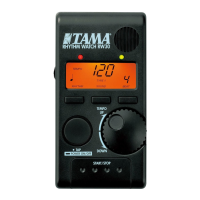

 General