ACVUJ9-düHt6Ee
,
-t
7, > |:+HAC7 97 t
-dE.Et
4
r=l*,
+tg;üäl*dt
.
Acv?at-o)j
-
7ßbqDC
lNo)*^o)ö 6, ? \/ rL=t,
i^lv?</jät,\"
*Ac7 97t
-oWrE#EEä
I <
ffi7*. ftH
#EElr?ts?<iEl, <
räEL\ < /iär,\.
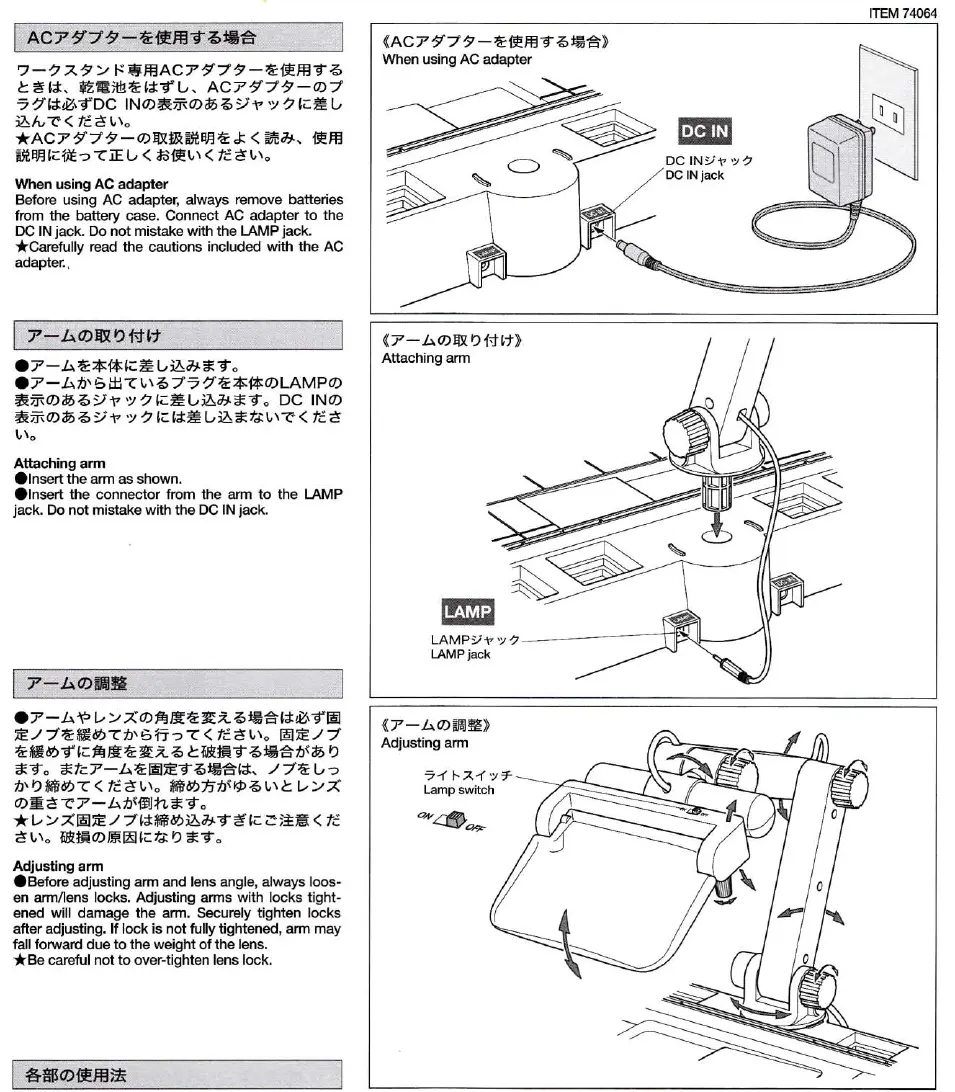
Wh6n using AC adapter
Befoe using AC adapter, always
remove
battedgs
trom the battery case. Connect
AC
adapter
to the
DC lN
jack
Dic not mistake with the LAMP
jack
*Carcfully
read the cautions included
with lhe AC
adapler..
7
-I\AB.D
ttl,
a7-Ääf6tE=
UÄAr*
4"
a7-Aä'5 H<
t\5
7,
rJE*ffoLAMPo
*^@öä,tsv,t
äU[a]*t.
DC lNo
*fr
06
6
»
+ v r
LlXä L[ä
rel\?
<
li ä
Attaching
arm
alnsert
ihe am as shown.
alnsert
the
connector
lrom lhe arm to lhe LAM
jack
Do nol mistake with the DC lN
jack.
v-Lo)§lE
|TEM 7rt064
«ACv97 t
-ttr'BE
6l€ä»
When usinq
AC
adapter
«7-LOWD$t »
Attaching am
«7-Lofr#»
Adjusting
am
.117<rA
,z<@^-
a7
-
l\P l, >
7
ofr
EA§i- iEe ßlYlt
@
E/ )äEb-(b'6'.n
-c< (tiätt"
@E)a
äffebt
|.6t§u§zz
t
MF'?-
6wa»b o
*'{
"
*ttv
-LäHE?
6Eät*,
/
aE U'c
ä'Di6drz < tiäL\.
ffibfrh\rtät\t
l,>7
oEZzv
-
l^htBltl*.t
"
*vr/.@E/
) t*ffiöüar? ä r. EEE
<
/i
är,\" {&fläO*trl-äD ä7"
Adju§ing
arm
aB€lore
adjusting am and lens angle, always loos-
en arm/lens locks. Adjusting arms with locks tight-
ened will damage the arm, Securely
tighten locks
atter adjustrng.
lf
lock
is not
fully tightened,
arm may
fall foMard du€ to ths woight of the lens.
*Be
careful not to over-tighten lens lock.
*so)EE*



 To Next Page
 Loading...