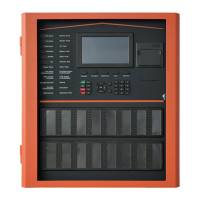
TX7004 Operating Instruction
Following an ALARM Condition
FIRE
Alarm Tone and Red Display
N0001: 02-17 05:32 Panelself Zone-001 Total Fire Alarm Devices
Panel 1 Ground Floor
List of Zones on Fire Alarm Condition – Total Zone: 0001 Total Devices:0001
Activation: 0000
000000
0000
Last Fire: 02-17 05:32 Panelself Zone-001 Total Fire Alarm Devices
Panel 1 Ground Floor
1. Open the door. LCD screen
displays: The first, and in multiple
alarm condition also the last fire,
time and zone location. Fire LED
turn on steady and corresponding
zone indication.
N0001: 02-17 05:32 Panelself Z0001 L01 D001 ˂ Photo w/Heat Detector ˃
General Manager Office
List of Zones on Fire Alarm Condition – Total Zone: 0001 Total Devices:0001
Activation: 0000
000000
0000
N0002: 02-17 05:30 Panelself Z0001 L01 D002 ˂ MCP ˃
Service Door
Last Fire: 02-17 05:32 Panelself Zone-001 Total Fire Alarm Devices
Panel 1 Ground Floor
2. Press “(F1) Detail” button to view
the zone number, device loop,
address, device type and location
3. To view all fire events, press key
▲and▼ (Up and Down cursor to
scroll)
Silencing the panel buzzer and sounder
1. Silence the control panel
Press the “BUZ Mute” button. Display
show “PASSCODE: __” input the code
and press “Enter”
2. Silencing the sounder signal
Press the “Silence” button. Display show
“PASSCODE: __” input the code and
press “Enter” and then SILENCE LED turn
on steady
Resetting the system
When the alarm condition has been cleared,
restore and replace all affected devices in
accordance with the details provided with
each device.
1. Reset the system
In fire mode. Press “RESET” button.
Display show “PASSCODE: ___”
input the code. After reset the display
should shows “NORMAL STATUS”


 To Next Page
 Need help?
 General