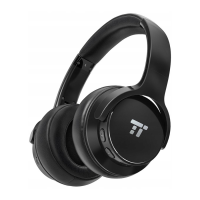
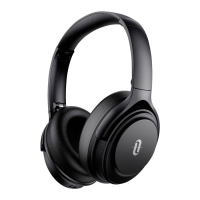
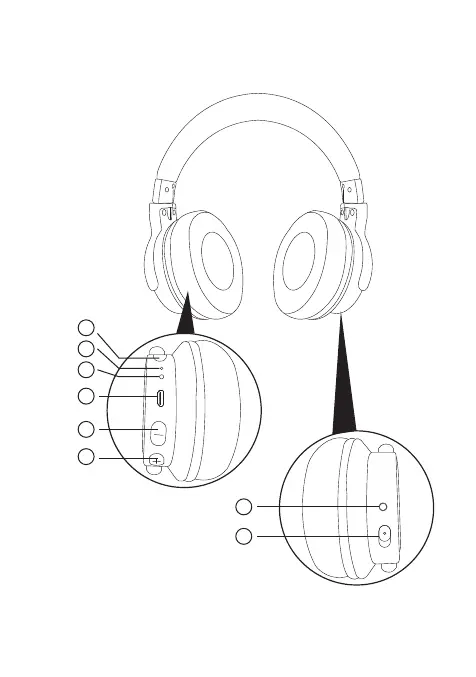
Produktabbildung
1. Power-Knopf
2. Mikrofon
3. LED-Anzeige
4. Micro-USB-Ladeanschluss
5. Lautstärke - / Vorheriges Lied (langes Drücken)
6. Lautstärke + / Nächstes Lied (langes Drücken)
7. ANC-Knopf / -Anzeige
8. 3.5mm Audioanschluss
Anmerkung:
·Wenn der Akkustand niedrig ist, ertönt eine Ansage.
·Drücken Sie den ANC-Knopf, um die Rauschunterdrückung zu
aktivieren / zu deaktivieren. Die Anzeige geht dementsprechend
an / aus.
製品図
1.電源ボタン
2.マイク
3.LEDインジケータ
4.マイクロUSB充電ポート
5.音量-/戻る(長押し)
6.音量+/進む(長押し)
7.ANCボタン/インジケータ
8.3.5mmオーディオポート
注意:
·バッテリーが少なくなると声によるお知らせがあります。
·ノイズキャンセレーション機能を起動(または中止)するには、ANCボタンでス
イッチを入れて(切って)ください。インジケータがそれに従いついたり消えた
りします。
WIRELESS ANC HEADPHONES
User Guide
www.taotronics.com
1
2
3
4
5
6
7
8
EN FR IT
DE ES JP
Product Diagram
1. Power Button
2. Microphone
3. LED Indicator
4. Micro USB Charging Port
5. Volume - / Previous Track (long press)
6. Volume + / Next Track (long press)
7. ANC Button / Indicator
8. 3.5mm Audio Port
Note:
·A voice prompt will be heard when the battery is low.
·Switch the ANC Button to activate / deactivate the noise cancellation
function. Its indicator will turn on / off accordingly.
Schéma du Produit
1. Bouton d’Alimentation
2. Microphone
3. Voyant à LED
4. Port de Charge Micro USB
5. Volume - / Piste Précédente (pression longue)
6. Volume + / Piste Suivante (pression longue)
7. Bouton / Voyant ANC
8. Port Audio 3.5mm
Note:
·Une annonce vocale sera entendue lorsque la batterie est faible.
·Utilisez l’interrupteur ANC pour activer / désactiver la fonction de
réduction de bruit. Le voyant s’allumera / s’éteindra en fonction.
Diagrama del Producto
1. Botón de Encendido
2. Micrófono
3. Indicador LED
4. Puerto de Carga Micro USB
5. Volumen - / Pista Anterior (Presión larga)
6. Volumen + / Pista Siguiente (Presión larga)
7. Botón ANC / Indicador
8. Puerto de Audio de 3,5 mm
Nota:·
·Un indicador de voz se escuchará cuando la batería esté baja.
·Presione el botón ANC para activar / desactivar la función de
cancelación de ruido. Su indicador se activará/ desactivará
automáticamente.
Schema del Prodotto
1. Pulsante di Accensione
2. Microfono
3. Indicatore LED
4. Porta di Ricarica Micro USB
5. Volume - / Traccia Precedente (pressione lunga)
6. Volume + / Traccia Successiva (pressione lunga)
7. Pulsante ANC / Indicatore
8. Porta Audio da 3,5mm
Note:
· Un messaggio vocale verrà riprodotto quando il livello della batteria è
basso.
· Premere il Pulsante ANC per attivare / disattivare la funzione di
cancellazione del rumore. Il relativo indicatore si accenderà / spegnerà
di conseguenza.
EN
Package Contents
1 x TaoTronics Wireless ANC Headphones (TT-BH040)
1 x USB Charging Cable
1 x 3.5mm Audio Cable
1 x Airline Adapter
1 x Travel Pouch
1 x User Guide
DE
Lieferumfang
1 x TaoTronics Kabellose ANC Kopfhörer (TT-BH040)
1 x USB-Ladekabel
1 x 3.5mm Audiokabel
1 x Flugzeugadapter
1 x Reisebeutel
1 x Bedienungsanleitung
How to Use
1. Charging
1) Connect the charging port with any USB charging adapter or
active computer USB port.
2) Charging will start automatically with the LED indicator turning red.
3) The headphones are fully charged when the LED indicator turns off.
2. Pairing
1) Make sure the headphones and your Bluetooth® device are next
to each other (within 3 feet / 1 meter).
2) Press and hold the Power Button for 5 seconds to bring the
headphones into pairing mode with the LED indicator ashing blue
and red.
3) Activate Bluetooth® on your phone and search for nearby
Bluetooth® connections.
4) Find “TaoTronics TT-BH040” in the search results. Tap on the name to
connect. Once connected, the LED indicator will ash blue once
every 3 seconds.
Note:
·The Bluetooth® headphones can remember previously paired
devices. If you have previously paired the headphones with a
device, simply turn on your device and the headphones, they will
connect to the last connected device automatically without going
into pairing mode.
Control Functions
Function
Power on / off
Play / Pause / Answer
/Hang up phone calls
Reject phone calls
Redial
Volume + / -
Previous / Next Track
Operation
Press and hold the Power Button until the LED
indicator ashes / turns off
Press the Power Button once
Press and hold the Power Button for 2 seconds
Press the Power Button twice
Press the Volume + / - Button
Press and hold the Volume + / - Button
Anleitung
1. Ladevorgang
1) Schließen Sie den Ladeanschluss an einem beliebigen USB-
Ladeadapter oder einem aktiven Computer-USB-Anschluss an.
2) Der Ladevorgang beginnt automatisch und die LED-Anzeige wird rot.
3) Die Kopfhörer sind vollständig geladen, wenn sich die LED-Anzeige
ausschaltet.
2. Koppeln
1) Gehen Sie sicher, dass sich die Kopfhörer und Ihr Bluetooth®-Gerät
nebeneinander benden (innerhalb von 1 Meter / 3 Fuß).
2) Halten Sie den Multifunktionsknopf 5 Sekunden lang gedrückt, um
die Kopfhörer in den Kopplungsmodus zu versetzen. Die LED-
Anzeige blinkt dann blau und rot.
3) Aktivieren Sie die Bluetooth®-Funktion Ihres Handys und suchen Sie
nach Bluetooth®-Verbindungen in der Nähe:
4) Suchen Sie in den Suchergebnissen nach “TaoTronics TT-BH040”.
Tippen Sie zum Verbinden auf den Namen. Wenn die Verbindung
erfolgreich war, blinkt die LED-Anzeige alle 3 Sekunden blau.
Anmerkung:
·Die Bluetooth®-Kopfhörer können sich bereits gekoppelte Geräte
merken. Wenn Sie die Kopfhörer vorher bereits mit einem Gerät
gekoppelt haben, schalten Sie Ihr Gerät und die Kopfhörer einfach
ein. Sie werden sich automatisch mit dem zuletzt verbundenen
Gerät verbinden, ohne in den Kopplungsmodus wechseln zu müssen.
Steuerungsfunktionen
Funktion
Ein- / Ausschalten
Wiedergabe / Pause /
Anruf annehmen /
Telefonat auegen
Anruf ablehnen
Wahlwiederholung
Lautstärke + / -
Vorheriges / Nächstes Lied
Bedienung
Halten Sie den Power-Knopf gedrückt, bis die
LED-Anzeige blinkt / sich abschaltet
Drücken Sie den Power-Knopf einmal
Halten Sie den Power-Knopf 2 Sekunden lang
gedrückt
Drücken Sie den Power-Knopf zweimal
Drücken Sie die Knöpfe Lautstärke + / -
Halten Sie die Knöpfe Lautstärke -/+ gedrückt
TT-BH040
EUROPE
E-mail:
support.uk@taotronics.com(UK)
support.de@taotronics.com(DE)
support.fr@taotronics.com(FR)
support.es@taotronics.com(ES)
support.it@taotronics.com(IT)
EU Importer: ZBT International Trading GmbH, Halstenbeker Weg 98C,
25462 Rellingen, Deutschland
NORTH AMERICA
E-mail : support@taotronics.com(US)
support.ca@taotronics.com(CA)
Tel : 1-888-456-8468 (Monday-Friday: 9:00 – 17:00 PST)
Address: 46724 Lakeview Blvd, Fremont, CA 94538
Shenzhen NearbyExpress Technology Development Co., Ltd.
Address: 333 Bulong Road, Shenzhen, China, 518129
www.taotronics.com
MANUFACTURER
Learn more about the EU Declaration of Conformity:
https://www.taotronics.com/downloads-TT-BH040-CE-Cert.html
ASIA PACIFIC
E-mail: support.jp@taotronics.com(JP)
Tel:03-5542-0238(10-18時/土日祝除く)
JP Importer: 株式会社ニアバイダイレクトジャパン,東京都
中央区入船2-9-5HKビル2F
MADE IN CHINA


 To Next Page
 Loading...