EasyManua.ls Logo

Tapco Juice J800 User Manual

Tapco Juice J800
20 pages
To Next Page IconTo Next Page
Page #1 background imageLoading...
Page #1 background image
J800
J1400
J2500
owner’s manual
J•800
J•1400
J•2500
SIGOLSIGOL
30
-
AB
00
30
-
00
ON
OFF
POWER
BY
J•2500
dB dB
BREAKER
CL
I
P
LIMI
T
O
N
O
F
F
S
U
B
S
O
N
IC
F
IL
T
ER
A
T
30H
z
O
N
O
F
F
STEREO
AMP MODE
MONO
B
RID
G
E
CHANNEL B BRIDGED CHANNEL A
CAUTION
TO REDUCE THE RISK OF FIRE OR ELECTRIC SHOCK,
DO NOT EXPOSE THIS APPARATUS TO RAIN OR
MOISTURE. SEE INSTRUCTIONS BEFORE USING.
INPUT B
LINE
(BALANCED)
INPUT A
LINE
(BALANCED)
SERIAL /DATE CODE
INPUT
CONNECTION
B
R
OU
G
H
T
T
O
Y
OU
B
Y
T
H
E
G
R
OO
V
Y
F
OL
K
S
IN
W
OODINV
I
L
L
E,
WA, U
S
A. M
A
NU
F
A
C
T
U
R
E
D
I
N
C
H
INA.
"
T
APC
O"
A
ND
"
MAC
K
I
E"
AR
E
R
EG
IS
T
ER
E
D
T
R
A
DEMAR
K
S
OF
MAC
K
IE
DES
IG
NS
I
NC
.
WWW
.
TA
P
CO
GEA
R
.
CO
M
STEREO/MONO
BRIDGED
SPEAKER CONNECTION
T59052
T59052
by
Question and Answer IconNeed help?

Do you have a question about the Tapco Juice J800 and is the answer not in the manual?

Tapco Juice J800 Specifications

General IconGeneral
BrandTapco
ModelJuice J800
CategoryAmplifier
LanguageEnglish

Summary

Safety and Warnings

General Safety Instructions

Comprehensive safety guidelines for operation, electrical hazards, and environmental factors.

Portable Cart Warning

Warning regarding safe movement and stability of equipment on carts.

Hookup Diagrams

Front Panel Controls

Front Panel Indicators and Switches

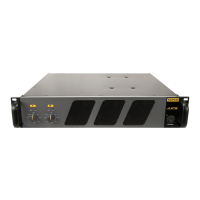
Explanation of Level, SIG, OL indicators, and the POWER switch.

Rear Panel Features

Rear Panel Connections and Settings

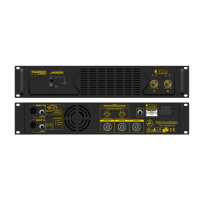
Details on speaker outputs, inputs, breaker, filters, and mode switches.

Speakon Connection Details

Troubleshooting

No Power Issues

Steps to diagnose and resolve issues when the amplifier does not power on.

No Sound Issues

Steps to diagnose and resolve issues when no audio output is heard.
Noise and Hum Diagnosis

Juice Series Specifications

TAPCO Limited Warranty

Related product manuals