SETVALUE RECALL
While TX2 is running/ waiting for inputs, set value/
values can be recalled (viewed) without disturbing the
timing process.
Briefly press the
button on the TX2 timer.
1. If the configured mode is
or the display
will show the set value for one second.
2.
If the configured mode is or the display will
show
and its set value followed by and
its set value.
CONFIGURATION RECALL
While TX2 is running/ waiting for inputs pressing the
button for 3 seconds causes to display to show
the configuration setting of parameters 1 to 6 one
after the other.
CONFIGURATION
TX2 is a multifunctional timer. To make it function in
the desired way it has to be configured.
Configuration can be done through the front panel
buttons.
To enter into the configuration mode.
1. Remove power to the instrument.
2. Keep the
button pressed
3. Apply power.
4. Leave the button when the display shows
.
5. Navigate the configuration parameters using
and buttons.
To change parameter value
6. Press the
button to enter that parameter.
7. The display shows the value of that parameter.
8. Using
and buttons change to the
desired value.
9. Using
button exit that parameter.
10. Similarly other parameters can be changed.
To save the changes and exit the configuration
mode
11. Navigate using
and buttons (to the
parameter) when the display shows
.
12. Press the
button.
13.
The TIMER is now updated with the new
configuration and is ready to be used.
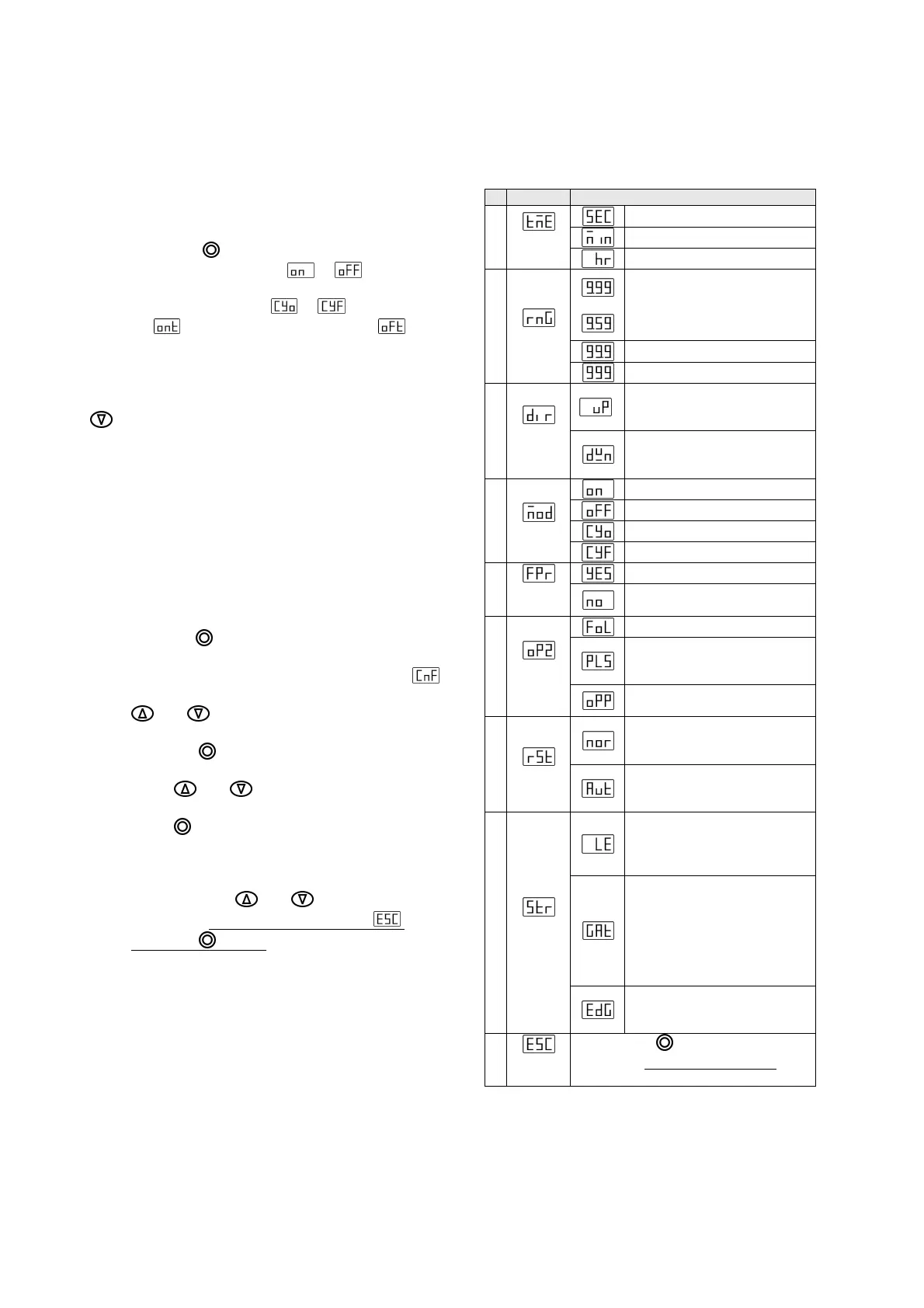
Configuration Parameters
#
Name. Setting range for parameter
Seconds
Minutes
1
Time
Units
Hours
9.99 When Time units is set
to seconds
9.59 When Time units is set
to Minutes or Hours.
99.9
2
Range
999
UP: Once the timer starts
the display increases from 0
to Set value.
3
Directio
n
DOWN: Once the timer
starts the display decreases
from Set value to 0.
On delay
Interval
Cyclic with ON time first.
4
Mode
Cyclic with OFF time first.
Reset by front panel Enable.
5
Front
Reset
Reset by front panel
Disable.
Output 2 follows Output 1.
Output 2 pulses on for
750ms when START input is
given.
6
Output
2
Output 2 is opposite off
Output 1.
Normal: To start a new
cycle a RESET input has to
be given.
7
Reset
Auto: A new cycle can be
started without first giving a
RESET signal.
Level: The START input can
be closed permanently and
the timer will always read it
as start input present.
Gate: When
START
is open
the relay state does not
change but the time
counting stops. On make
of START contact time
counting starts from the last
time count.
8
Start
type
Edge: Timing starts on
application of START input
(Open to Close).
Exit
Config
On pressing
button
at this
parameter configuration is saved
and
timer goes into normal operation.



 To Previous Page
 Loading...