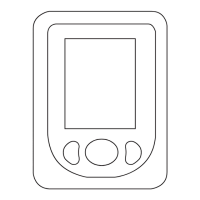
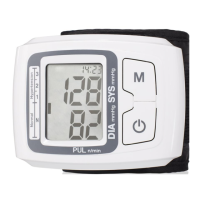
Uncover your forearm and do up the wristband so
that the visor is on the inner part of the
forearm 1cm from the palm of your hand. Make sure
the wristband ts correctly. (Fig.5).
Rest your arm on the table with palm facing upward
so that your wrist is at heart level and you can see
the display perfectly. If necessary use the carry case
to rest your wrist on (Fig.6)
How to measure the pressure on both model
(Tensio Precise Plus y Tensio):
- Turn the appliance on using the on/off switch.
The LCD screen will come on, displaying all of the
symbols, wait until the 0 appears.
Now the corresponding memory number (1 or 2)
will appear.
To change from memory 1 to 2, with the machine off
press and hold the On/Off button until one of the two
memories appears (R), once selected press the On/
Off button again and it will switch off. Press the On/
Off button again and the screen will display an “0”.
The armband will now inate automatically.
- Keep still, without talking and with the appliance
at the height of your heart until the measuring has
nished.
When the measurement has been taken the arm-
band will deate automatically and the LCD screen
will display the values for systolic and diastolic
pressure and the heart rate. The blood pressure
classication indicator, based on WHO parameters,
will appear on the right of the screen (Fig. 5)
3 minutes after performing the measurement, the
appliance will switch off automatically.
Memory reading:
With the appliance off, press the memory button (C)
and the screen will display the average for the last
3 readings (T), press button (C) again and the other
stored reading will be displayed, each memory group
can store a maximum of 90 readings.
If the appliance remains idle for more than 3 minutes
it switches off automatically.
Erasing the memories:
To erase the memories, press and hold the memory
button (C) for 3 seconds while using the read
function. All memories will have been erased.
Auto-disconnection function (stand-by):
For the purpose of saving energy, the appliance
goes to self-disconnection mode 3 minutes after
process has nished if the user has not performed
any action with it during this period.
Once you have nished using the appliance:
- Turn the appliance off, using the on/off switch.
- Remove the batteries from the appliance if you are
not going to use it for some time.
- Clean the appliance
Practical recommendations:
- Avoid eating, smoking and intensive activity in the
30 minutes before taking the measurement.
Leave at least 1 minute between each reading to
relax your blood ow in the arm.
Special messages:
The following messages can appear on the screen:
List of Error code. Error Cause How to correct
Er 30 Power on, cuff ination rate is
too low or main unit does not
connect with the cuff.
1. Reconnect the air tube connector with
the main unit
2. Cuff or bladder leakage, if necessary
purchased a new one.
3. Conrm the cuff is wrapped up co-
rrectly (ref 4), retake the measurement
Er 2 Weak Signal or cuff is too
loose
Cuff too loose. Conrm the cuff is
wrapped up correctly (ref 4.2) retake the
measurement
Er 3 Heavy shock during the
measurement.
Remain still, retake the measurement
(ref 4.1)
Er 5 Bad Signal: moving or talking
during the measurement.
Remain still, retake the measurement
(ref 4.1)
Er 7 Measurement abnormal Please retake the measurement
Lo Low battery power, cannot
inate
Change battery (ref 3.1)
Manual Tensios.indb 13 2/12/15 12:43


 To Next Page
 Loading...