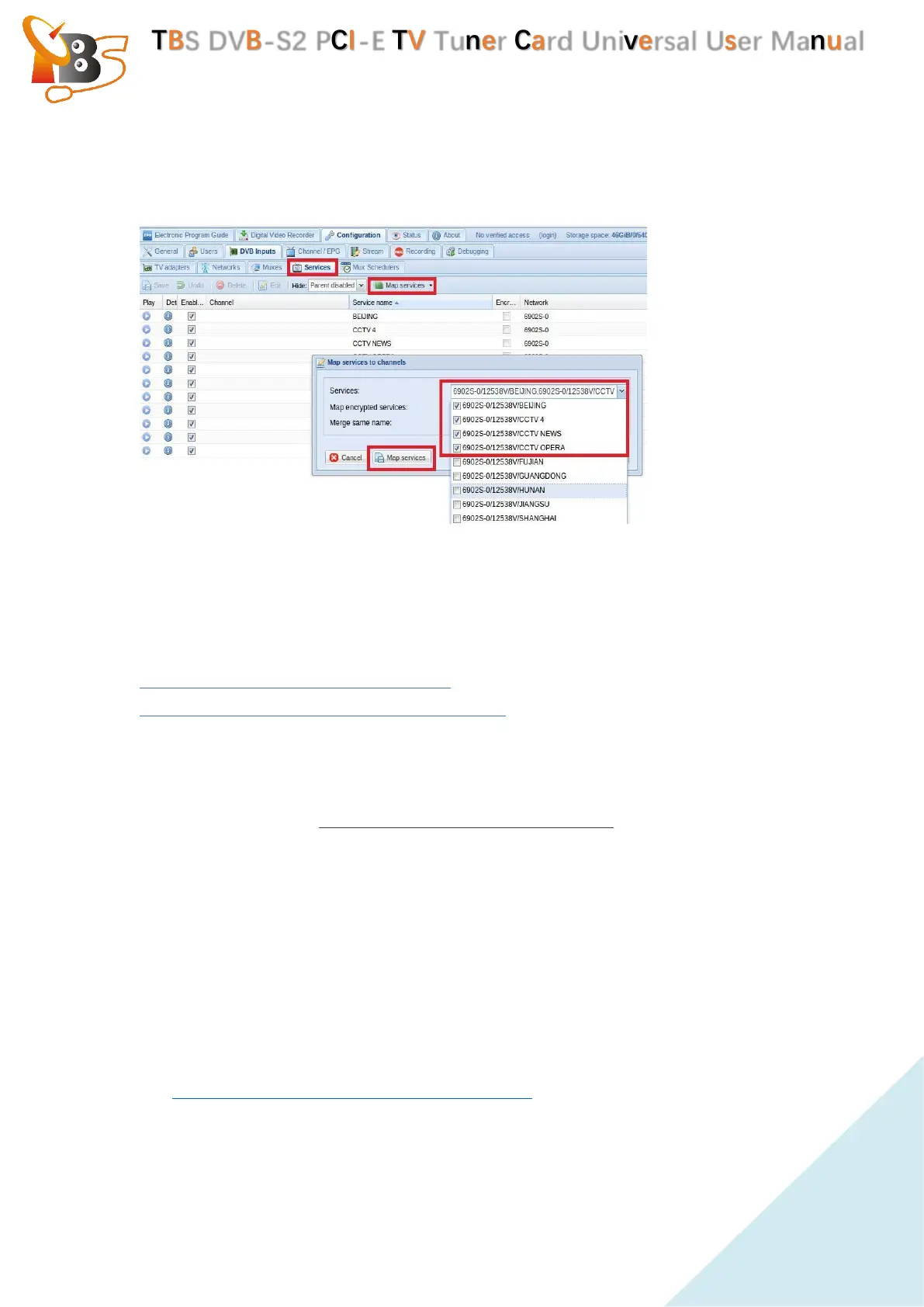
Log in “Services”, you can live streaming all the TV programs that you would
like to watch in “Map services”. (See screenshot below.)
5.3.3. Astra cesbo
There are detailed installation steps and interface settings on the Astra website,
please check for reference:
https://cesbo.com/en/astra/quick-start
https://cesbo.com/en/5.64/astra/web-interface
Commands for settings :
➢ Installation : choose the correct astra version you need to download , run
command: # wget http://cesbo.com/download/astra/xxx
➢ Grant authority: # chmod +x astra
➢ Copy Astra to /usr/bin : # cp astra /usr/bin
➢ Create a menu to store configuration files : # mkdir /ect/astra
➢ Create a configuration file : # vi astra.conf
➢ Purchase the Astra license, put the entire license file “license.txt”, which sent
to your email box under the menu of “/ect/ Astra".
https://cesbo.com/orders/software/astra/buy/
➢ Run astra: # astra –c /ect/astra/astra.conf –p 8000 –daemon


 To Next Page
 Loading...