EasyManua.ls Logo

tbs electronics DVB-S2 PCI-E TV - Tuner Card Models and System Requirements; System Requirements for Tuner Cards; Supported Applications for TBS Tuner Cards; Hardware Installation Procedure

tbs electronics DVB-S2 PCI-E TV
20 pages
Print Icon
To Next Page IconTo Next Page
To Previous Page IconTo Previous Page
Loading...
DVB Hardware | IPTV System | Video IP Encoder/Transcoder
www.tbsiptv.com | www.tbsdtv.com | sales@tbsdtv.com
TBS DVB-S2 PCI-E TV Tuner Card Universal User Manual
2
support@tbsdtv.com
2. Suitable Tuner Card Models
2.1. System requirements:
Windows XP / Vista/ 7/8/10, Linux
Available PCI Express x1, x4, x8 or x16 slot
Digital TV signal (ISDB-T/DVB-T2/C2/S2X/S2/T/C/S)
2.2. Application:
Data receiving
IPTV streaming
Media monitoring
Digital content distribution
3. Hardware Installation (we use TBS6904se as example.)
3.1. Install TBS6904se into PC
Turn off the computer or server, remove the computer cover case and take out
cover panel of PCI-E slot, where the card is to be installed. Insert the card into the
PCI-E slot and fix the card bracket with screw, make sure the card is firmly and
completely inserted into the PCI-E slot, then put back the computer cover.

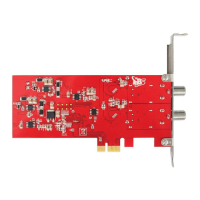
TBS6902
DVB-S2 dual tuner PCI-E card
TBS6904se
DVB-S2 quad tuner PCI-E card
TBS6903X
Professional DVB-S2 dual tuner PCI-E card
TBS6909X
DVB-S2 octa tuner PCI-E card
TBS6908
Professional DVB-S2 quad tuner PCI-E card
TBS6910
DVB-S2 dual tuner dual CI PCI-E card