Optional - To mount on a wall
(Wall mount hardware and accessories are not included)
Preparation must be done before mounting your TV on a wall.
To mount on a wall
Note: Do not place your TV in a location exposed to direct sunlight, heat, fire, or moisture.
Exposure will damage the TV.
The VESA number is the horizontal and vertical measurement of the mounting holes. For
example, 200X200 refers to the fact that the mounting measurements are 200mm horizontally
and 200mm vertically.
Follow the instructions that come with the wall mount.
Your wall mount must be able to bear a minimum of five times the TV’s net weight to avoid
causing damage.
58” Models Purchase a VESA 300x400 (4 M6x16mm screws)
To mount your TV to the wall, purchase a VESA wall mount
If you are mounting your TV to the wall, don’t attach the stands.
6
1
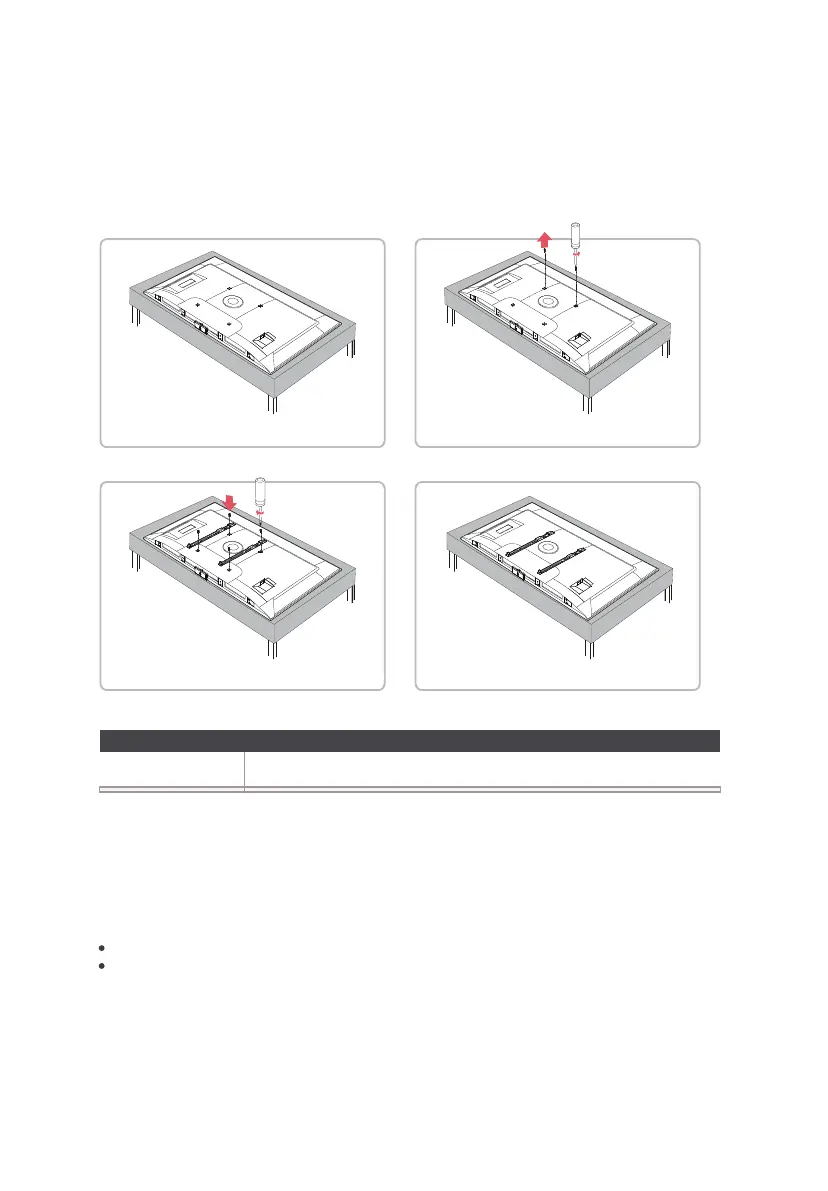
Place your TV on a soft, cushioned surface.
3 4
Screw the VESA bracket tightly onto the back cover with 4
VESA screws
purchased with the wall mount separately.
Follow the instructions that come with the wall mount to
hang the TV on the wall.
2
Remove the 2 screws from the back of the TV and store in a
safe place.
Warnings:
This product should only be mounted by a professional installer.
Never install or mount this product to the ceiling with the screen side facing down. Installing
or mounting this product to the ceiling or the underside of a structure or surface is hazardous
and may result in personal injury and/or property damage.


 To Next Page