The TCL NXTWEAR G Glasses are a wearable display device designed to provide an immersive viewing experience. These smart glasses connect to a mobile phone via a USB Type-C connector, allowing users to view content from their device on a larger, virtual screen.
Function Description
The primary function of the TCL NXTWEAR G Glasses is to act as a personal display for compatible mobile phones. When connected, the glasses project content from the phone, offering a private and expansive viewing experience. The device supports both 2D and 3D modes, allowing users to enjoy various types of media. An accompanying Smart Glasses app enhances functionality by providing features such as brightness adjustment, mode switching, and firmware updates. The maximum brightness of the display is automatically adjusted based on the connected device's OTG output capacity.
Usage Features
The TCL NXTWEAR G Glasses are designed for ease of use and comfort.
- Components: The glasses consist of front decorative lenses, sound holes, temples, windows, a hinge, a proximity sensor, and a nose pad. A cable extends from the temples for connection to a mobile phone.
- Nose Pad Selection and Adjustment: The device comes with three different nose pads, allowing users to select the one that best fits their nose shape for optimal comfort. The nose pad's position and width can be slightly adjusted to suit personal preference. However, frequent adjustments and vigorous activities should be avoided to prevent damage to the nose pad.
- Prescription Lenses (Optional): For users requiring vision correction, the glasses include a corrective lens frame. This frame can be taken to an optical store to have suitable prescription lenses installed. Once fitted, the corrective lens frame magnetically attaches to the inner side of the glasses.
- Connecting to a Mobile Phone: The glasses connect to a mobile phone via a USB Type-C cable. For devices equipped with USB Type-C with DisplayPort Alternate Mode, a direct connection is possible. Users are advised to download and install the Smart Glasses app from the TCL website for full functionality.
- Wearing the Glasses: To wear the glasses, users should open the temples completely and slide them onto their face, from the forehead to the ears. It is crucial to ensure the temples are fully open before wearing to avoid pinching hands or hair. The hinge has a limited amount of flexibility, so care should be taken not to over-extend the temples to prevent damage.
- Audio Experience: The glasses feature sound holes, indicating integrated audio capabilities for an immersive experience.
- Proximity Sensor: A proximity sensor is included, likely for features such as automatic display on/off or other interactive functions based on whether the glasses are being worn.
Maintenance Features
Proper care and maintenance are essential to ensure the longevity and optimal performance of the TCL NXTWEAR G Glasses.
- Cleaning: The glasses come with a cleaning cloth for regular maintenance. Users should avoid using strong chemicals, cleaning agents, or strong detergents, as these can lead to material changes and potentially affect eye health. A clean, dry, soft cloth is recommended for wiping the glasses.
- Before Cleaning and Maintenance: Before cleaning or performing any maintenance, users should stop using the glasses and disconnect all connections or cables from other equipment.
- Environmental Considerations: The manual emphasizes saving paper and trees, encouraging users to consider the environment before printing.
- Storage: The glasses should not be placed in direct sunlight, such as on a car dashboard or window sill, as this could cause damage.
- Durability and Protection:
- Do not let children or pets bite the glasses to prevent injury or device failure.
- Avoid squeezing the glasses during use to prevent damage to the device or extrusion of the lenses, which could harm the wearer's face.
- The glasses are not waterproof; therefore, they should not be used in water or rain.
- Disposal: The glasses should not be treated as ordinary domestic waste. Users are encouraged to comply with local ordinances for disposal and support recycling initiatives.
The manual provides extensive safety information to prevent personal injury or property damage.
- Safe Environment: Use the glasses only in a safe environment.
- Hearing Protection: To prevent possible hearing damage, avoid listening at high volume levels for long periods.
- Physical Activity: Do not use the glasses during sudden or intensive activity.
- Temperature: If the glasses feel hot to the touch or uncomfortably warm, stop using them and allow them to cool down.
- Eye Strain/Dizziness: Immediately discontinue use if experiencing eye strain or dizziness.
- Damage: Stop using the glasses immediately if they are damaged.
- Liquid Exposure: Do not expose the glasses to liquid.
- Health Considerations: Consult a doctor before using the glasses if sick, fatigued, under the influence of intoxicants/drugs, or not feeling generally well.
- Skin Irritation: Stop using the glasses if swelling, itchiness, skin irritation, or other discomforts occur where the skin contacts the device. If symptoms persist, contact a doctor.
- Age Restriction: This product is not intended for use by children under the age of 14 without direct adult supervision.
- User Manual: Users must read the entire user manual to become familiar with the features and safe usage of the product.
The TCL NXTWEAR G Glasses are designed to be a personal, portable display solution, offering a blend of technology, comfort, and user-friendly features for an enhanced media consumption experience.

 Need help?
 General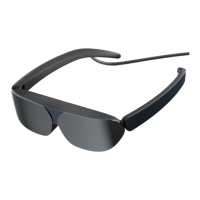

 To Next Page
