EasyManua.ls Logo

Teac C-3RX - DBX PCB Adjustment and Test Points

Teac C-3RX
44 pages
Print Icon
To Next Page IconTo Next Page
To Previous Page IconTo Previous Page
Loading...
15
5-6
DBX
PCB
ADJUSTMENT
NOTES:
1.
This
section
adjustment
is
not
usually
needed
unless
any
of
ad-
justor(s)
have
been
changed
or
any
component(s)
on
the
PCB
have
sustained
damage,
since
both
the
ENCODER
and
DE-
CODER
sections
have
been
precisely
adjusted
in
the
factory.
2.
For
this
section
adjustment,
it
is
necessary
to
unsolder
the
wires
from
terminals
A,
C,
B,
D,
F,
1,
H,
and
J
on
the
dbx
PCB. Turn
the
deck
OFF
to
prevent
accidental
damage
when
unsoldering
or
resoldering.
3.
Simply
press
the
POWER
switch
to
ON
(all
other
switches
and
controls
on
the
deck
have
no
affect
on
this
adjustment),
then
make
this
section
adjustment.
4.
The
measurement
equipment’s
GND
(0
V)
terminal
should
be
connected
to
the
dbx
PCB’s
E
terminal,
except
in
steps
2
and
3,
and
6
to
8
in
both
the
ENCODER
and
DECODER
adjustments.
5-7
ADJUSTMENT
AND
TEST
POINT
LOCATIONS
(2)
Saaikalt
he.
i
OT
a
Ol
ail
Bist
e
'
@
,
tay
OA
edt
iite
eg
Lge
Lies
Gg
HEE
gy
qe
§
Auda’
Cech
tall
Alsi
a
i
a
Per
ry"
wil
ee.
fs
WN
ll
.
y
ae
j
‘f
7
2
oa
Bhar
res
ie
4
§
Mow
ee
alison
ArH
a
RA,
g
&
cs
dbx
PCB
102
(oy
6.
hte
fi
ge
gstEEe
&
¢
‘i
me
ibe
eke
‘aoe
ie
CO
ii
(em
SU
IS:
4
a
goof
prep
EER
i77°@
&
al
Nall
Badal
Net
:
A
Pa
AY
VV
:
PEW
TW
WA
A
é
SER
ERR
r4
id
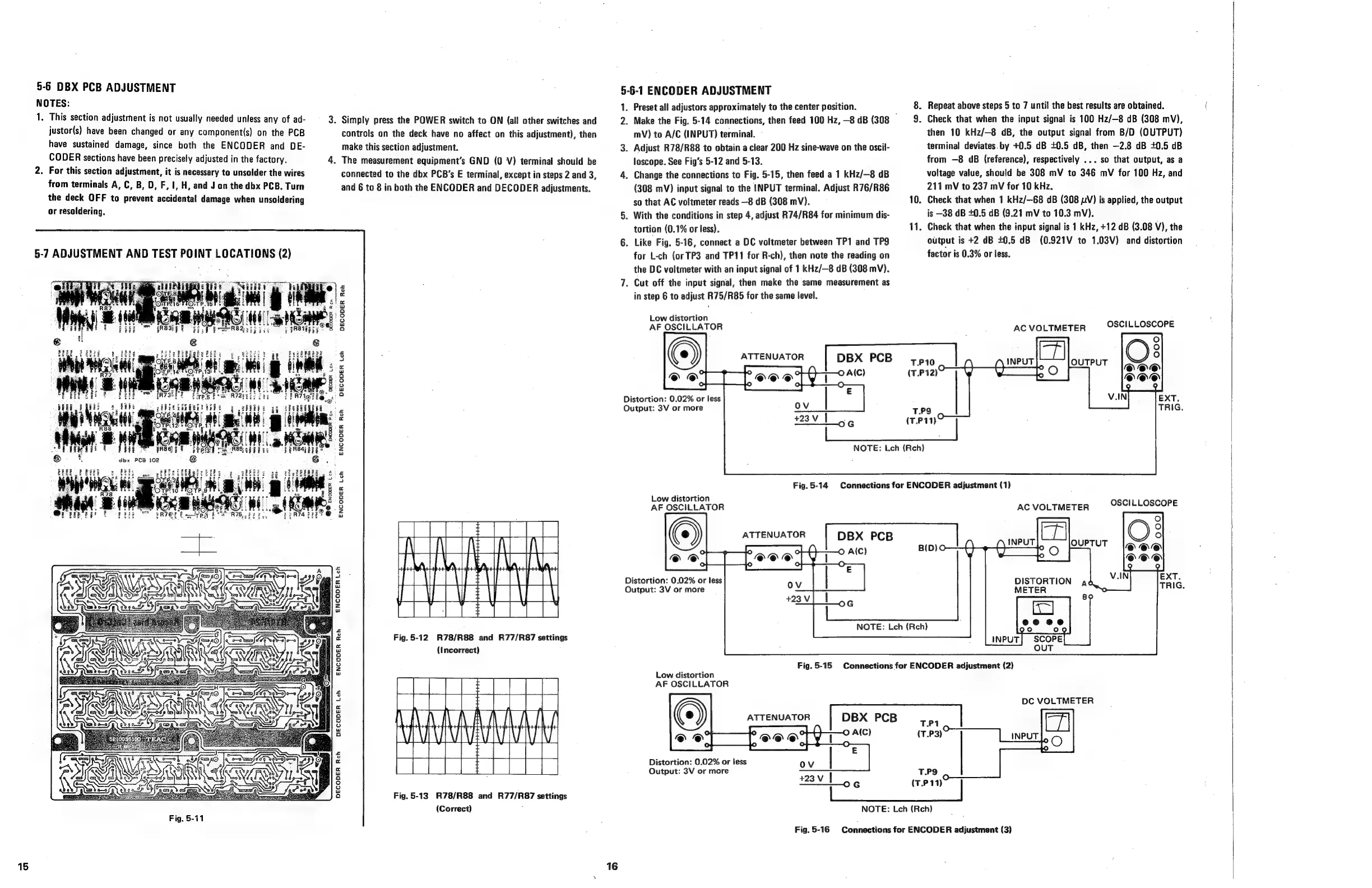
Fig.
5-12
R78/R88
and
R77/R87
settings
iw
(Incorrect)
3
o
2
w
=
3
ec
w
(=)
°
oO
w
a
DECODER
Rech
RAO
a
Be
Ce
Fig.
5-13
R78/R88
and
R77/R87
settings
(Correct)
Fig.
5-11
5-6-1
ENCODER
ADJUSTMENT
1.
2.
Distortion:
0.02%
or
less
Output:
3V
or
more
16
Distortion:
0.02%
or
less
Output:
3V
or
more
Preset
all
adjustors
approximately
to
the
center
position.
Make
the
Fig.
5-14
connections,
then
feed
100
Hz,
—8
dB
(308
,
mV)
to
A/C
(INPUT)
terminal.
.
Adjust
R78/R88
to
obtain
a
clear
200
Hz
sine-wave
on
the
oscil-
loscope.
See
Fig’s
5-12
and
5-13.
.
Change
the
connections
to
Fig.
5-15,
then
feed
a
1
kHz/—8
dB
(308
mV)
input
signal
to
the
INPUT
terminal.
Adjust
R76/R86
so
that
AC
voltmeter
reads
—8
dB
(308
mV).
.
With
the
conditions
in
step
4,
adjust
R74/R84
for
minimum
dis-
tortion
(0.1%
or
less).
.
Like
Fig.
5-16,
connect
a
DC
voltmeter
between
TP1
and
TP9
for
L-ch
(or
TP3
and
TP11
for
R-ch),
then
note
the
reading
on
the
DC
voltmeter
with
an
input
signal
of
1
kHz/—8
dB
(308
mV).
.
Cut
off
the
input
signal,
then
make
the
same
measurement
as
in
step
6
to
adjust
R75/R85
for
the
same
level.
Low
distortion
AF
OSCILLATOR
10.
11.
.
Repeat
above
steps
5
to
7
until
the
best
results
are
obtained.
.
Check
that
when
the
input
signal
is
100
Hz/—8
dB
(308
mV),
then
10
kHz/—8
dB,
the
output
signal
from
B/D
(OUTPUT)
terminal
deviates.by
+0.5.
dB
+0.5
dB,
then
—2.8
dB
+0.5
dB
from
—8
dB
(reference),
respectively
...
so
that
output,
as
a
voltage
value,
should
be
308
mV
to
346
mV
for
100
Hz,
and
211
mV
to
237
mV
for
10
kHz.
Check
that
when
1
kHz/—-68
dB
(308
pV)
is
applied,
the
output
is
—38
dB
+0.5
dB
(9.21
mV
to
10.3
mV).
Check
that
when
the
input
signal
is
1
kHz,
+12
dB
(3.08
V),
the
output
is
+2 dB
40.5
dB
(0.921V
to
1.03V)
and
distortion
factor
is
0.3%
or
less.
OSCILLOSCOPE
AC
VOLTMETER
ATTENUATOR
DBX
PCB
T.P10
(T.P12)
T.P9
(T.P11}
Fig.5-14
Connections
for
ENCODER
adjustment
(1)
Low
distortion
AF
OSCILLATOR
©
A(C)
|
DBX
PCB
|
(D)O
NOTE:
Leh
(Reh)
AC
VOLTMETER
OSCILLOSCOPE
DISTORTION
ad
METER
Fig.
5-15
Connections
for
ENCODER
adjustment
(2)
Low
distortion
AF
OSCILLATOR
ATTENUATOR
©
A(C)
Distortion:
0.02%
or
less
Output:
3V
or
more
DBX
PCB
T.P1
(T.P3)
TPS
#23v
1
G
(T.P
11)
|
DC
VOLTMETER
NOTE:
Lch
(Reh)
Fig.5-16
Connections
for
ENCODER
adjustment
(3)