October 2013
2
4. In the Device Settings part of the Configuration Settings
window, you will need to enter the Device Type and
Serial # of the gauge on the top line. Choose the Device
Type from the drop down list, enter the device Serial #,
and a Device Label of your choice. Note: You can use the
Scan for Ports/Devices button to confirm that you can create a communication link with the
gauge – the gauge must be “on” to be detected.
5. Now open the Channel Settings window (click on the
View and Edit Channel Settings button). In the Label
fields, type in appropriate labels for Channels A and B on
the DG-700. These labels will appear on the graph
generated by TECLOG3. Leave the Channel Type set to
Pressure. You can choose the graph color that will be displayed for each channel by clicking
on the color square. Exit the Channel Settings window.
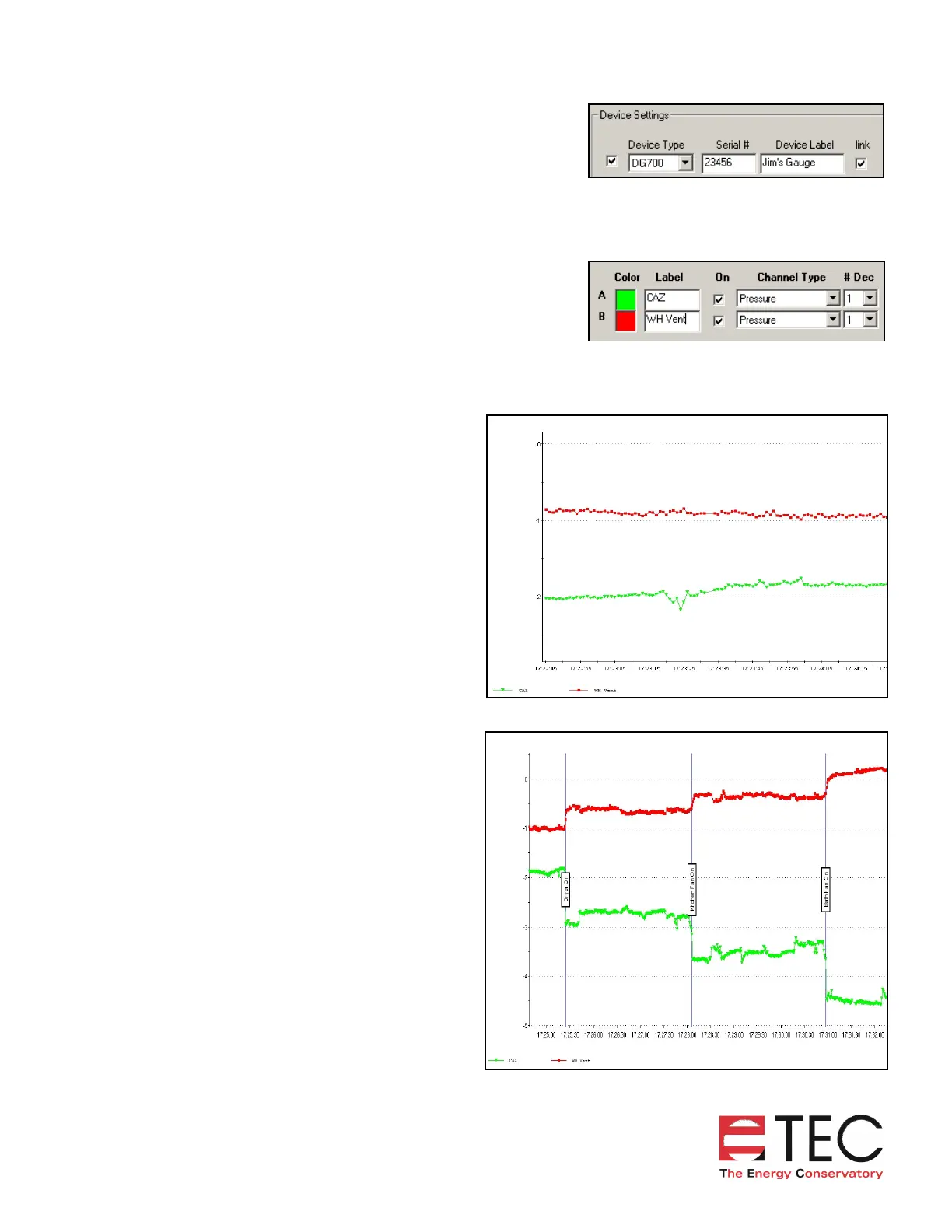
6. Begin data recording using the
Recording….Start Recording menu item.
After entering a filename, data collection
and recording will begin. TECLOG3 will
display a graph showing the CAZ pressure
and the appliance draft pressure. In the
graph to the right, the baseline CAZ
pressure (green) is approximately –2 Pa
(typical cold climate wintertime pressure)
while the baseline water heater vent
pressure (red) is about –1 Pa.
7. Turn on exhaust fans one at a time. Each
time an exhaust fan is turned on, TECLOG3
graphically displays the change in both the
CAZ pressure and the vent pressure. In this
case, a dryer, a kitchen fan and a bath fan
were turned on. The CAZ becomes more
depressurized with each successive fan,
until the CAZ pressure was about –4.5 Pa
with all fans running. This represents a
measured worst case fan depressurization of
-2.5 Pa (from –2 Pa baseline to –4.5 Pa with
all fans running). The graph also shows that
the water heater vent pressure becomes
slightly positive with all fans running,
indicating that outside air has begun to
come down the water heater venting
system. Note: The air handler fan did not
cause a change in CAZ pressure.


 To Next Page
 Loading...

