P10
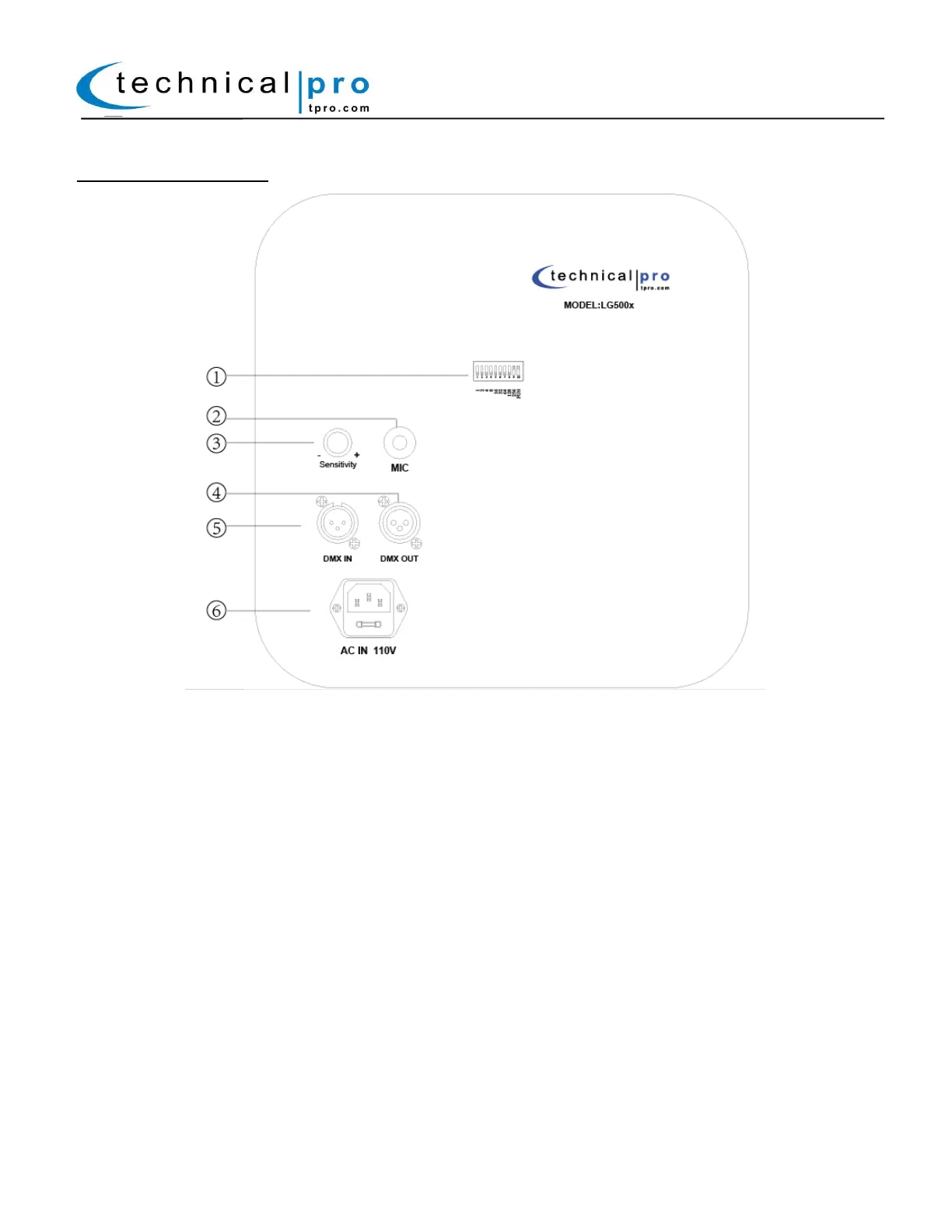
LG500x Rear Panel
1. DIP Switches: The DIP switches can be used to set the fixtures to a certain setting / mode. When the
fixture is connect to a DMX controller use the DIP switches to assign an address to the fixture.
2. Microphone: This built-in microphone will pickup any sounds when the unit is being operated in
sound-activated mode. The fixture will illuminate changes according to the sound.
3. Sensitivity Knob: Use this knob to adjust the sensitivity of the lights when the fixture is operating in
sound-activated mode.
4. DMX Output(XLR): DMX(Digital Multiplex) is the form of communication between controller and fixtures.
When linking multiple LG500x units simply connect the DMX OUTPUT to the DMX INPUT on the next unit.
5. DMX Input (XLR):DMX(Digital Multiplex) is the form of communication between controller and fixtures.
Connect the DMX output from the controller to this input, When linking multiple LG500x. More details on the
settings can be found below.
6. Power Plug: Connect the plug to the AC Mains to power on the fixture.


 To Next Page
 Loading...