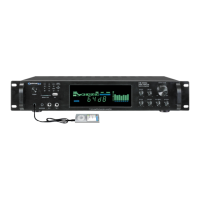
21.USB Input: Insert your USB flash drive or iPod™(Classic and Nano) into this slot. The unit will only read .mp3,
.wav, .wma files from the USB flash drive or iPod™(Classic and Nano).The maximum storage size of the USB
flash drive cannot exceed 32GB. Make sure to press the input selector button (23) to play the signal from the USB
flash drive or iPod™(Classic and Nano).
22.SD Card Input:
Insert your SD card into this slot. The unit will only read .mp3, .wav, .wma files from SD card.
The maximum storage size of the SD card cannot exceed 32GB.
Make sure to press the input selector button (23)
to play
the signal from the SD Card.
23.Mode Selector: Use this button to switch among all the inputs.
24.
Play / Pause / Record Button:
When the input selected is USB/SD, press this button to pause the
signal from the USB flash drive,SD card or iPod™(Classic and Nano) connected to the USB input. Press
this button again to play.The play/pause function will only work for the USB flash drive,SD card or iPod™
(Classic and Nano). THERE IS NO RECORDING FUNCTION WHEN INPUT SELECTED IS USB/SD.
When the input selected is PHONO/AUX/MP3 and there is an USB flash drive or SD card (with blank
space on it) inserted into their respective slot, pressing and holding this button will activate the
recording function.Press this button and hold for several seconds and the recording indicator on the face
will be illuminated. The unit will create a new file in the connected USB flash drive or SD card and get
ready to makea recording. At this point there is no actual recording yet. Press the button again and the
unit will start recording onto the USB flash drive or SD Card and the recording indicator will start to flash.
Press the button a third time to pause the recording and the recording indicator will stop flashing and be
illuminated. Press again to continue the recording. Press and hold this button for several seconds to
save the file and end the recording and exit. If both USB flash drive and SD card are connected, the unit
will begin recording onto the USB flash drive. If the USB flash drive is full, remove it and then press the
record button again to start another recording. The unit will also be able to record the signal from
microphone onto the USB flash drive or SD Card. When the recording funcion is activated and there is a
microphone connected and have it turned on, the unit will mix the signal from MP3 or AUX with the
microphone’s into one track. If two microphones are connected and turned on, both signal from them will
be recorded and mixed into one track with the signal from MP3 or AUX.
THE RECORDING FILE FORMAT IS .WAV.
25.Previous Track / Previous 10 Button: Press this button to go back to the beginning of the previous track on
either
the
iPod™
(Classic and Nano)
, USB flash drive or SD Card. Press this button and hold for several seconds to
quickly go10 tracks back.
PRE50



 To Next Page