EasyManua.ls Logo

Technics SC-CH570 - Page 44

Technics SC-CH570
112 pages
Print Icon
To Next Page IconTo Next Page
To Previous Page IconTo Previous Page
Loading...
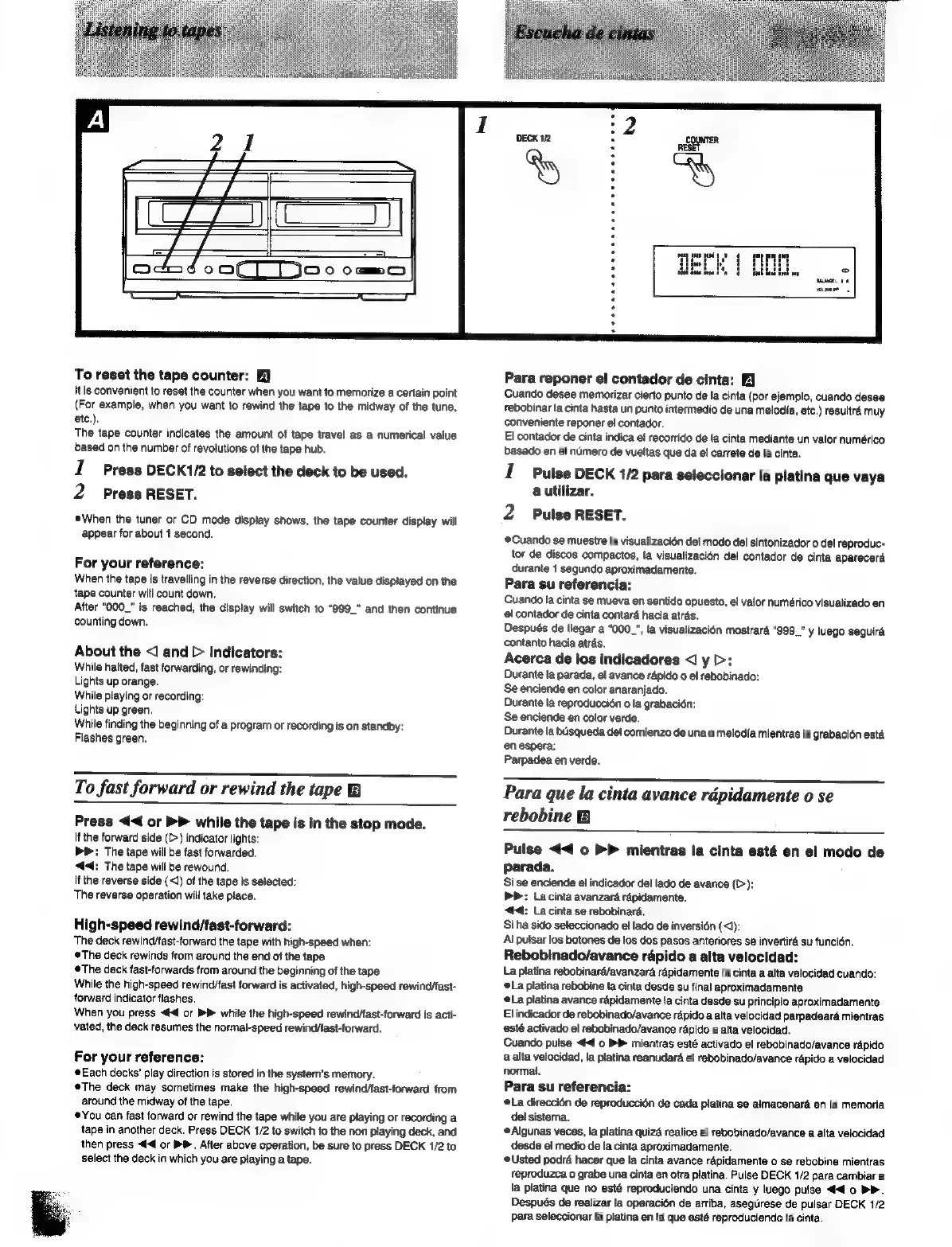
To
reset
the
tape
counter:
itis
convenient
to
reset
the
counter
when
you
want
to
memorize
a
certain
point
(For
example,
when
you
want
to
rewind
the
tape
to
the
midway
of
the
tune,
etc.),
The
tape
counter
indicates
the
amount
of
tape
travel
as
a
numerical
value
based
on
the
number
of
revotutions
of
the
tape
hub.
1
Press
DECK1/2
to
select
the
deck
to
be
used.
2
Press
RESET.
When
the
tuner
or
CD
mode
display
shows,
the
tape
counter
display
will
appear
for
about
1
second.
For
your
reference:
When
the
tape
is
travelling
in
the
reverse
direction,
the
value
displayed
on
the
tape
counter
will
count
down,
After
“O00_”
is
reached,
the
display
will
switch
to
“999_"
and
then
continue
counting
down.
About
the
<]
and
>
indicators:
While
halted,
fast
forwarding,
or
rewinding:
Lights
up
orange.
While
playing
or
recording:
Lights
up
green.
While
finding
the
beginning
of
a
program
or
recording
is
on
standby:
Flashes
green.
To
fast
forward
or
rewind
the
tape
B
Press
<<
or
®P
while
the
tape
is in
the
stop
mode.
If
the
forward
side
(>)
indicator
lights:
bP:
The
tape
will
be
fast
forwarded.
44:
The
tape
will
be
rewound.
If
the
reverse
side
(<1)
of
the
tape
is
selected:
The
reverse
operation
will
take
place.
High-speed
rewind/fast-forward:
The
deck
rewind/fast-forward
the
tape
with
high-speed
when:
©The
deck
rewinds
from
around
the
end
of
the
tape
The
deck
fast-forwards
from
around
the
beginning
of
the
tape
While
the
high-speed
rewind/ast
forward
is
activated,
high-speed
rewind/fast-
forward
indicator
flashes.
When
you
press
<4
or
bP
while
the
high-speed
rewind/ast-forward
is
acti-
vated,
the
deck
resumes
the
normal-speed
rewind/tast-forward.
For
your
reference:
Each
decks’
play
direction
is
stored
in
the
system’s
memory.
The
deck
may
sometimes
make
the
high-speed
rewind/fast-forward
from
around
the
midway
of
the
tape.
You
can
fast
forward
or
rewind
the
tape
while
you
are
playing
or
recording
a
tape
in
another
deck.
Press
DECK
1/2
to
switch
to
the
non
playing
deck,
and
then
press
<4
or
PP.
After
above
operation,
be
sure
to
press
DECK
1/2
to
select
the
deck
in
which
you
are
playing
a
tape.
Para
reponer
el
contador
de
cinta:
Cuando
desee
memorizar
cierto
punto
de
la
cinta
(por
ejemplo,
cuando
desee
rebobinar
la
cinta
hasta
un
punto
intermedio
de
una
melodia,
etc.)
resultré
muy
conveniente
reponer
el
contador.
El
contador
de
cinta
indica
el
recorrido
de
la
cinta
mediante
un
valor
numérico
basado
en
el
numero
de
vueltas
que
da
el
carrete
de
la
cinta.
1
Pulse
DECK
1/2
para
seleccionar
la
platina
que
vaya
a
utilizar.
2
Pulse
RESET.
Cuando
se
muestre
fa
visualizacién
del
modo
del
sintonizador
o
del
reproduc-
tor
de
discos
compactos,
ta
visualizacién
del
contador
de
cinta
aparecerd
durante
1
segundo
aproximadamente.
Para
su
referencia:
Cuando
la
cinta
se
mueva
en
sentido
opuesto,
el
valor
numérico
visualizado
en
el
contador
de
cinta
contaré
hacia
atras.
Después
de
llegar
a
“000_",
la
visualizacién
mostrard
“999.”
y
luego
seguira
contanto
hacia
atras.
Acerca
de
los
Indicadores
<J
y
>:
Durante
la
parada,
el
avance
rapido
o
el
rebobinado:
Se
enciende
en
color
anaranjado.
Durante
la
reproduccién
o
la
grabacién:
Se
enciende
en
color
verde.
Durante
la
busqueda
del
comienzo
de
una
o
melodia
mientras
la
grabaci6n
esta
en
espera:
Parpadea
en
verde.
Para
que
la
cinta
avance
rdpidamente
o
se
rebobine
B
Pulse
<<
0
>>
mientras
la
cinta
esta
en
el
modo
de
parada.
Si
se
enciende
el
indicador
del
lado
de
avance
(>
):
PP:
La
cinta
avanzard
rapidamente.
<d4:
La
cinta
se
rebobinard.
Si
ha
sido
seleccionado
el
lado
de
inversion
(<J):
Al
pulsar
los
botones
de
los
dos
pasos
anteriores
se
invertird
su
funcién.
Rebobinado/avance
rapido
a
alta
velocidad:
La
platina
rebobinaré/avanzara
répidamente
la
cinta
a
alta
velocidad
cuando:
La
platina
rebobine
la
cinta
desde
su
final
aproximadamente
La
platina
avance
rapidamente
la
cinta
desde
su
principio
aproximadamente
El
indicador
de
rebobinado/avance
répido
a
alta
velocidad
parpadearé
mientras
activado
el
rebobinado/avance
rapido
a
alta
velocidad.
Cuando
putse
<4
o
BP
mientras
esté
activado
el
rebobinado/avance
rapido
a
alta
velocidad,
Ja
platina
reanudaré
el
rebobinado/avance
rapido
a
velocidad
normal.
Para
su
referencia:
@La
direccién
de
reproduccién
de
cada
platina
se
almacenara
en
la
memoria
del
sistema.
@Algunas
veces,
la
platina
quiza
realice
el
rebobinado/avance
a
alta
velocidad
desde
el
medio
de
la
cinta
aproximadamente.
Usted
podra
hacer
que
la
cinta
avance
rapidamente
o
se
rebobine
mientras
reproduzca
o
grabe
una
cinta
en
otra
platina.
Pulse
DECK
1/2
para
cambiar
a
la
platina
que
no
esté
reproduciendo
una
cinta
y
luego
pulse
<4
0
bh.
Después
de
realizar
la
operacién
de
arriba,
asegurese
de
pulsar
DECK
1/2
Para
seleccionar
la
platina
en
la
que
esté
reproduciendo
la
cinta.

Other manuals for Technics SC-CH570

Related product manuals