EasyManua.ls Logo

Technics SX-E33 - Page 13

Technics SX-E33
58 pages
Print Icon
To Next Page IconTo Next Page
To Previous Page IconTo Previous Page
Loading...
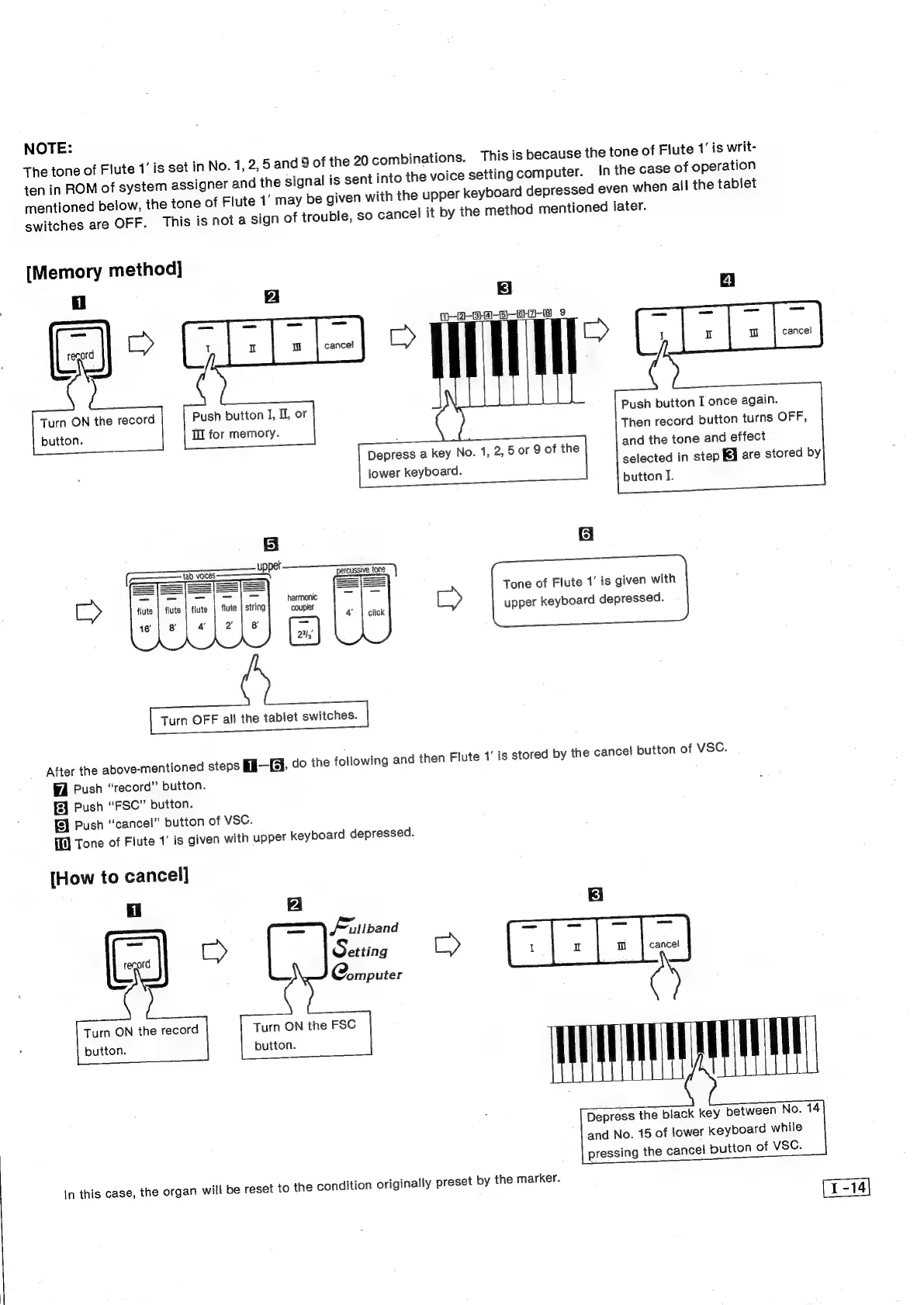
NOTE:
The
tone
of
Flute
1’
is
set
in
No.
1,
2,
5
and
9
of
the
20
combinations.
This
is
because
the
tone
of
Flute
1’
is
writ-
ten
in
ROM
of
system
assigner
and
the
signal
is
sent
into
the
voice
setting
computer.
in
the
case
of
operation
mentioned
below,
the
tone
of
Flute
1’
may
be
given
with
the
upper
keyboard
depressed
even
when
all
the
tablet
switches
are
OFF.
This
is
not
a
sign
of
trouble,
so
cancel
it
by
the
method
mentioned
later.
[Memory
method]
1
4
|
cancel
Push
button
I
once
again.
Then
record
button
turns
OFF,
and
the
tone
and
effect
selected
in
step
KA
are
stored
by
button
I.
f-O-Ba-S-S-)
9
Wl
Depress
a
key
No.
1,
2,
5
or
9
of
the
lower
keyboard.
Push
button
I,
U
or
Tl
for
memory.
Turn
ON
the
record
button.
—s
ae
_
SS
harmonic
coupler
Tone
of
Flute
1’
is
given
with
ED
upper
keyboard
depressed.
Turn
OFF
all
the
tablet
switches.
After
the
above-mentioned
steps
fi—{@.
do
the
foliowing
and
then
Flute
1’
is
stored
by
the
cancel
button
of
VSC.
Push
“record”
button.
fl
Push
“FSC”
button.
fl
Push
“cancel”
button
of
VSC.
ff
Tone
of
Flute
1’
is
given
with
upper
keyboard
depressed.
[How
to
cancel]
Fillband
=
Setting
eee:
nme
cancel
C@omputer
Turn
ON
the
FSC
button.
Turn
ON
the
record
button.
Depress
the
black
key
between
No.
14
and
No.
15
of
lower
keyboard
while
pressing
the
cancel
button
of
VSC.
In
this
case,
the
organ
will
be
reset
to
the
condition
originally.
preset
by
the
marker.