EasyManua.ls Logo

Technics SX-KN650 - Page 22

Technics SX-KN650
86 pages
Print Icon
To Next Page IconTo Next Page
To Previous Page IconTo Previous Page
Loading...
7)
c
°
-
©
a
a.
Q.
iy*)
13°]
oO
5
QO
is}
-
a
Part
|
Sounds
and
effects
Conductor
How
sounds
are
assigned
to
the
keyboard
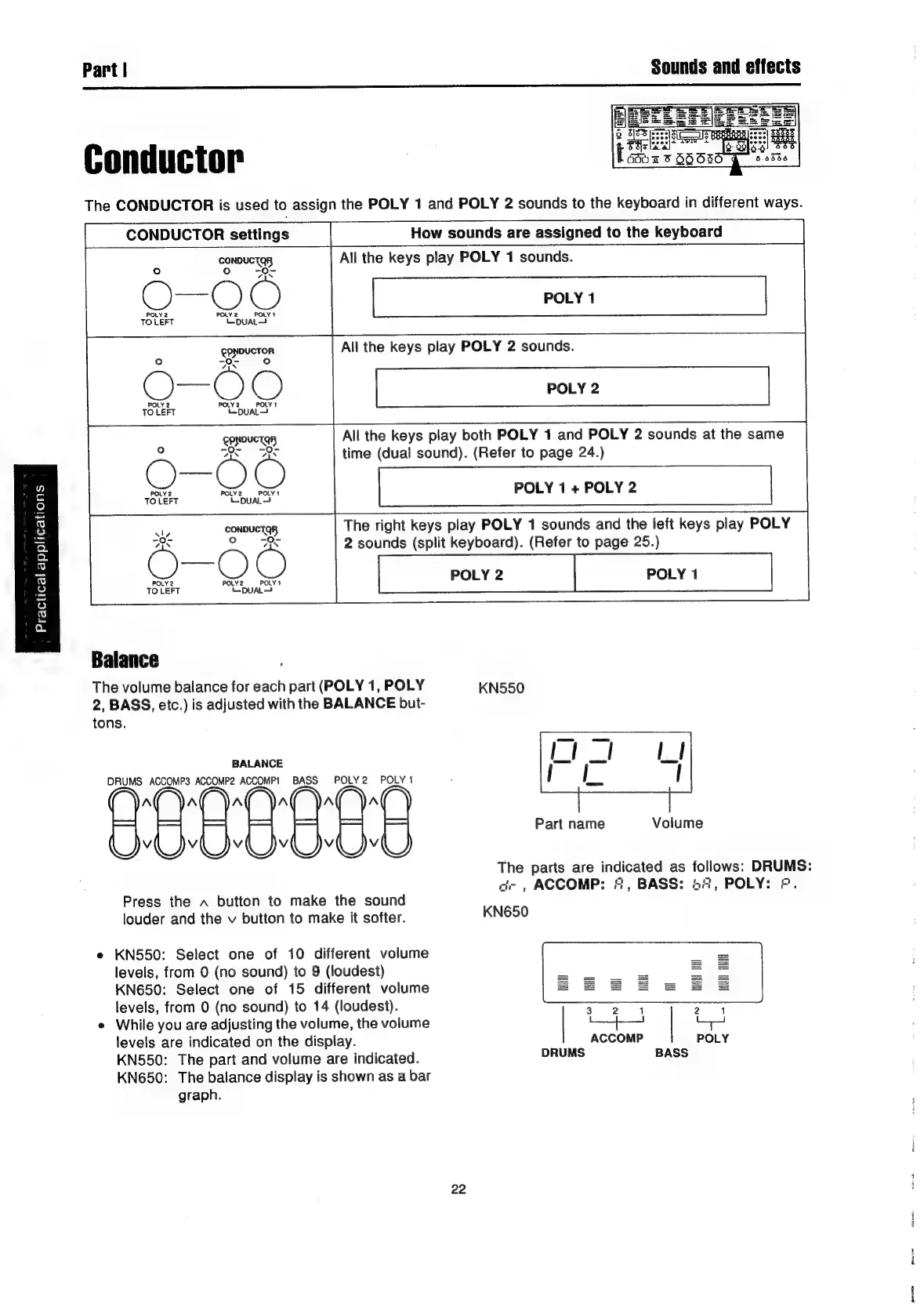
All
the
keys
play
POLY
1
sounds.
POLY
1
All
the
keys
play
POLY
2
sounds.
POLY
2
All
the
keys
play
both
POLY
1
and
POLY
2
sounds
at
the
same
time
(dual
sound).
(Refer
to
page
24.)
POLY
1
+
POLY
2
The
right
keys
play
POLY
1
sounds
and
the
left
keys
play
POLY
2
sounds
(split
keyboard).
(Refer
to
page
25.)
POLY
2
POLY
1
IDUCTOR
Se
rhs
POLY
1
“DUAL
gppovetay
7u*
7s
Balance
The
volume
balance
for
each
part
(POLY
1,
POLY
KN550
2,
BASS,
etc.)
is
adjusted
with
the
BALANCE
but-
tons.
BALANCE
DRUMS
ACCOMP3
ACCOMP2
ACCOMP!
BASS
POLY2
POLY
1
Part
name
Volume
The
parts
are
indicated
as
follows:
DRUMS:
a-,
ACCOMP:
“,
BASS:
54,
POLY:
©.
Press
the
~
button
to
make
the
sound
louder
and
the
v
button
to
make
it
softer.
KN650
e
KN550:
Select
one
of
10
different
volume
levels,
from
0
(no
sound)
to
9
(loudest)
KN650:
Select
one
of
15
different
volume
levels,
from
0
(no
sound)
to
14
(loudest).
e
While
you
are
adjusting
the
volume,
the
volume
levels
are
indicated
on
the
display.
KN550:
The
part
and
volume
are
indicated.
KN650:
The
balance
display
is
shown
as
a
bar
graph.
HITT
i
22

Related product manuals